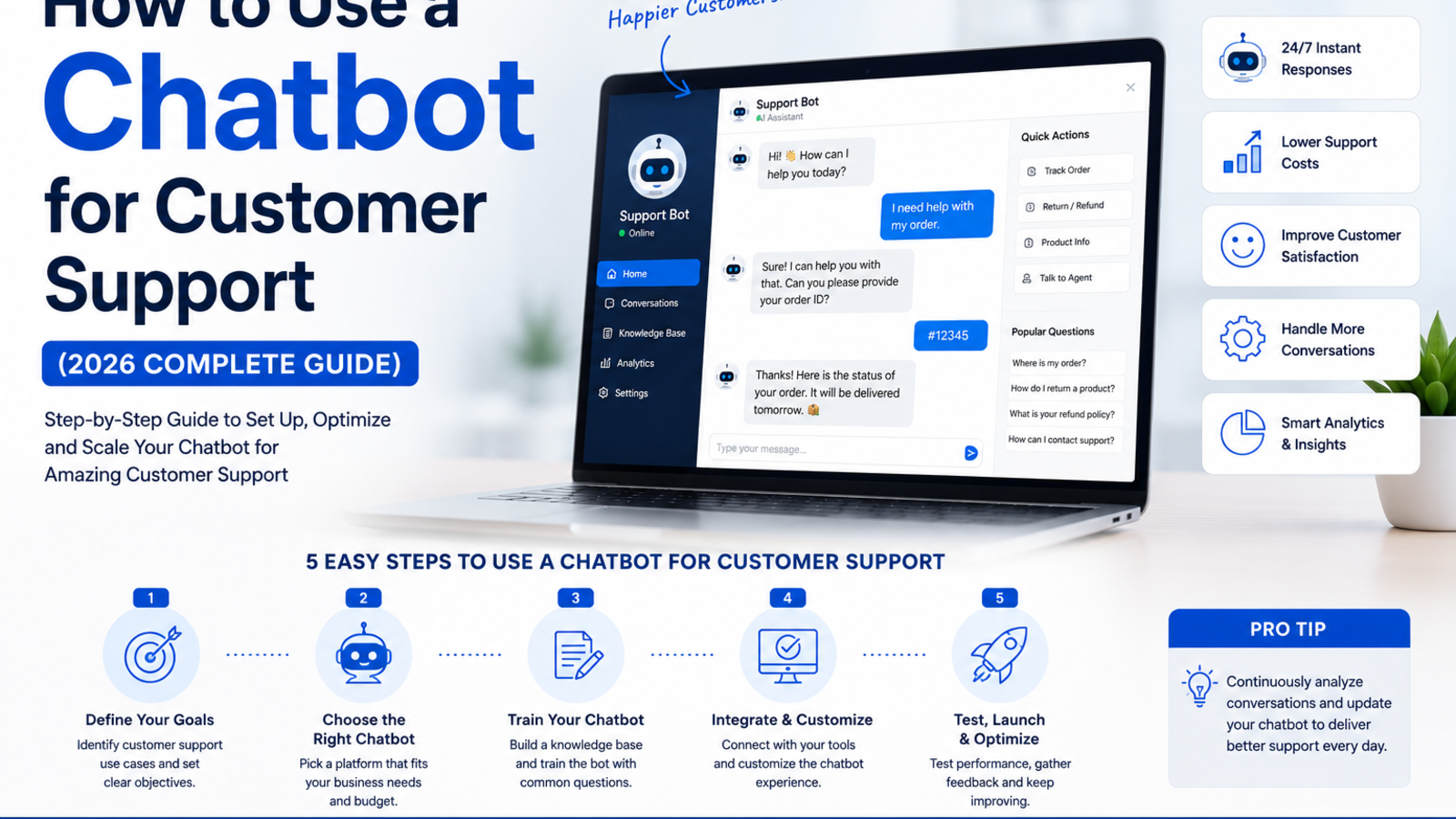
How to Use a Chatbot for Customer Support (2026 Complete Guide)
Learn how AI chatbots handle customer support 24/7 — answering questions, resolving tickets, and reducing costs without hiring extra staff. Free to start with Glanceia
Introduction
Your customer has a problem at 11 PM on a Sunday. They go to your website, look for help, find nothing useful, and send an email — which sits in your inbox until Monday morning. By then they have either solved it themselves, left a bad review, or switched to a competitor.
This is the customer support gap that most small and mid-sized businesses live with every day. Not because they do not care about customers. But because 24/7 human support is expensive, and contact forms and email threads are slow.
An AI chatbot closes this gap permanently. It sits on your website around the clock, handles the most common support questions instantly, escalates the complex ones to your team, and gives every customer the feeling that someone is always there — without you needing to hire a night shift.
This guide covers exactly how chatbots improve customer support, what they can and cannot handle, how to set one up, and what to look for in a platform if you are just getting started.
Why Traditional Customer Support Has a Response Time Problem
Most businesses handle customer support through some combination of email, contact forms, and phone — all of which have the same fundamental flaw: they require a human to be available at the exact moment a customer needs help.
The numbers tell the story clearly. Studies consistently show that customers expect a response to a support query within minutes when using chat — and within a few hours via email. The reality for most small businesses is that email responses take 12 to 24 hours on average, and phone support is only available during business hours.
Meanwhile, customer inquiries do not follow business hours. Questions come in evenings, weekends, and public holidays — exactly when most support teams are offline. Every unanswered inquiry in that window is a customer whose frustration grows with every hour they wait.
A chatbot changes this equation entirely by removing the dependency on a human being present to give a first response.
What a Customer Support Chatbot Can Handle
A well-trained AI chatbot can independently handle a much larger share of support volume than most businesses expect. Here is what it covers without needing any human involvement:
Frequently asked questions Shipping policies, return policies, pricing, product specifications, service details, business hours, location — anything your team currently answers ten times a day can be answered by the chatbot ten thousand times a day.
Account and order queries Order status, booking confirmations, subscription details — questions customers ask repeatedly and that are answered the same way every time.
Product and service information Compatibility questions, feature comparisons, plan differences, technical specifications — the chatbot gives the same accurate answer every time without variation or human error.
Troubleshooting and how-to guidance Step-by-step instructions, common error resolutions, setup guides — anything from your existing help documentation can be delivered conversationally through the chatbot.
Lead capture during support conversations Customers who reach out with support questions are already engaged. A chatbot can capture their contact details within the same conversation, turning a support interaction into a lead for your team to follow up on.
Escalation to human agents When a query is too complex, too sensitive, or outside the chatbot's training data, it can seamlessly hand off the conversation to a human — providing the agent with a summary of what was already discussed so the customer does not have to repeat themselves.
What a Chatbot Should Not Be Expected to Handle Alone
A chatbot is not a replacement for every aspect of customer support. There are situations that genuinely need a human:
Emotionally sensitive complaints where empathy and judgment matter
Complex refund disputes requiring account-level decisions
Technical issues that require back-and-forth troubleshooting beyond FAQs
Cases involving legal, medical, or financial decisions
A good chatbot setup recognises this and routes these conversations to a human quickly, rather than trying to handle everything and frustrating the customer in the process. The goal is not to eliminate humans from support — it is to make sure humans spend their time on the cases that actually need them, instead of answering the same FAQ for the hundredth time.
The Business Case: What Customer Support Automation Actually Saves
The numbers behind AI chatbot adoption in customer support are significant. Businesses that automate their tier-1 support with a chatbot consistently report:
30 to 80% reduction in support ticket volume as common questions get resolved without creating a ticket at all
Response time goes from hours to seconds for the majority of incoming queries
Support team capacity multiplies because agents handle only the complex cases that need human judgment
Customer satisfaction improves because getting an instant answer at 11 PM feels better than waiting until Monday
The cost math is equally compelling. A human support agent costs your business in salary, training, management overhead, and the physical constraints of shifts and time zones. A chatbot handles volume that would otherwise require multiple additional hires — at a fraction of the cost and with no sick days, no overtime, and no gaps between shifts.
Step-by-Step: Setting Up a Customer Support Chatbot With Glanceia
Step 1: Create Your Free Account
Go to Glanceia and sign up for a free account. No credit card or technical knowledge required to get started.
Step 2: Build Your Support Knowledge Base
This is the most important step and the one that determines how useful your chatbot actually is. Upload all the content your support team currently uses to answer questions:
Your existing FAQ page — paste the text directly or upload as a PDF
Your return, refund, and shipping policies
Product or service documentation
Pricing and plan details
Common troubleshooting steps for your most frequent issues
Contact and escalation information — when and how to reach a human agent
The more complete and specific this content is, the better the chatbot answers. A chatbot trained on a thorough support knowledge base can handle 60 to 70 percent of incoming queries without any human involvement.
For a full walkthrough of this process, see our guide on how to train a chatbot on your own data.
Step 3: Write a Support-Specific Welcome Message
Your chatbot's opening message should immediately signal that it is there to help. Some examples that work well for customer support:
"Hi! Need help with an order, a question, or anything else? I'm here right now."
"Hello! Got a question about our products or your account? Ask me anything."
"Hi there! I can help with support questions, pricing, or anything else — what do you need?"
Avoid robotic or overly formal openers. A warm, direct welcome message increases the number of customers who actually use the chatbot instead of navigating away.
Step 4: Set Up Escalation and Lead Capture
Configure two critical settings before going live:
Escalation path: When the chatbot cannot answer a question, it should provide the customer with a direct way to reach a human — your support email, WhatsApp number, or a link to raise a ticket. Never leave a customer in a dead end.
Lead capture: Set the chatbot to collect name and email from customers who engage with it. This is especially valuable for support conversations that get resolved — you now have the customer's contact details for follow-up, upselling, or satisfaction check-ins.
Step 5: Embed on Your Website
Glanceia gives you a single embed script that goes into your website footer — one copy-paste step that puts the chatbot on every page of your site, not just the contact page. This means customers can get support from your homepage, your product pages, your pricing page, or anywhere else they might have a question.
For platform-specific instructions, see our guides on adding a chatbot to WordPress, Wix, or Shopify.
Step 6: Review Conversations and Improve
After going live, review the chatbot conversation logs weekly. The questions it could not answer reveal gaps in your knowledge base — fill those gaps and the chatbot gets better over time. The most common questions it does answer give you insight into what your website or onboarding flow could be communicating better before customers need to ask.
Real Example: What This Looks Like for a Small Business
A SaaS company with a 2-person support team handles around 300 customer queries a month. Around 200 of those are variations of the same five questions: pricing, trial extension, cancellation policy, integration setup, and billing. The team spends the majority of their support time answering these, leaving limited capacity for complex issues that genuinely need attention.
After adding a chatbot trained on their documentation and FAQ:
The 200 repetitive queries get answered instantly by the chatbot, any time of day
The team's inboxes now fill with only the 100 complex queries that actually need human judgment
Support response time on complex issues improves because agents are no longer buried in repetitive tickets
A customer who contacts support at 2 AM on a Saturday gets an answer immediately instead of waiting until Monday
The same two-person team now effectively handles the support load that would otherwise require three or four people — and customers get faster responses across the board.
Building a Support Chatbot That Customers Actually Want to Use
The difference between a chatbot that customers love and one they immediately abandon comes down to a few things:
Give it real answers, not generic responses. A chatbot that responds to "what is your refund policy?" with "please contact our support team" has failed. Train it properly so it can actually answer the question.
Make escalation frictionless. Customers should never feel trapped in a chatbot loop. If the chatbot cannot help, it should make it easy and immediate to reach a human.
Keep the widget visible. A chatbot buried in a corner of the page that customers cannot find helps nobody. Make it prominent, especially on pages where support questions are most likely — pricing, checkout, product pages.
Update it when things change. New product launches, policy updates, pricing changes — update the chatbot's training data at the same time you update your website. Outdated chatbot answers erode trust fast.
Review the data regularly. The conversations your chatbot has are one of the richest sources of customer insight your business has. Use them.
How AI Chatbots Compare to Traditional Support Channels
Support ChannelResponse TimeAvailable HoursCost to ScaleHandles Volume SpikesEmail12–24 hoursBusiness hours onlyHire more staffNo — queue growsPhoneInstant (if answered)Business hours onlyHire more staffNo — wait times growLive ChatMinutes (if staffed)Business hours onlyHire more staffNo — agents get overwhelmedAI ChatbotSeconds24/7/365Flat costYes — no extra cost
The chatbot wins on every dimension that matters for small businesses with limited teams: speed, availability, and cost to scale.
FAQ
Can a chatbot fully replace a human support team? No — and it should not try to. A chatbot handles the repetitive, high-volume tier-1 queries that do not need human judgment. Complex issues, sensitive complaints, and escalations still need a human. The goal is to make your human team more effective by filtering out the noise, not to replace them entirely.
How do I make sure the chatbot gives accurate answers? Train it on your actual business content — your FAQs, policies, and product documentation. The more specific and complete your uploaded content is, the more accurately the chatbot answers. Glanceia answers only from the content you provide, so accuracy is determined by the quality of what you upload.
What happens when the chatbot does not know the answer? A well-configured chatbot should acknowledge that it cannot help with that specific query and immediately provide the customer with an escalation path — your support email, WhatsApp number, or a ticket link.
Will customers be frustrated talking to a chatbot instead of a human? Research consistently shows that customers prefer getting an instant answer from a chatbot over waiting hours for a human response. Frustration comes from chatbots that give unhelpful, generic answers — not from chatbots themselves. A well-trained chatbot that gives accurate, specific answers to real questions earns high customer satisfaction scores.
How long does it take to set up a customer support chatbot? With a no-code platform like Glanceia, most businesses are live within 30 to 60 minutes — the majority of that time spent uploading and organising their support content rather than on any technical setup.
Final Thoughts
Customer support is one of the highest-impact areas to automate in a small business, and AI chatbots are the most practical way to do it. They close the response time gap, free your team from repetitive queries, and give customers the immediate help they expect — at any hour, without adding headcount.
The setup is simpler than most businesses expect, and the return starts showing up from the first day the chatbot goes live.
Ready to upgrade your customer support with an AI chatbot? Try Glanceia free →
Published by Laxman- Team Glanceia