What to Actually Upload When Setting Up an AI Chatbot
Setting up an AI chatbot is easy — knowing what to upload is what actually determines if it gives good answers. Here's exactly what to gather first.
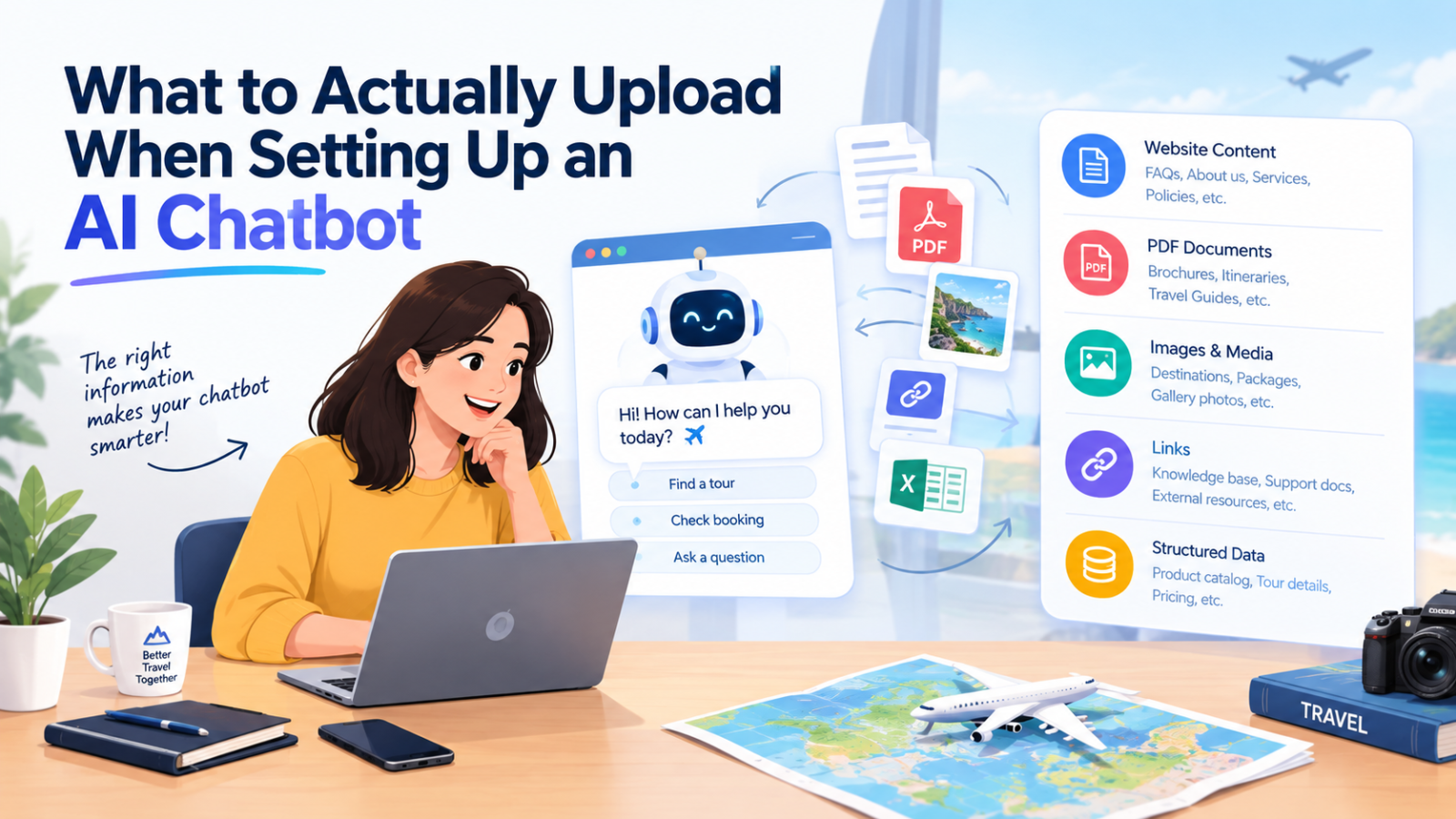
Most people setting up an AI chatbot for the first time get stuck at the same point: the chatbot's ready to go, the code snippet's in place, and then — what do you actually feed it? A vague sense that it needs "your business info" isn't enough to get good answers out of it. The chatbot is only ever as good as what you upload, so getting this part right matters more than any setting or customization option.
Here's a practical, specific breakdown of what to gather, in what order, and why each piece matters.
Start With Your FAQ Page — Even a Rough One
If you have an FAQ page, or even a loose document of questions customers ask often, that's your best starting point. It's already written in a Q&A format, which is exactly the shape a chatbot needs to give direct answers.
Don't have a formal FAQ? Write one quickly before uploading anything else. Think through the ten questions you answer most often by email or chat, and just write them down with their answers. This single document usually ends up doing more work than everything else combined, because it directly mirrors what people are actually asking.
Pricing and Package Information
If pricing varies by product, package, date, or tier, upload whatever document you use internally to track that — a pricing sheet, a rate card, a spreadsheet of package details. This is one of the most commonly asked categories of question ("how much is this," "is there a group rate," "what's included at this tier"), and it's also the one visitors get most frustrated by when the answer is vague or missing.
For travel companies specifically, this means tour package details, seasonal pricing, and what's included in each package. For service businesses, it means your service tiers and what's covered at each level.
Policies (Refunds, Cancellations, Shipping, Terms)
Policy questions are some of the most repetitive — and highest-stakes — questions a chatbot handles, because a wrong or vague answer here can create real problems. Upload your actual policy documents directly: refund policy, cancellation policy, shipping and delivery terms, warranty information, terms of service if relevant.
Don't paraphrase these from memory into a new document — upload the actual policy text you already publish, so the chatbot's answers match what you're legally and practically committed to.
Product or Service Details
Whatever you sell, gather the descriptive material that explains it: product specs, service descriptions, what's included, what's not, how something works. If you have product pages on your website already, the underlying content from those pages (descriptions, specifications, dimensions, materials) is exactly what should go in.
For travel and booking businesses, this includes itinerary details, accommodation information, what's included in a tour versus booked separately, and any requirements (visas, fitness level, age restrictions).
Availability Information
If availability changes — rooms, appointments, packages, dates — this is worth uploading even if it feels repetitive with pricing info. Availability questions ("is this open next weekend," "do you have anything in December") are extremely common and extremely time-sensitive, so keeping this document current is worth the effort.
Your Actual Business Details
Simple, but easy to forget: hours of operation, contact information, physical location if relevant, shipping regions, languages supported, holiday closures. These feel too basic to bother uploading, but they're asked constantly, and a chatbot without them will either make something up or dead-end the conversation — both bad outcomes.
What Not to Upload
Don't upload marketing copy expecting factual answers. A homepage headline or an Instagram caption isn't written to answer a direct question — it's written to sell a feeling. Upload the underlying facts separately, even if that means writing a short new document specifically for the chatbot.
Don't upload outdated documents "just in case." An old pricing sheet or a discontinued policy will confuse the chatbot's answers, sometimes without you noticing until a customer flags it. Only upload what's currently accurate.
Don't upload anything containing sensitive customer data. Chatbot training data should be about your business — policies, products, pricing — never actual customer records, order history, or personal information.
How Glanceia Handles This
This is exactly the setup Glanceia is built around: you upload PDFs, Word docs, or spreadsheets — the same documents listed above — and the chatbot answers only from what you've given it. No hallucinated policies, no generic industry non-answers, and no need to manually write hundreds of scripted responses. Each business's data stays isolated too, so answers are always specific to your business, never mixed with anyone else's.
A realistic upload order, if you're starting from scratch:
FAQ document (write one quickly if you don't have one)
Pricing/package information
Policies (refunds, cancellations, shipping)
Product or service details
Availability information
Basic business details (hours, contact, locations)
Most businesses can gather all of this in under an hour, since it's usually just consolidating documents that already exist somewhere.
After You Upload: Test It Like a Real Visitor Would
Once everything's in, spend ten minutes asking the chatbot the actual questions your customers ask — not generic tests, the real ones you see in your inbox every week. If an answer is off, it usually means the underlying document was unclear or missing a detail, not that the chatbot is broken. Fixing the source document tends to fix the answer immediately.
The Bottom Line
An AI chatbot is only as good as what you feed it. Skip the vague instinct to "upload everything" and instead gather the specific documents that mirror what customers actually ask: your FAQs, pricing, policies, product details, and availability. Get that right, and the chatbot handles the repetitive questions accurately from day one — no scripting, no guesswork required.
Ready to set one up? Glanceia lets you upload your existing documents and go live in minutes — free to start. Get in touch if you want help figuring out what to gather first.