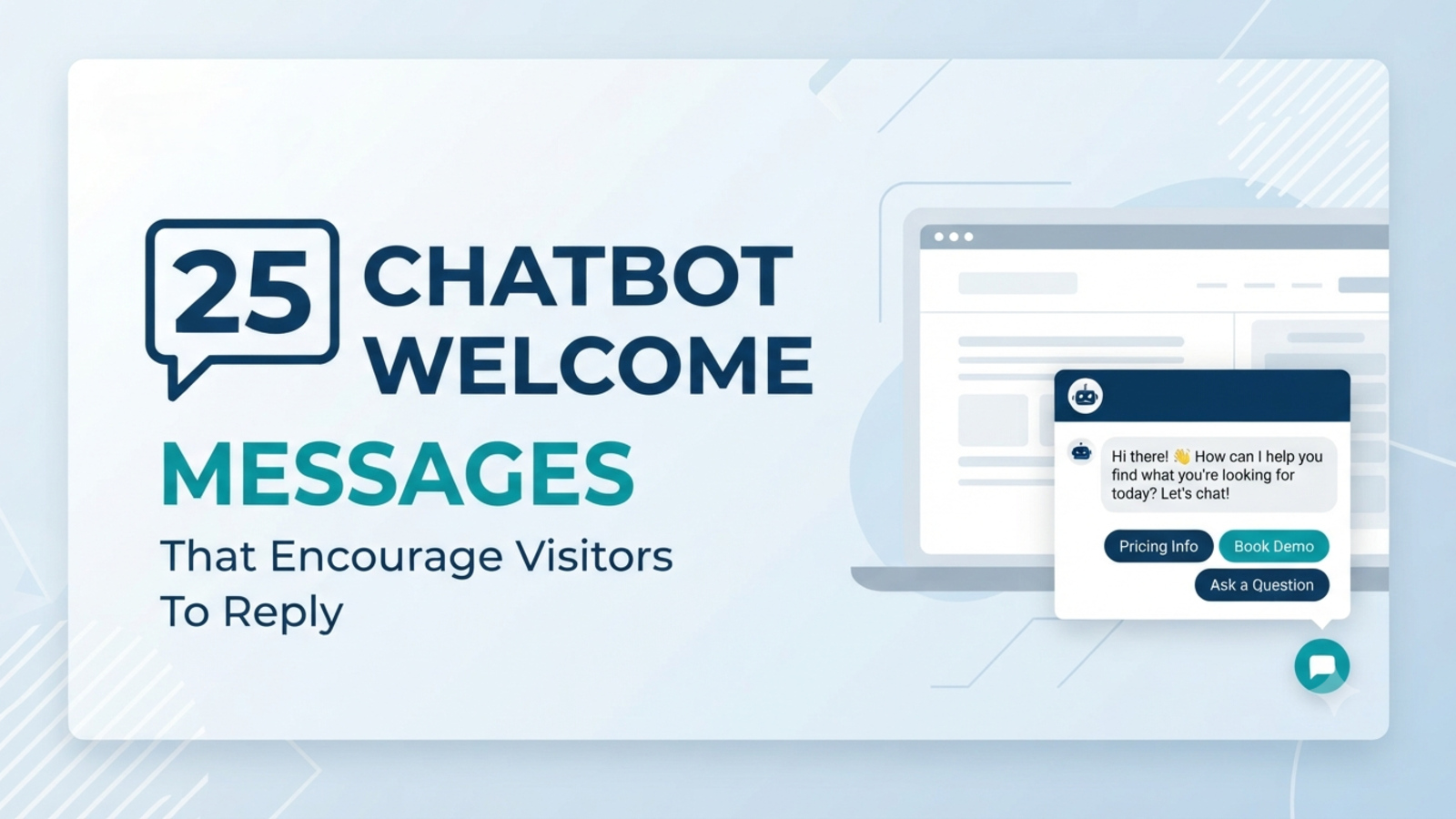
25 Website Chatbot Welcome Messages That Encourage Visitors to Reply
Looking for chatbot welcome message ideas? Explore 25 website chatbot greetings for ecommerce, SaaS, travel and service businesses.
Imagine someone visiting your website for the first time. They are interested in your products or services, but they have a few questions before making a decision.
They notice a small chat icon in the corner of the screen and decide to open it.
The chatbot appears with a simple message:
"Hello! How can I help you?"
It is polite, but it does not give the visitor much reason to respond.
Now imagine a different greeting:
"Hi! Looking for the right solution for your business? I can help you explore our services, compare options, or answer your questions. What are you looking for today?"
The second message feels more useful because it gives visitors a clear idea of what they can ask.
That small difference can shape the entire conversation.
A website chatbot welcome message is often the first interaction a visitor has with your automated assistant. It introduces the chatbot, sets expectations and gives people a reason to start asking questions.
Whether you run an online store, a SaaS company, a travel agency or a service-based business, choosing the right greeting can make your website feel more welcoming and easier to navigate.
In this guide, we will explore 25 website chatbot welcome messages for different business situations, explain why they work and share practical tips to help you create greetings that sound natural instead of robotic.
Why Does a Chatbot Welcome Message Matter?
A chatbot welcome message may look like a small part of your website, but it plays an important role in starting conversations.
Think about a physical store. When someone walks in, a helpful salesperson might greet them and ask whether they need assistance.
A website chatbot can perform a similar role.
Instead of waiting for visitors to find a contact form or search through multiple pages, it gives them a direct way to ask questions.
A well-written greeting can help your business:
Make first-time visitors feel more comfortable.
Explain what the chatbot can help with.
Encourage visitors to ask questions.
Guide customers towards relevant products or services.
Identify potential customers who need further assistance.
Start conversations that may lead to sales or enquiries.
However, simply displaying a welcome message does not guarantee more leads or sales. The message needs to be relevant to the visitor's needs, and the chatbot must be able to provide useful answers after someone responds.
What Makes a Good Website Chatbot Welcome Message?
Before looking at the examples, it helps to understand what separates an effective chatbot greeting from a generic one.
You do not need complicated language or a long introduction. In fact, shorter and clearer messages often make it easier for visitors to respond.
Here are five things worth considering.
1. Start With a Friendly Greeting
A simple "Hi", "Hello" or "Welcome" is usually enough.
Your chatbot does not need to sound overly enthusiastic or pretend to be a human employee. A natural, conversational greeting is more approachable.
2. Tell Visitors What the Chatbot Can Do
People should understand why they might want to use the chatbot.
For example:
"I can help you explore our services, understand pricing and find answers to common questions."
This gives visitors a reason to continue rather than leaving them wondering what to type.
3. Ask One Simple Question
A welcome message should make the next step obvious.
Instead of ending with a generic statement, ask something easy to answer.
For example:
"What are you looking for today?"
Or:
"Would you like help choosing a product?"
A single, relevant question creates a natural starting point for a conversation.
4. Match the Greeting to the Website Page
Someone visiting a pricing page probably has different questions from someone browsing a product page.
Your chatbot greeting should reflect that context.
For example, a pricing-page visitor might see:
"Comparing our plans? I can help you understand the differences and find an option that fits your needs."
This is more useful than displaying the exact same greeting on every page.
5. Avoid Asking for Personal Information Too Early
A visitor who has just opened your chatbot may not be ready to share their name, phone number or email address.
Start by helping them.
Once they show interest or request further assistance, you can explain why collecting their contact information would be useful.
A good conversation should feel like a helpful interaction, not an immediate attempt to collect personal details.
25 Website Chatbot Welcome Messages You Can Copy and Customize
Here are 25 ready-to-use chatbot welcome messages for different industries, customer journeys and business goals.
You can copy these examples and replace the placeholders with your business name, products, services or relevant details.
A. General Website Chatbot Welcome Messages
These greetings work well for business websites, company homepages and websites that serve different types of customers.
1. The Friendly First Impression
"Hi! Welcome to [Business Name]. Looking for something specific? I can help you explore our services, find information or answer your questions. What brings you here today?"
Why it works: It introduces the business and gives visitors several reasons to start a conversation without making the message feel like a sales pitch.
2. The Helpful Website Assistant
"Hello! I'm your virtual assistant. Whether you have a question about our services, pricing or general information, I'm here to help. What would you like to know?"
Why it works: Visitors immediately understand the chatbot's purpose. It is especially useful for businesses with multiple services or information-heavy websites.
3. The New Visitor Welcome
"First time visiting us? Welcome! I can help you find your way around, understand what we offer and get answers to common questions. What are you interested in?"
Why it works: It makes first-time visitors feel welcome and reduces the effort required to understand the website.
4. The Quick Question Greeting
"Need a quick answer? Ask me anything about [Business Name]. I can help with our products, services, policies and other common questions."
Why it works: It sets a clear expectation that visitors can ask direct questions instead of searching through several website pages.
5. The Personalized Assistance Message
"Hi there! Every customer has different needs. Tell me what you're looking for, and I'll help you find the most relevant information."
Why it works: It puts the visitor's needs first and encourages a conversation without forcing them into a predefined sales process.
B. Ecommerce Chatbot Welcome Messages
Online stores often receive questions about products, availability, shipping, payment methods and returns.
These chatbot greetings can help visitors get the information they need while browsing.
6. Help Customers Choose the Right Product
"Welcome to [Store Name]! Need help finding the right product? Tell me what you're looking for, and I'll help you explore the available options."
Why it works: Some shoppers know what they need but are unsure which product to choose. This message opens the door to product-related questions.
7. Product Information Assistant
"Interested in something you're viewing? I can help explain product features, specifications and available options. What would you like to know?"
Why it works: This works particularly well when visitors are exploring individual product pages and need more information before purchasing.
8. Shipping and Delivery Support
"Hi! Have a question about delivery, shipping charges or order timelines? I'm here to help you understand our shipping information."
Why it works: Delivery-related questions are common in ecommerce. Addressing them early can make the shopping experience more convenient.
9. Help Before Checkout
"Almost ready to place your order? Have a question about payment methods, delivery or returns? Let me help you before you check out."
Why it works: It gives hesitant shoppers a convenient way to clarify their concerns before completing a purchase.
C. SaaS and Technology Website Chatbot Welcome Messages
Software companies need to explain features, pricing, integrations and product capabilities.
A chatbot can help visitors understand what the product does and whether it fits their requirements.
10. SaaS Product Introduction
"Welcome to [Product Name]! Curious about what our software can do? I can explain its features, use cases and how it works. What would you like to explore?"
Why it works: It introduces the chatbot as a product guide rather than simply another support channel.
11. Feature Discovery Greeting
"Looking for a particular feature? Tell me what you're trying to accomplish, and I'll help you understand how [Product Name] can support your workflow."
Why it works: Visitors often arrive at SaaS websites with a specific problem. This greeting encourages them to describe that problem.
12. Pricing and Plan Assistance
"Comparing plans? I can help you understand the differences between our available options and find the information you need. What are you looking for?"
Why it works: Pricing can be confusing when a product has multiple plans. The chatbot gives visitors a place to ask questions before making a decision.
13. Integration Support
"Need to connect [Product Name] with another tool? Tell me which platform you use, and I can help you explore our integration information."
Why it works: Integration compatibility can influence software purchasing decisions. This message is especially helpful for technical and business users.
D. Travel Agency and Hotel Chatbot Welcome Messages
Travel websites often receive enquiries about destinations, hotel availability, tour packages, booking procedures and prices.
A well-designed travel chatbot can help visitors explore their options before speaking with a travel consultant.
14. Travel Inspiration Greeting
"Welcome! Planning your next holiday? Tell me where you'd like to travel, your preferred dates or the kind of experience you're looking for. Let's explore your options!"
Why it works: It starts with the traveler's interests instead of immediately asking them to book something.
15. Destination Discovery
"Not sure where to travel next? I can help you explore destinations, travel packages and experiences based on your preferences. What kind of trip do you have in mind?"
Why it works: Some travelers have a budget or holiday period in mind but have not selected a destination. This message helps them start exploring.
16. Holiday Package Assistance
"Interested in our holiday packages? Tell me your preferred destination, travel dates and number of travelers, and I'll help you find relevant package information."
Why it works: It encourages visitors to share useful trip details, helping the chatbot guide the conversation towards relevant options.
17. Hotel Booking Assistance
"Welcome to [Hotel Name]! Looking to plan your stay? I can help with room information, hotel facilities and booking-related questions. What would you like to know?"
Why it works: Hotel visitors often need specific information before booking. This greeting directs them towards the information they are likely to need.
E. Lead Generation and Service Business Welcome Messages
For service providers, consultants, agencies and local businesses, a chatbot can help turn website enquiries into meaningful conversations.
18. Request a Service Quote
"Looking for help with a project? Tell me a little about what you need, and I'll help you find the right service information or next step."
Why it works: It encourages visitors to describe their requirements, helping businesses understand whether an enquiry is relevant.
19. Consultation Booking Assistance
"Interested in speaking with our team? I can help you understand our services and find the right way to arrange a consultation. What would you like to discuss?"
Why it works: It gives interested visitors a clear path towards personal assistance.
20. Understand Customer Requirements
"Every project is different. What are you trying to achieve, and what kind of support are you looking for? I'll help you explore the right options."
Why it works: This message works well for consultants, marketing agencies, software development companies and other businesses that offer customized services.
21. Soft Lead Capture Message
"Hi! I can help you learn more about our services and answer your initial questions. If you'd like someone from our team to follow up, I can also help you share your contact details."
Why it works: It introduces the possibility of lead capture without demanding personal information before providing assistance.
F. Customer Support and After-Hours Chatbot Welcome Messages
Sometimes visitors open a chatbot because they need help with a problem, an order or an existing service.
These greetings are designed to make support conversations more organized and approachable.
22. After-Hours Customer Support
"Thanks for visiting [Business Name]! Our team may not be available right now, but I can still help with common questions about our services and policies. What do you need assistance with?"
Why it works: It sets expectations about staff availability while still offering visitors a useful way to find information.
23. Existing Customer Assistance
"Welcome back! Need help with an existing order, service or account? Tell me a little about the issue, and I'll help you find the appropriate next step."
Why it works: It recognizes that returning customers may have different needs from first-time visitors.
24. Human Support Handoff
"Happy to help! If your question needs personal attention, I can help direct you towards our support team. What seems to be the issue?"
Why it works: It makes it clear that the chatbot is not the only support option. Customers can explain their concern before being directed to a human.
25. When the Visitor Is Not Sure What to Ask
"Not sure where to start? That's completely fine. Tell me what you're trying to find or what you need help with, and we'll take it one step at a time."
Why it works: Not every visitor knows exactly what to ask. This message lowers the pressure and gives them permission to begin with a simple explanation.
How to Choose the Right Chatbot Welcome Message for Your Business
You now have 25 examples, but you do not need to use all of them.
The most effective approach is to choose greetings based on what visitors are likely to need when they arrive on your website.
Here is a simple guide:
Business typeRecommended messagesGeneral business website1, 2, 3, 4 or 5Ecommerce store6, 7, 8 or 9SaaS company10, 11, 12 or 13Travel agency14, 15 or 16Hotel17Service business18, 19 or 20Lead generation website21Customer support website22, 23 or 24General-purpose chatbot25
A useful starting point is to review your website's most important pages and think about what a visitor might want to know on each one.
For example, someone visiting your pricing page may need help comparing plans. Someone visiting a service page may want to understand the process or request a quote.
Your welcome message should make that next interaction easier.
5 Common Mistakes to Avoid When Writing Chatbot Greetings
Even a well-designed chatbot can feel unhelpful when its opening message is poorly written.
Here are five mistakes worth avoiding.
1. Using the Same Greeting Everywhere
A generic greeting can work on a homepage, but it may not be ideal for every page.
A visitor exploring a specific product probably has different questions from someone reading your company's About page.
Customize your greeting around the visitor's likely intent whenever possible.
2. Writing Long Introductions
Your chatbot does not need to explain everything your business offers in its opening message.
Avoid long paragraphs that take up the entire chat window.
Keep the greeting focused on the most useful information and one clear question.
3. Making Promises the Chatbot Cannot Keep
Do not tell visitors that the chatbot can track orders, confirm appointments or provide live pricing unless those capabilities are actually connected and available.
Your greeting should accurately describe what the assistant can help with.
This is particularly important for AI chatbots that rely on an uploaded knowledge base.
4. Asking Too Many Questions at Once
Imagine opening a chatbot and immediately being asked for your name, email, phone number, budget, location and requirements.
That can feel overwhelming.
Start with one simple question and collect additional information only when it becomes relevant.
5. Forgetting the Human Support Option
Some customer questions are too complicated for an automated assistant.
Give visitors a clear route to contact your team when the chatbot cannot resolve their issue.
A good chatbot should make customer support easier, not create another barrier.
How to Create Personalized Website Chatbot Welcome Messages With Glanceia
Writing a good greeting is important, but businesses also need a convenient way to customize how their chatbot welcomes visitors.
This is where Glanceia can help.
Glanceia is an AI chatbot builder designed to help businesses answer website questions, provide automated customer support and capture potential leads.
Instead of building an entire chatbot system from scratch, you can create an assistant, provide it with your business information, customize its appearance and connect it to your website.
Here is how you can get started.
Step 1: Create Your Glanceia Account
Visit Glanceia.com and create your account.
You can start with the free plan without needing a credit card.
Step 2: Create Your Chatbot
From your dashboard, create a chatbot for your business.
Give it a name that makes sense to your visitors, such as:
Website Assistant
Customer Support Assistant
Sales Assistant
Travel Assistant
Step 3: Add Your Business Knowledge
Provide information that helps your chatbot understand your business.
You can use website content, FAQs and supported documents, including PDFs, Word documents and CSV files.
For example, an ecommerce business might add product information, shipping policies, payment details and return instructions.
This helps the chatbot respond using information relevant to the business rather than relying entirely on generic answers.
Step 4: Customize Your Welcome Message
This is where the examples in this article become useful.
Choose a message that matches your business and the needs of your visitors.
With Glanceia, you can configure your chatbot's first message, adjust its tone and customize its appearance to match your website.
For example, a travel agency could use:
"Welcome! Planning your next holiday? Tell me your preferred destination or travel dates, and I'll help you explore our available packages."
A software company could use:
"Hi! Want to understand how our platform works? I can help you explore features, integrations and pricing. What would you like to know?"
The goal is to make the chatbot feel like a natural part of your website.
Step 5: Test Your Chatbot Before Going Live
Before publishing your assistant, test the welcome message and ask questions that your customers are likely to ask.
Check whether the chatbot:
Understands the questions visitors ask.
Provides relevant answers using your business information.
Handles questions it cannot answer appropriately.
Directs visitors towards the next useful step.
Provides a suitable route to human assistance when needed.
A well-written welcome message is only the beginning. The rest of the conversation needs to be just as helpful.
Step 6: Add Glanceia to Your Website
Once your chatbot is ready, copy its JavaScript embed code from the Glanceia dashboard.
Add the snippet to your website using the appropriate integration method for your platform.
You can use this approach with platforms such as WordPress, Shopify, Wix and custom-coded websites.
After publishing the changes, open your website and test the chatbot as a regular visitor would.
You can learn more and create your first chatbot at Glanceia.com.
Final Thoughts: A Better Welcome Can Start a Better Customer Conversation
A website chatbot does not need a complicated introduction to be useful.
Sometimes, a simple greeting and one relevant question are enough to help visitors get started.
The important thing is to understand what your customers need and make it easy for them to ask.
An ecommerce store may need a greeting that helps shoppers choose products. A travel agency may want to help visitors explore destinations. A SaaS company may need to explain its features and pricing.
There is no single welcome message that works for every business.
Choose a greeting that reflects your brand, keep the language natural and make sure your chatbot can deliver on what it promises.
With Glanceia, you can create a website chatbot, add your business knowledge, customize its first message and make it available to visitors through a simple website integration.
Ready to give your website visitors a more helpful welcome?
Create your free AI chatbot with Glanceia and start turning website questions into meaningful customer conversations.
Frequently Asked Questions About Website Chatbot Welcome Messages
1. What is a good welcome message for a website chatbot?
A good website chatbot welcome message is friendly, clear and relevant to the visitor's needs. For example: "Hi! Welcome to [Business Name]. Looking for information about our services or pricing? I'm here to help. What would you like to know?"
2. How long should a chatbot welcome message be?
A chatbot welcome message should generally be short enough to read quickly. One or two sentences are often sufficient. Introduce the assistant, explain what it can help with and ask one simple question.
3. Should a chatbot welcome message include the business name?
Including your business name can help visitors understand which company the chatbot represents. It is particularly useful on websites where the chatbot might appear across several different sections.
4. How do I make my chatbot sound more human?
Use everyday language, short sentences and a friendly tone. Avoid overly technical language, repetitive phrases and exaggerated promises. Also, make sure the chatbot's responses match the tone of your business.
5. Should I use different chatbot welcome messages on different pages?
Yes, when you have useful page-specific context. A product page can have a product-related greeting, while a pricing page can introduce assistance with plans and pricing questions. This makes the interaction more relevant.
6. Can a website chatbot welcome message help generate leads?
A welcome message can encourage visitors to start conversations that may develop into sales enquiries. A chatbot can then collect relevant contact information when visitors show interest or request follow-up assistance.
However, a greeting alone does not guarantee lead generation. The quality of the conversation and the follow-up process also matter.
7. Can I customize my AI chatbot welcome message?
Yes. Many website chatbot platforms offer customizable greetings. Glanceia allows businesses to configure their chatbot's first message and customize its appearance and tone to better match their brand.
8. What should a chatbot say when the business is closed?
It should clearly communicate that the team is currently unavailable while explaining what the chatbot can still help with.
For example: "Our team is currently offline, but I can help answer common questions about our services. Leave your enquiry if you would like our team to follow up."
9. Should an AI chatbot introduce itself as an AI assistant?
It is generally a good practice to be transparent that visitors are interacting with an automated or AI assistant. This helps set realistic expectations and avoids confusion about whether a human agent is responding.
10. Which is better: a generic chatbot greeting or a personalized greeting?
A personalized greeting is often more relevant because it can reflect the visitor's page, product or likely needs. However, personalization should only use context that is actually available. A simple, useful generic greeting is better than pretending to know something about a visitor that the chatbot does not know.