Best AI Chatbot for Business Website Trained on Your Own Documents (2026)
Generic AI chatbots are everywhere in 2026. The problem is that generic is exactly the wrong word to describe what a business chatbot needs to be.
Introduction
Generic AI chatbots are everywhere in 2026. The problem is that generic is exactly the wrong word to describe what a business chatbot needs to be.
A visitor arriving on your website does not want to know what a large language model thinks about your industry in general. They want to know your specific pricing. Your actual return policy. Whether your service covers their exact location. What is included in your specific package. The answer to the one question standing between them and becoming your customer.
A chatbot that answers from general AI knowledge gives generic answers. A chatbot trained on your own business documents — your FAQ, your pricing guide, your service descriptions, your policies — gives specific answers that build trust and convert visitors into leads and customers.
This guide covers the best AI chatbots for business websites that train on your own documents in 2026 — evaluated specifically on how well they learn from your content, how accurately they answer from it, and how accessible they are for businesses that need to go live without a development team.
What Does "Trained on Your Own Documents" Actually Mean?
This distinction is critical to understand before evaluating any platform.
Most AI chatbots are powered by large language models — AI systems trained on vast amounts of internet data. These models are genuinely intelligent and can hold natural conversations. But their knowledge is general and static. They do not know that your return window is 30 days (not the industry-standard 14). They do not know that your Starter plan includes three users while your Pro plan includes unlimited. They do not know that your service covers Mumbai but not Pune.
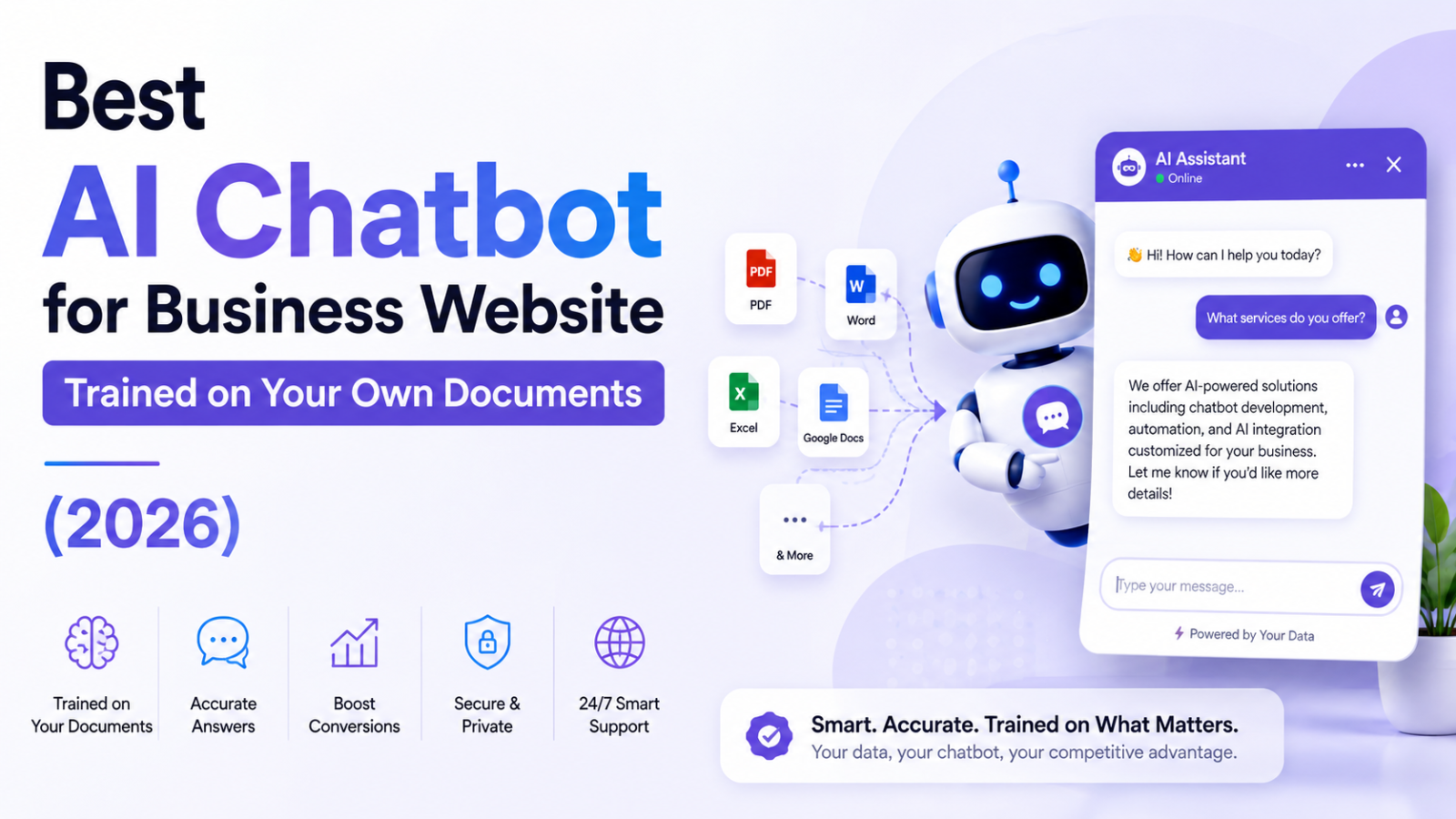
When a chatbot is trained on your own documents, a different process happens. Your specific files — PDFs, Word documents, spreadsheets, text files, web pages — are processed and stored in a knowledge base. When a visitor asks a question, the AI searches your knowledge base first, finds the most relevant passages from your specific content, and generates a response based on what your documents actually say.
This is called Retrieval-Augmented Generation (RAG) — and it is the technology that separates a document-trained business chatbot from a generic AI assistant. The result is a chatbot that sounds like it knows your business inside out, because it has read everything you have written about your business.
Why Generic AI Chatbots Fail for Business Websites
To appreciate why document training matters, consider what happens without it.
A visitor on your software company's website asks: "Does your tool integrate with Zapier?"
A generic AI chatbot answers: "Many software tools integrate with Zapier, which is a popular automation platform. You should check the tool's documentation or contact support to confirm."
A document-trained chatbot that has read your integrations page answers: "Yes — we have a native Zapier integration that supports over 3,000 app connections. You can set it up directly from your dashboard under Integrations → Zapier. Here's the step-by-step guide from our documentation."
The first answer is technically accurate but commercially useless. The second answer builds confidence, confirms a specific feature, and reduces friction toward purchase — all because the chatbot was trained on your actual content.
This difference compounds across every conversation, every product question, every policy query. A document-trained chatbot multiplies the value of content you have already written. A generic chatbot adds noise.
What to Look For in a Document-Trained Business Chatbot
Before comparing specific platforms, understand the criteria that separate genuinely useful document-trained chatbots from ones that underperform in production.
Accepts multiple document formats Your business content lives in many formats — PDFs, Word documents, plain text, spreadsheets, website pages. A good document-trained chatbot accepts all of these rather than requiring you to convert everything to one format before uploading.
Website URL ingestion Many businesses have their most important content already published on their website. A chatbot that can read your existing website pages — your FAQ, your pricing page, your services page — means you do not have to duplicate content into separate documents.
Answers specifically from your content, not from general AI knowledge The most important quality check: ask the chatbot a question that only your documents would know the answer to. If it gives a generic answer that sounds reasonable but does not come from your specific content, the RAG implementation is poor.
No-code setup for non-technical teams A document-trained chatbot that requires a developer to configure is inaccessible to most small businesses. The best platforms let a non-technical business owner upload documents, customise the widget, and embed on their website without writing code.
Embeddable website widget The chatbot needs to appear on your actual website as an embedded widget — not just as a standalone interface. Visitors should be able to ask questions while browsing your pages, not be redirected to a separate chat platform.
Lead capture built in A chatbot that answers questions but never collects visitor contact information is leaving commercial value on the table. Lead capture should be configurable within the same platform.
Honest about what it does not know A document-trained chatbot should acknowledge when a question falls outside its knowledge base rather than hallucinating a plausible-sounding answer from general AI knowledge. A chatbot that confidently gives wrong answers damages trust faster than one that admits uncertainty.
Transparent, predictable pricing AI chatbot pricing in 2026 ranges from genuinely free to thousands of dollars per month. For business website use cases, the right cost is in the $0 to $50 per month range for most small businesses — not enterprise pricing designed for large support teams.
Best AI Chatbots for Business Websites Trained on Your Own Documents
#1 — Glanceia: Best for Small Business Websites, Fastest Setup
Best for: Small businesses, service providers, travel agencies, ecommerce stores, agencies, clinics, and any business that wants a website chatbot trained on their specific content in under 30 minutes
Starting price: Free / $9 per month
Document formats: PDF, DOCX, TXT, plain text paste, website URL
AI included: Yes — on all plans including free
No-code setup: Yes — under 30 minutes from signup to live
Website widget: Yes — single embed script for any website platform
Lead capture: Yes — built into every plan
Free plan: Fully functional, no time limit, no credit card required
Glanceia earns the top spot specifically for business websites because it is the most accessible, fastest, and most affordably priced document-trained chatbot available in 2026 — without compromising on the AI quality that makes document training valuable.
The process is genuinely simple. Upload your FAQ document, your service descriptions, your pricing guide, your policies — as PDFs, pasted text, or by providing your website URL. Glanceia reads everything, trains the AI on your specific content, and within minutes you have a chatbot that answers questions with the specificity of someone who has read your entire business knowledge base.
The accuracy comes from your content quality. Unlike some platforms that blend your uploaded content with general AI knowledge — creating the risk of answers that are plausible but not actually from your documents — Glanceia grounds responses in what you have provided. A visitor asking about your pricing gets your pricing, not an estimate based on industry averages.
The widget embeds on any website platform — WordPress, Wix, Webflow, Shopify, Squarespace, Framer, Next.js, or any custom-built site — with a single line of code. No developer required.
Lead capture is included on every plan including the free tier — collecting visitor name, email, and qualifying information automatically within the same conversation where the chatbot answered their question.
The free plan has no time limit and requires no credit card — you can validate whether a document-trained chatbot adds value to your specific business before spending anything. The paid plan at $9 per month is the lowest flat-rate entry for a genuine document-trained AI chatbot in the market.
Try Glanceia free — no credit card needed →
#2 — Chatbase: Best for Developers and Technical Teams
Best for: SaaS companies, technical teams, and developers wanting a flexible document-trained chatbot with API access and model selection
Starting price: Free (limited) / $32 per month Hobby
Document formats: PDF, DOCX, TXT, CSV, website URL, Notion, Confluence
AI included: Yes — credit-based system on all plans
No-code setup: Partial — straightforward upload and embed, but some technical comfort helps for advanced configuration
Website widget: Yes
Lead capture: Yes — on paid plans
Free plan: Limited — approximately 50 message credits, chatbot deleted after 14 days of inactivity
Chatbase is one of the most established document-trained chatbot platforms in 2026 and has genuine strengths for technical teams. The breadth of document format support is impressive — beyond PDFs and text, it ingests Notion pages, Confluence wikis, CSV files, and YouTube transcripts, making it particularly relevant for SaaS companies with diverse documentation sources.
The AI quality is strong. Chatbase uses RAG effectively and generally stays grounded in uploaded content rather than drifting into general AI knowledge. For technical users who want to select specific AI models — choosing between GPT and Claude depending on use case — the model flexibility is a genuine advantage.
The limitations that affect its ranking: the free plan is effectively a trial rather than a permanent free tier (chatbots are deleted after 14 days of inactivity, and the 50-message monthly limit is far too low for real business traffic). The credit-based pricing system on paid plans makes monthly costs harder to predict — using premium AI models burns through credits significantly faster than using standard models. And branding removal requires a paid plan at a price point that makes the real cost meaningfully higher than the Hobby plan's base price.
Best for: Technical teams comfortable with credit-based pricing who want model selection flexibility and broad document format support.
#3 — CustomGPT.ai: Best for Source-Grounded Answers With Citations
Best for: Professional services, legal firms, healthcare, compliance-heavy industries, and any business where showing the source behind an answer is critical to building trust
Starting price: From $49 per month
Document formats: PDF, DOCX, website URL, YouTube, audio files, 1,400+ formats claimed
AI included: Yes
No-code setup: Yes
Website widget: Yes
Lead capture: Yes
Free plan: Trial available
CustomGPT.ai differentiates itself on one specific capability that is genuinely valuable for certain businesses: source citations. When the chatbot answers a question, it shows the specific document or page section the answer came from, with a clickable link to the original source. Visitors can verify that the answer came from your actual documentation rather than trusting the AI's claim.
For businesses in professional services, legal, healthcare, or compliance-heavy industries — where the provenance of information matters as much as the information itself — this citation capability is a meaningful differentiator. A client asking a legal services firm's chatbot about their fee structure and seeing "Source: Fee Schedule document, Section 3, Page 2" has a different level of confidence than receiving an answer with no verifiable origin.
The trade-off is price. CustomGPT.ai starts at $49 per month — significantly higher than Glanceia's $9 per month entry price — and is positioned toward professional and enterprise use cases rather than the broader small business market. The document format support is the broadest on this list, which matters for organisations with diverse content types.
Best for: Businesses where showing document sources alongside answers is critical to client trust — legal, financial, healthcare, and compliance-heavy industries.
#4 — Botpress: Best for Technically Capable Teams Wanting Maximum Customisation
Best for: Developer-led teams who want deep control over conversation logic, custom AI model integration, and complex workflow automation
Starting price: Free (2,000 messages per month) / From $89 per month
Document formats: PDF, DOCX, website URL, knowledge bases
AI included: Yes — on all plans
No-code setup: Partial — no-code interface exists but maximum value requires technical familiarity
Website widget: Yes
Lead capture: Yes
Free plan: Yes — 2,000 messages per month, most generous free volume on this list
Botpress combines document-trained AI with the most comprehensive conversation flow builder available for non-enterprise teams. Where most document-trained chatbots are essentially "upload content and answer questions," Botpress lets developers build complex multi-step workflows on top of the knowledge base — routing conversations based on intent, triggering external API calls, connecting to CRM systems, and building conditional logic that adapts to each visitor's journey.
The free plan's 2,000 monthly message limit is the most generous by volume of any platform on this list — enough to cover a small business website's full monthly conversation volume on the free tier.
The limitation that affects most small businesses: Botpress rewards technical investment. Getting more than basic RAG functionality from the platform requires meaningful time with its documentation and flow builder. For a non-technical business owner who wants to upload their FAQ and be live in 30 minutes, Botpress is not the right starting point.
Best for: Technical teams and developer-led businesses who want to build sophisticated conversational workflows on top of a document-trained AI foundation.
#5 — SiteGPT: Best for Website-Specific Training Without Document Upload
Best for: Businesses whose primary content is already published on their website and who want to avoid document preparation entirely
Starting price: From $49 per month
Document formats: Website URL (primary), PDF upload available
AI included: Yes
No-code setup: Yes
Website widget: Yes
Lead capture: Yes
Free plan: Trial available
SiteGPT takes a different approach to document training — instead of requiring you to upload documents, it crawls your existing website and trains the chatbot on everything it finds there. If your FAQ page, pricing page, services page, and blog posts already contain your business knowledge, SiteGPT can ingest all of it automatically without any document preparation.
For businesses whose website is their primary content repository — and where that content is well-organised and regularly updated — this crawl-first approach is genuinely convenient. Update your website and the chatbot's knowledge updates when it re-crawls.
The limitation is that most small businesses do not have their complete business knowledge published on their website. Policies that exist only as internal documents, pricing details that are not publicly listed, FAQ answers that have never been written down — none of these are accessible through website crawling. Document upload capability is essential for most real business implementations.
Best for: Businesses with comprehensive, well-organised website content who want to skip document preparation entirely.
How to Choose the Right Document-Trained Chatbot for Your Business
Use this framework to match your situation to the right platform:
For non-technical business owners who need to be live quickly and affordably: Glanceia. Upload your documents, customise the widget, embed one script. Free to start. $9 per month when you scale.
For technical teams who want model flexibility and broad document format support: Chatbase. Factor in the credit-based pricing and plan for the Hobby plan ($32 per month) as the minimum viable paid tier for real business use.
For professional services firms where showing answer sources is critical to client trust: CustomGPT.ai. Budget $49 per month and above.
For developer-led teams building complex conversational workflows on top of document-trained AI: Botpress. The free plan is the most generous starting point for technical validation.
For businesses whose content is comprehensively published on their website: SiteGPT. Use the website crawl as the primary training source, supplement with document uploads as needed.
The Documents That Make the Biggest Difference
Regardless of which platform you choose, the quality of your document-trained chatbot depends entirely on the quality of the documents you upload. These are the highest-impact documents for most business website chatbots:
FAQ Document — Highest Impact The single most valuable document you can upload is a comprehensive FAQ written specifically for the chatbot. Not a reformat of your existing FAQ page — a purpose-built document that answers every question your visitors, leads, and customers regularly ask, with complete, specific answers. Aim for 30 to 50 questions minimum. Specific answers produce specific chatbot responses. Vague answers produce vague chatbot responses.
Service or Product Descriptions What you offer, what is included, what differentiates each option, who each option is designed for, and what the expected outcome is. Visitors make purchase decisions based on this information — the chatbot needs it to answer pre-purchase questions accurately.
Pricing Document Including ranges, what is included at each price point, how pricing is calculated, any conditions or qualifications, and payment terms. Pricing questions are among the most common that visitors ask and among the most conversion-critical.
Full Policy Documentation Returns, refunds, cancellations, booking terms, shipping, guarantees, warranty — written completely, not summarised. A visitor asking about your cancellation policy should get the full answer, not a direction to read the full policy elsewhere.
Process and Getting Started Guides How a new customer or client gets started with you — the steps, the timelines, what they need to provide, and what to expect at each stage. This content reduces the friction between purchase decision and actual engagement.
Common Mistakes When Training a Business Chatbot on Your Documents
Uploading vague content and expecting specific answers The AI can only answer as specifically as the content you give it. "Pricing varies — contact us" in your FAQ produces "pricing varies — contact us" from the chatbot. Rewrite vague answers before uploading.
Uploading outdated documents and forgetting to update A document-trained chatbot gives answers from the documents it was trained on. If your pricing changed six months ago but the uploaded pricing document is from before the change, the chatbot quotes old prices. Update training content whenever your business changes.
Not testing with real visitor questions before going live The most important 30 minutes after setting up a document-trained chatbot is testing it with the actual questions your visitors and customers ask. Ask 20 to 30 questions that cover your most common scenarios. Fix any gaps before real visitors encounter them.
Relying only on the website crawl without supplementing with documents Most businesses have important content that is not published on their website — internal policy documents, detailed pricing structures, answers to common questions that nobody has written down yet. A chatbot trained only on your website misses this unpublished knowledge.
Ignoring the conversation logs after launch Questions the chatbot could not answer from your documents are not failures — they are content gaps to fill. Review your chatbot conversation logs weekly and update the training documents based on what real visitors actually ask.
FAQ — AI Chatbot Trained on Your Own Documents
What does it mean to train an AI chatbot on your own documents? Training a chatbot on your own documents means uploading your business content — FAQs, pricing guides, policies, product descriptions — to a chatbot platform that uses Retrieval-Augmented Generation (RAG) to answer visitor questions specifically from your content rather than from general AI knowledge.
Which AI chatbot platform is best for small business websites that want to train on their own documents? Glanceia is the best option for small businesses — free plan with AI included, accepts PDF and text uploads as well as website URLs, no-code setup, embeds on any website, and paid plans from $9 per month with no hidden fees.
What document formats can I use to train a chatbot? Most document-trained chatbot platforms accept PDFs, Word documents (DOCX), plain text files, and website URLs. Some platforms like Chatbase also support Notion, Confluence, CSV files, and audio/video transcripts. Glanceia accepts PDFs, DOCX, plain text paste, and website URLs.
Does a document-trained chatbot answer only from my documents or mix in general AI knowledge? This depends on the platform and how it is configured. Well-implemented RAG chatbots answer primarily from your uploaded documents and acknowledge when a question falls outside their knowledge base. Poorly implemented ones blend your content with general AI knowledge, which can produce answers that sound credible but are not actually from your documents.
How many documents should I upload to get good results? Start with a comprehensive FAQ document (30 to 50 questions with specific answers), your full service or product descriptions, your pricing document, and your key policies. This covers the majority of what visitors actually ask. Add more documents based on what the conversation logs reveal visitors are asking that the chatbot could not answer.
Can I update the documents after the chatbot is live? Yes — update your documents in the chatbot platform's dashboard whenever your business changes. Changes take effect immediately on your live website without needing to touch the embed script.
What is the difference between a document-trained chatbot and a general AI assistant like ChatGPT? A general AI assistant answers from its broad training data — vast amounts of internet content. It does not know your specific business details. A document-trained chatbot answers specifically from the content you uploaded — your pricing, your policies, your services. For business website use, document-trained chatbots are far more valuable for conversion and customer service.
Final Thoughts
A generic AI chatbot that answers questions about your industry is not the same as a document-trained chatbot that answers questions about your business. The first impresses visitors without helping them. The second converts visitors by giving them exactly the specific information they need at the exact moment they need it.
The technology to build a genuinely useful document-trained business website chatbot is accessible, affordable, and deployable in under 30 minutes in 2026. The competitive advantage it creates — 24/7 specific answers, instant lead capture, reduced support load, improved conversion — compounds from the first day it is live.
Start with your FAQ document and your service descriptions. Upload them. Go live. Review the conversation logs. Fill the gaps. The chatbot gets more valuable with every iteration.
Ready to train an AI chatbot on your own business documents for free? Try Glanceia — no credit card needed →
Published by Laxman- Team Glanceia