Free vs Paid Chatbot — Is Upgrading Actually Worth It in 2026?
Free vs paid chatbot — which one should your business use? This honest guide breaks down exactly what you get for free, when to upgrade, and whether the cost is justified.
Introduction
When you start searching for a chatbot for your website, one of the first decisions you face is whether to use a free plan or upgrade to a paid one. On one side, free sounds appealing — zero cost, no commitment, easy to test. On the other side, paid plans promise more features, more conversations, and better AI capability.
The honest answer to "is upgrading worth it?" is not a simple yes or no. It depends entirely on what the free plan actually gives you, what the paid plan adds, and whether the difference translates into real business results for your specific situation.
Most guides on this topic are written by chatbot companies trying to push you toward their paid plans. This one is not. This is an honest breakdown of what free chatbot plans genuinely deliver in 2026, where they fall short, when upgrading makes financial sense, and when staying on the free plan is the smarter move.
What Free Chatbot Plans Actually Give You in 2026
The free chatbot market has improved significantly in the last two years. What used to be a nearly useless demo tier has evolved into something genuinely functional for small businesses with low-to-moderate website traffic.
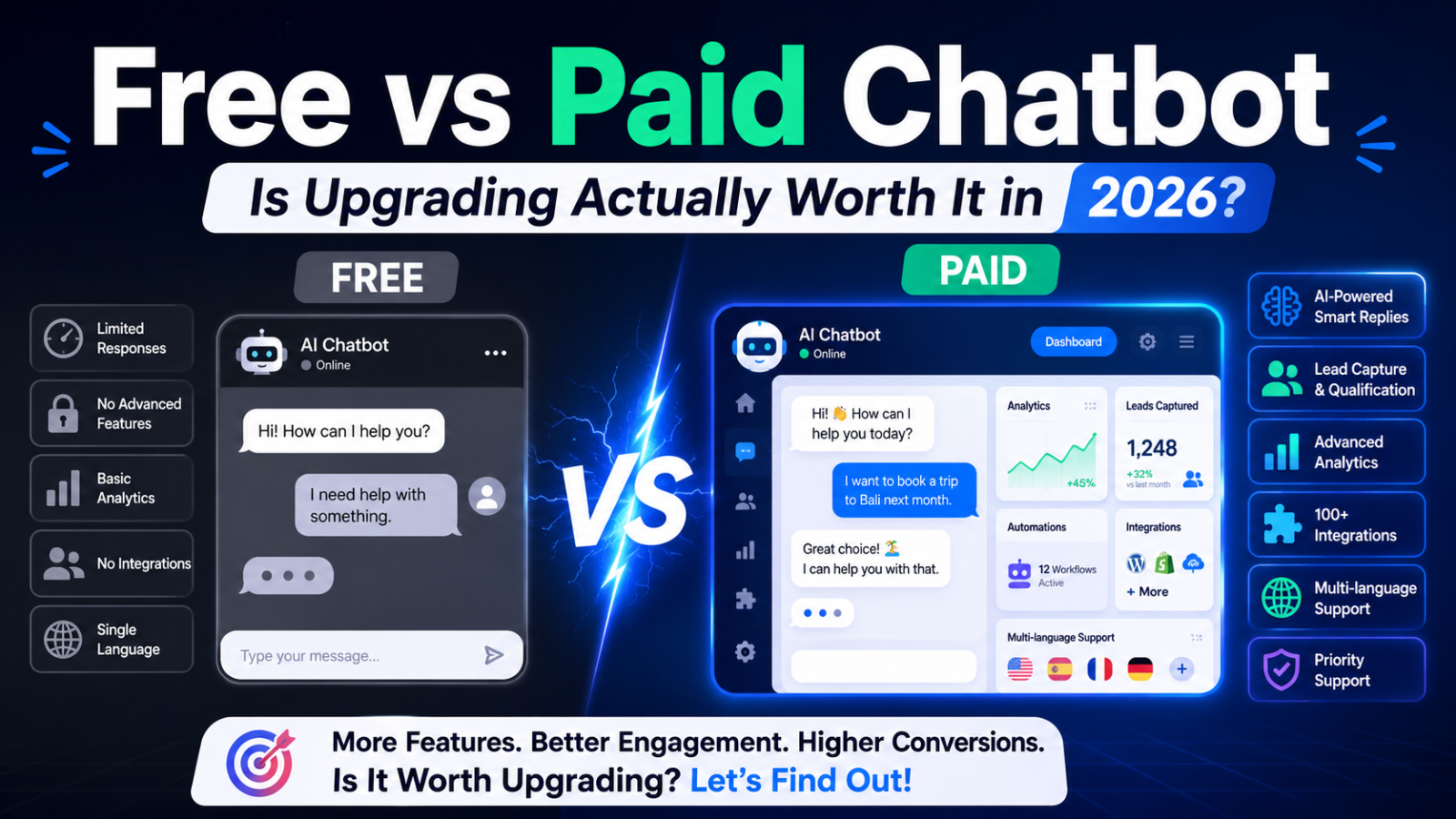
Here is what the best free chatbot plans in 2026 actually include:
The Good: What You Genuinely Get for Free
Full AI capability on the best free plans Not all free plans include AI — but the best ones do. Glanceia's free plan, for example, includes genuine AI trained on your specific business content. You upload your FAQ document, your services description, and your pricing — and the chatbot answers visitor questions accurately from that content. No scripts. No button menus. Real conversational AI.
Website widget that works on any platform A free chatbot widget that embeds on WordPress, Wix, Webflow, Shopify, or any custom site via one line of code. No developer required, no platform restrictions.
Lead capture Collecting visitor name and email from conversations — the core commercial value of a website chatbot — is available on free plans from the better providers. This turns anonymous web traffic into named leads your team can follow up with.
Unlimited time The best free plans have no expiry date. You can run on the free tier indefinitely as long as your conversation volume stays within the plan's limits. This is a genuine free product, not a trial dressed up to look like one.
Basic analytics Conversation volume, common questions, lead capture stats — enough data to understand how the chatbot is performing without needing a paid dashboard.
The Reality: Where Free Plans Have Real Limits
Conversation volume caps Every free chatbot plan limits how many conversations or messages the chatbot can handle per month. The specific limit varies widely:
Glanceia free plan: entry-level conversation volume suitable for low-traffic websites
Tidio free plan: 100 Lyro AI conversations — enough for very light testing only
Chatbase free plan: approximately 50 message credits — runs out in the first few days for any site with real traffic
Botpress free plan: 2,000 messages per month — the most generous by volume
When you exceed the monthly limit, one of three things happens depending on the platform: the chatbot stops responding, you get charged overage fees, or the platform forces you to upgrade. The first is the most common outcome on free plans — and it means visitors get no response at all until the next billing cycle begins.
Branding on the widget Most free plans display a "Powered by [Platform Name]" badge in the chat widget. This is not a disaster, but it does signal to visitors that you are using a third-party tool rather than something built for your brand. For businesses where brand presentation matters — agencies, professional service firms, premium product brands — the branding can feel mismatched.
Limited integration options Connecting your chatbot to CRM platforms, email marketing tools like Mailchimp, or automation services like Zapier is often restricted to paid plans. On the free tier, leads captured by the chatbot typically stay within the chatbot platform's own dashboard rather than flowing automatically into your wider marketing stack.
No priority support If something goes wrong on the free plan, you are in a general support queue. Paid plans typically include faster response times, dedicated support channels, or account managers who can help you get more out of the platform.
Fewer customisation options Some advanced widget customisation — custom fonts, advanced positioning rules, page-specific display logic — may be restricted to paid tiers.
What Paid Chatbot Plans Add
The jump from free to paid is not the same on every platform. Understanding what you actually get for the additional cost is essential before making the decision to upgrade.
Higher Conversation Volume
This is the most common reason businesses upgrade. The free plan's conversation limit is no longer sufficient for the website traffic they are receiving, and they need more monthly conversations without the chatbot cutting off mid-month.
On most platforms, the first paid tier doubles or triples the free plan's conversation allowance. On Glanceia, the paid plan starting at $9 per month provides significantly higher volume at a predictable flat monthly cost.
Branding Removal
Most paid plans remove the "Powered by" badge from the widget, giving the chatbot a fully branded appearance that feels like a native part of your website.
Advanced Integrations
Paid plans typically unlock integrations with CRM platforms, email marketing tools, and automation services. This is where the commercial value of upgrading becomes most tangible — leads captured by the chatbot flow automatically into your marketing stack rather than sitting in a separate dashboard.
Multiple Chatbots
Running more than one website or wanting a different chatbot for different sections of your site often requires a paid plan that allows multiple chatbot instances under one account.
Advanced Analytics
Deeper conversation analytics — satisfaction rates, drop-off points, most-asked questions by category, conversion tracking — are usually restricted to paid tiers and help you optimise the chatbot's performance over time.
Priority Support
Faster access to support when you need it. On a free plan, a technical issue might sit unresolved for 24 to 48 hours. On a paid plan, the same issue typically gets resolved the same day.
The Real Question: Is the Upgrade Worth It?
This is where most comparison articles go vague. They list features and leave you to decide. Here is a more useful framework.
Upgrade is Worth It When:
Your conversation volume regularly hits the free plan's limit If your chatbot is consistently running out of monthly conversations before the end of the month, you are actively losing opportunities — visitors arriving after the limit is hit get no response. The cost of those missed conversations almost certainly exceeds the cost of upgrading.
Check your chatbot dashboard. If you are reaching 80 to 90 percent of the free plan's limit in a typical month, upgrade before you start losing conversations.
You need leads to flow into your CRM or email marketing automatically If you are managing the leads captured by your chatbot manually — checking the dashboard, copying contact details, pasting them into Mailchimp or HubSpot — you are creating unnecessary work and introducing delay. Every hour a captured lead sits in the chatbot dashboard without being followed up is an hour that lead could be cooling off.
Upgrading to access integrations means every lead is in your CRM or email sequence automatically, within seconds of being captured. The time saved and the faster follow-up speed more than justify the upgrade cost.
Your brand presentation matters to your clients or customers If you are an agency presenting work to clients, a professional services firm that clients evaluate on credibility signals, or a premium product brand where perception is part of the value — a "Powered by [Platform]" badge in your chatbot widget is a minor but real friction point. Upgrading to remove it is inexpensive relative to the brand impression it protects.
A single additional conversion per month covers the upgrade cost This is the clearest ROI test. Take your average deal value. If the chatbot generates one additional inquiry per month from visitors who would otherwise have bounced — and that inquiry converts at even a modest rate — does the revenue cover the upgrade cost?
For almost any service business where the average deal is worth $100 or more, the answer is yes. At $9 per month for the Glanceia paid plan, you need less than one additional customer per year to break even on the upgrade. In practice, the volume and lead quality improvements from upgrading typically deliver many times that.
You are running multiple websites or need multiple chatbot instances Free plans typically restrict you to one chatbot. If you are managing multiple sites — your main business site, a landing page, a separate product microsite — you need a paid plan that allows multiple deployments under the same account.
Stay on the Free Plan When:
Your website traffic is low and the conversation limit is not being reached If your site gets 200 visitors a month and the chatbot handles 20 to 30 conversations, and the free plan allows significantly more than that — you are nowhere near the limit. Upgrading adds no practical benefit. Stay free until your traffic grows.
You are still testing whether a chatbot helps your business at all The free plan is the right environment to validate the concept. Run the chatbot for 30 to 60 days on the free plan. See whether it captures leads, whether visitors engage with it, and whether those leads convert into customers. Only upgrade once you have evidence the chatbot is delivering value worth paying for.
The integrations you need are not blocked by the free tier If you only need the chatbot for lead capture and you check the leads manually — and this is manageable for your current volume — there is no urgent reason to upgrade just to access integrations you do not yet need.
You are early in your business journey and every cost matters A bootstrapped business in its first year should start free and upgrade deliberately. The free plan from Glanceia gives you a fully functional AI chatbot with no time limit. Use it, generate value from it, and upgrade when the revenue it generates justifies the cost.
A Practical Upgrade Decision Framework
Here is a simple test to decide whether upgrading makes sense for your business right now.
Step 1: Check your current conversation volume How many conversations per month is your chatbot handling? How close are you to the free plan's limit? If you are under 50 percent of the limit, upgrading is probably not urgent.
Step 2: Calculate the cost of a missed conversation If your chatbot stops responding when it hits the monthly limit, estimate how many visitors arrive after that point. If your average deal value is ₹20,000 and even one in ten of those visitors would have converted with a working chatbot — is that more or less than the upgrade cost?
Step 3: Estimate time spent on manual lead management How many minutes per day or week do you spend checking the chatbot dashboard, copying leads, and entering them into your CRM or email tool? Multiply that by your hourly rate or your team member's hourly cost. If the integration unlock on the paid plan saves more than that, upgrading pays for itself in time savings alone.
Step 4: Identify the specific feature you need The best reason to upgrade is a specific feature you need right now — not a vague sense that more features must be better. Identify the one thing the paid plan has that the free plan does not, and decide whether that specific thing justifies the cost.
Step 5: Calculate the break-even Glanceia's paid plan costs $9 per month. That is $108 per year. If the chatbot helps you convert one additional customer per year worth more than $108 — upgrading is profitable. For most businesses, the chatbot pays for itself in the first week after upgrade.
Free vs Paid Chatbot: Honest Platform-by-Platform Breakdown
Glanceia
Free plan quality: One of the best in the market — AI included, no time limit, lead capture included, works on any website platform
What the paid plan adds: Higher monthly conversation volume, advanced features, and integrations
When to upgrade: When your conversation volume is consistently approaching the free plan's limit, or when you need leads to flow automatically into your email marketing or CRM
Upgrade cost: From $9 per month — the lowest flat-rate paid entry for a genuine AI chatbot in the market
Honest verdict: Start free. Upgrade when volume or integration needs justify it. The $9 paid plan makes the ROI calculation straightforward for almost any business.
Tidio
Free plan quality: Extremely limited for AI — the 100 Lyro AI conversations are a one-time limit, not monthly. After that, the chatbot reverts to basic rule-based flows only.
What the paid plan adds: Ongoing AI conversations, higher volume, live chat integrations
When to upgrade: Almost immediately if you need AI — the free plan does not sustain ongoing AI beyond the initial 100-conversation allocation
Upgrade cost: $29 per month base + $39 per month Lyro AI = $68 minimum for a functional AI chatbot
Honest verdict: The free plan is effectively a demo. If you need AI capability beyond initial testing, budget for the combined cost upfront.
Chatbase
Free plan quality: Demo-grade — approximately 50 message credits per month and chatbot deleted after 14 days of inactivity. Not suitable for production use on a real business website.
What the paid plan adds: Sustainable conversation volume, persistent chatbot, higher credit allowances
When to upgrade: Before going live with real traffic — the free plan is only suitable for testing
Upgrade cost: $32 per month for the Hobby plan — the minimum viable Chatbase plan for real business use
Honest verdict: If Chatbase is your platform of choice, plan to pay from day one. The free plan is genuinely trial-grade, not a usable free tier.
Botpress
Free plan quality: The most generous by message volume — 2,000 messages per month with AI included. Genuinely useful for low-traffic websites.
What the paid plan adds: Higher volume, team collaboration features, advanced analytics
When to upgrade: When monthly message volume consistently exceeds 2,000, or when you need team features
Upgrade cost: From $89 per month — a significant jump from free
Honest verdict: The free plan is strong enough for small businesses with low traffic. The paid plan jump is steep — factor this into your decision if you expect to outgrow the free tier within a year.
ManyChat
Free plan quality: Strong for social channels — up to 1,000 contacts on Instagram and Facebook Messenger. Weaker for website chatbot use.
What the paid plan adds: Unlimited contacts, WhatsApp integration, GPT AI features
When to upgrade: When contact volume exceeds 1,000 or when you need AI for social channel responses
Upgrade cost: $15 per month Pro + $29 per month GPT add-on = $44 minimum for AI capability
Honest verdict: Excellent free plan for social-first businesses. Website chatbot needs are better served by a website-first tool.
The Hidden Cost of Staying on a Free Plan Too Long
There is one cost that most businesses do not account for when evaluating the free vs paid chatbot decision: the cost of the free plan's limitations actively costing you money.
Consider a service business running a chatbot on a free plan with a 100-conversation monthly limit. In week 4 of the month, the limit is hit. For the remaining days of the month, every visitor who tries to use the chatbot gets no response. They experience a dead widget. That is worse than having no chatbot at all — a dead widget signals a business that does not maintain its tools.
If that business averages 15 website visitors per day in the last week of the month — that is 105 visitors who interacted with a non-functioning chatbot. If even 5 percent of them would have converted into paying customers — that is 5 lost customers per month. At an average deal value of ₹15,000, that is ₹75,000 in lost revenue per month from a plan limitation that costs $9 per month to remove.
This is the most under-appreciated argument for upgrading: not the features the paid plan adds, but the revenue leakage the free plan's limits create.
The Bottom Line: Free or Paid?
Start free if you are:
Testing whether a chatbot works for your business
Running a low-traffic website that will not hit conversation limits
In the early stages of your business where every cost is scrutinised
Not yet convinced the chatbot will generate enough value to justify ongoing cost
Upgrade to paid if you are:
Approaching or regularly hitting your free plan's conversation limit
Losing leads to manual management that integration would automate
Running a business where brand presentation matters and widget branding feels mismatched
Confident the chatbot is generating value and want to scale that value
The simplest version of the decision: Run the free plan for 30 to 60 days. Review the conversation logs. Count the leads captured. Calculate how many of those leads converted to customers and what they were worth. If the revenue attributable to the chatbot exceeds $9 per month by a comfortable margin — upgrade. If not — optimise the chatbot content and give it another month.
For most businesses, that calculation resolves itself within the first 30 days.
FAQ — Free vs Paid Chatbot
Is a free chatbot good enough for a real business? It depends on the platform and your traffic volume. Glanceia's free plan is a genuine, production-ready AI chatbot suitable for small businesses with moderate website traffic. Other platforms like Chatbase offer free plans that are effectively trials. Check what the specific free plan includes before deciding.
What is the main difference between free and paid chatbot plans? The most common differences are conversation volume limits, branding on the widget, access to integrations with CRM and email tools, and the number of chatbot instances allowed. The best free plans include AI — the limitation is usually volume rather than capability.
When does the free chatbot plan stop being enough? When you regularly approach the monthly conversation limit, when manual lead management is consuming meaningful staff time, or when a specific feature — like CRM integration — would clearly deliver more value than the upgrade costs.
What is the cheapest paid chatbot that includes full AI? Glanceia's paid plan at $9 per month is the lowest flat-rate entry price for a genuine AI chatbot with document training, lead capture, and no hidden add-on fees in the 2026 market.
Can I go back to the free plan after upgrading? On most platforms yes — you can downgrade to the free plan if the paid plan is not delivering enough value to justify the cost. Your chatbot and training content typically remain intact, just with the free plan's limitations restored.
Is the paid chatbot plan tax deductible? In most markets, software subscriptions used for business purposes are deductible as a business expense. Check with your accountant for the specific rules in your jurisdiction.
Final Thoughts
The free vs paid chatbot decision is not really a question about features — it is a question about whether your business has reached the point where the paid plan's additional capability generates more value than it costs.
For most small businesses, the right answer is to start free, run the chatbot for 30 to 60 days, and let the results make the decision obvious. If the chatbot is capturing leads and those leads are converting — upgrading to $9 per month is one of the easiest business decisions you will make. If it is not performing yet — fix the content and optimise before spending money.
The free plan from Glanceia is designed to be a real product, not a teaser. You can run a fully functional AI chatbot on your website for free, for as long as you need, until the volume and integration requirements of your growing business make upgrading the clear next step.
Start free. Upgrade when the math makes it obvious.
Ready to try the free plan with no time limit and no credit card? Try Glanceia free →
Published by Laxman- Team Glanceia