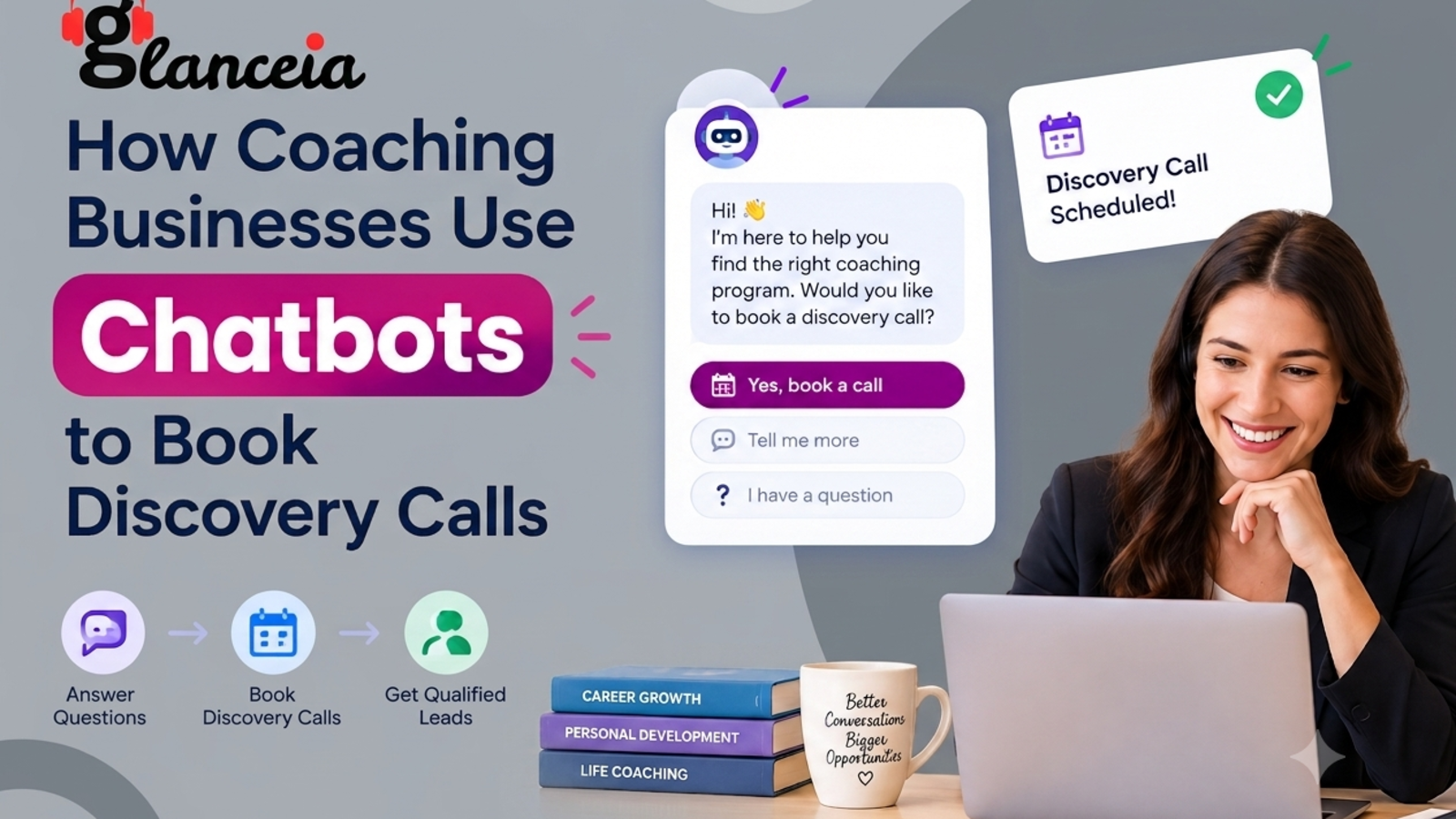
How Coaching Businesses Use Chatbots to Book Discovery Calls
Book discovery calls, coaching lead generation, coaching website chatbot, qualify coaching leads, AI chatbot for coaching business, get more coaching clients
If you coach for a living, you probably know this feeling. Someone lands on your website, reads your about page, looks at your programs, maybe even watches a video. Then they leave without a word.
You never find out what stopped them. Maybe they weren't sure it was for them. Maybe they had one small question and couldn't find the answer. Maybe it was 11 PM, they felt motivated, and there was nobody to talk to.
The discovery call is where most coaching sales are won. So the real job of a coaching website is to get the right people onto that call. A chatbot can help with that, and not in a pushy, salesy way. Here's how coaches are using them, and how you can too.
Why Discovery Calls Are Hard to Get
Coaching is a high-trust purchase. People aren't buying a gadget. They're deciding whether to open up to a stranger about their career, health, relationships, or business, and they're often paying a lot to do it.
That makes visitors cautious. A few things tend to get in the way:
Doubt about fit. "Does this person work with people like me?"
Unanswered practical questions. Price, format, how long it lasts, what a session looks like.
Fear of being sold to. Many people avoid booking a call because they expect a hard pitch.
Bad timing. Interest peaks at odd hours, and the moment passes by morning.
Too much friction. A long form or a vague "contact me" page is easy to ignore.
None of these are problems with your coaching. They're gaps between interest and action, and that's exactly where a chatbot earns its place.
1. Be There When the Interest Is Highest
Motivation doesn't follow office hours. People decide to change something on a Sunday night, after a rough week, or at 6 AM before work. If your site is silent at that moment, the feeling fades.
A chatbot is there whenever someone shows up. It can answer a question, ease a worry, and gather their details so you can follow up with a personal message the next day. For a coach working alone or with a small team, that's like having a very patient assistant who never sleeps.
Glanceia's assistant runs around the clock and can capture a visitor's name, email, and phone number during the chat, sending that lead information to your inbox.
2. Answer the Questions People Are Too Shy to Ask
Plenty of visitors have a question they'd never put in an email. Typing it to a chatbot feels safer.
The usual ones:
How much does coaching cost?
How long do clients typically work with you?
Are sessions online or in person?
Have you worked with someone in my situation?
What actually happens on a discovery call?
Is this a sales pitch?
That last question is worth taking seriously. A bot that says "No pressure. The call is a 20-minute chat to see if we're a good fit, and there's no obligation" can remove the main reason people hesitate.
To make this work, your bot needs your real answers. Glanceia learns from your website content, so you can point it at your URL or sitemap instead of preparing documents. Our guide on training a chatbot on your website content without PDFs shows how. If your site doesn't clearly answer these questions yet, writing a good FAQ page helps both your visitors and your bot.
3. Qualify Visitors Without Making It Feel Like a Quiz
Not everyone who visits your site is a good fit, and that's fine. A coach who spends half their week on calls with people who can't afford the program, or who want something you don't offer, burns out fast.
A chatbot can ask a couple of gentle questions before suggesting a call:
"What are you hoping to work on right now?"
"Are you looking to start in the next month or two, or just exploring?"
The answers tell you who's ready and what they care about. You walk into each discovery call already knowing something about the person, and the call becomes a real conversation instead of an interview.
The trick is restraint. Two or three questions, asked one at a time, feel natural. Ten feel like a government form. If you want tips on keeping it conversational, read our piece on making your chatbot sound more human.
4. Move From Curiosity to Booking Without Pressure
Once someone has their answers, they usually need a small push toward the next step. A good chatbot offers that step naturally:
"Sounds like we might be a good match. Want me to point you to the booking page so you can pick a time that suits you?"
Or, if you prefer to handle scheduling personally:
"Happy to set that up. What's the best email to reach you, and do mornings or evenings work better?"
Either way, you're making it easy to say yes. Keep your booking page clear and linked on your site so the bot can direct people to it, and make sure your fallback (collecting contact details) is ready for visitors who'd rather be contacted.
5. Greet People Based on the Page They're On
A visitor on your "Executive Coaching" page and a visitor on your "Free Resources" page are in very different places. One is considering a major investment. The other is dipping a toe in.
Your welcome message can reflect that:
Program page: "Thinking about working together? Ask me anything about how it works."
Blog post: "Enjoying the article? If you'd like help applying it, I'm around."
Pricing page: "Got questions about packages or payment options? Ask away."
With Glanceia you can write your own first message and choose between AI or custom responses, so each greeting sounds like you rather than a generic widget.
6. Know When Someone Is Close to Booking
Sometimes a visitor opens your booking page, looks at it, and leaves. That's a warm lead you almost had.
Glanceia can send real-time alerts when visitors reach key pages like booking or payment pages. For a coach, that's a useful signal. You might send a quick personal note or simply understand which pages lead to action. Even without acting on every alert, you learn what your best-converting path looks like.
7. Learn What Your Audience Is Really Asking
This one is easy to overlook, and it's valuable. Read your chatbot conversations and you get a free look inside your audience's heads.
You might notice that:
Many people ask whether you work with beginners, so your site should say so clearly.
The same price question keeps coming up, so your pricing page needs more explanation.
Visitors keep asking about a topic you haven't written about, so that's your next blog post or workshop.
Glanceia's analytics show top questions and conversation trends, so you can shape your messaging around what people actually want to know, in their words rather than yours.
8. Follow Up Where You Already Work
A lead you collect is only useful if you act on it. Glanceia connects with tools like HubSpot and Mailchimp, so the details from a chat can slot into the follow-up process you already use instead of living in a separate inbox.
A simple, human follow-up works best. Something like: "Hi Priya, thanks for stopping by and asking about group coaching. Happy to chat whenever suits you." Short, warm, specific.
9. Welcome Clients From Anywhere
Many coaches work with people across countries and time zones. A visitor who can chat in their own language is more likely to feel understood. Glanceia works in over 95 languages, so one chatbot can greet visitors in the language they write in.
What a Coaching Chatbot Should Not Do
Trust is the whole game in coaching, so it's worth being careful.
Don't pretend to be you. Make it clear the assistant is an AI. Visitors will meet the real you on the call, and a surprise at that stage damages trust.
Don't give coaching or advice in chat. The bot is there to inform and connect, not to replace your work.
Don't promise results. Avoid guarantees about outcomes in any automated reply.
Don't collect sensitive personal details. Stick to name, contact information, and a short note on what they want help with.
Don't hide the human. Always make it easy to reach you directly.
Also check the data protection rules that apply where you and your clients live, and make sure your privacy policy mentions chat data.
A Simple Setup Plan for Coaches
You can do this in an afternoon:
Create your chatbot by entering your website URL or sitemap.
Review your site. Make sure your services, pricing approach, session format, and discovery call process are clearly explained. This is what the bot learns from.
Write a welcome message in your own voice for your homepage and key program pages.
Set up lead capture so names, emails, and phone numbers reach you.
Plan the fallback. Decide what happens when a question is too personal or specific for the bot, such as offering to pass it to you directly.
Test with real questions that past clients asked before they signed up.
Read conversations weekly and keep refining your site and your bot.
Frequently Asked Questions
Can a chatbot really help me book more discovery calls?
It can, mainly by answering doubts quickly, being available outside your working hours, and making the next step easy. It won't create demand by itself, but it stops you from losing interested visitors to silence or friction.
Will a chatbot make my coaching feel impersonal?
Not if it's set up well. Keep the tone warm, be open that it's an AI assistant, and use it to start conversations, not replace them. Your personal touch still happens on the call.
Can the chatbot schedule the call for me?
It can collect a visitor's details and preferred times, and it can point people to your booking page if that information is on your website. You then confirm the time yourself or let them use your usual scheduling link.
Should it ask visitors qualifying questions?
A couple of light ones, yes. Asking what someone wants to work on and when they hope to start helps you prepare. Keep it short and conversational so it doesn't feel like screening.
Do I need technical skills?
No. With a no-code tool like Glanceia, you enter your website URL, customize the look and tone, and paste one line of code onto your site. It works with platforms like WordPress, Wix, Squarespace, and Shopify.
Can I try it before paying?
Yes. Glanceia has a free plan with no credit card required, so you can build a chatbot and see how visitors respond.
The Bottom Line
Coaching is a relationship business, and relationships start with a conversation. Your website is often the first place that conversation could happen, and for most coaches it doesn't, because there's nobody there to have it.
A chatbot won't replace you or your coaching. What it can do is greet people, answer the small questions that hold them back, and hand you a few warm leads you would otherwise never have known about. That's usually enough to turn a quiet website into one that fills your calendar.
Curious how it would look on your own site? Build your free chatbot with Glanceia, enter your website URL, and see what your visitors ask.