Tidio vs. Glanceia: Which AI Chatbot Architecture Wins in 2026?
Tidio vs. Glanceia: 2026 AI Chatbot & Context Window Comparison Meta Description: Looking for the ultimate AI chatbot for your SaaS or e-commerce platform? Compare Tidio's Lyro AI, context memory, and deployment features against Glanceia.
Introduction
Most "chatbot comparison" posts stack up feature checklists — unlimited ✅, integrations ✅, AI ✅ — without asking the question that actually matters: how is the thing built?
Tidio and Glanceia both put a chat widget on your website. But underneath, they're solving different problems. Tidio started as a live-chat and shared-inbox tool for support teams, with AI added on top. Glanceia was built the other way around — AI first, trained directly on your own documents, with no live-agent inbox to manage at all.
That difference in architecture is what actually determines your monthly bill, your setup time, and whether the bot gives useful answers on day one or needs weeks of tuning. Here's how they compare.
How Tidio Is Built
Tidio's core product is a shared inbox for human agents — live chat, email, and social messages routed to a team. AI (called Lyro) sits on top as a separate module, and a rules-based flow builder (Flows) sits alongside that as a third module.
That matters because Tidio bills these as three separate metered products:
Billable conversations — chats a human agent replies to
Lyro AI conversations — metered separately, with a limited one-time allowance before you pay per conversation
Flow triggers — rule-based automation, metered by visitors reached
It's a genuinely capable platform for teams that want live chat and AI and automated flows in one dashboard, especially e-commerce stores already running a support team. But it's architected around human agents first, AI second — which is exactly why the AI piece is bolted on as an add-on rather than baked into the core price.
How Glanceia Is Built
Glanceia skips the shared inbox entirely. There's no agent queue to staff — the product is a single AI assistant, trained on whatever you upload (PDFs, Word docs, plain text, FAQs), embedded on your site with one script tag.
The setup flow reflects that:
Upload your data — packages, pricing sheets, FAQs, policies
Customize — tone, colors, avatar, welcome message
Embed — one line of code, live same day
Because there's no human-agent layer, there's nothing to meter separately — you're not paying for "AI conversations" on top of "agent conversations" on top of "automation triggers." It's one assistant, trained on your content, with the whole company's data kept isolated from other customers on the platform.
The tradeoff is the flip side of that simplicity: if you need a big team of human agents handling live chat alongside AI, Tidio's shared-inbox model is more mature and built for exactly that. Glanceia is built for businesses that want one well-trained assistant handling the repetitive questions, not a full support desk.
Head-to-Head Comparison
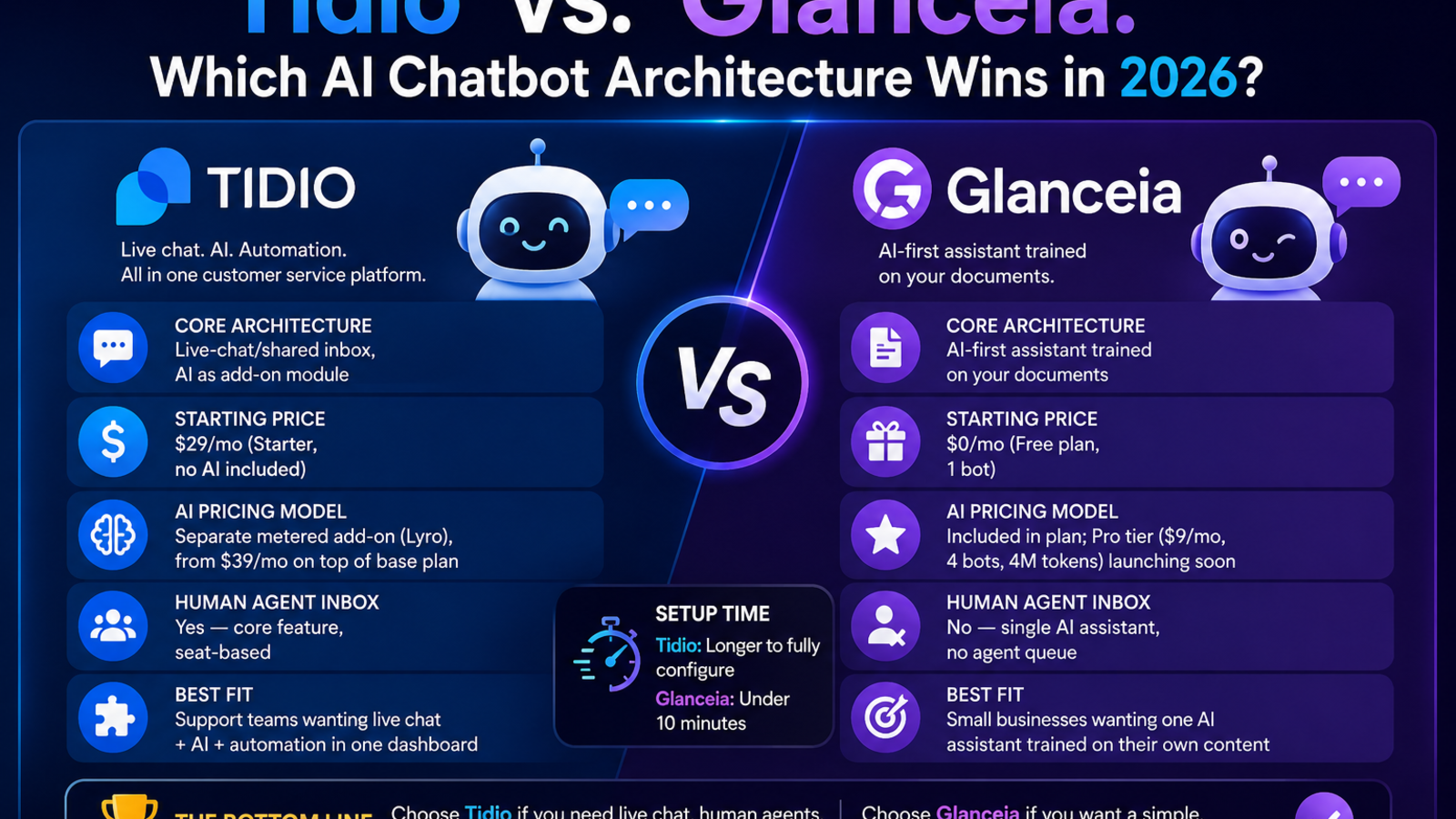
Glanceia vs Tidio: Quick Comparison
Both Glanceia and Tidio help businesses add AI chatbots to their websites, but they are designed for different needs.
Tidio is mainly a customer support platform that combines live chat, AI, and automation. It works well for businesses that have customer support teams and want human agents to step in when needed.
Glanceia is an AI-first chatbot builder. Instead of focusing on live chat, it lets you create an AI assistant that learns from your own documents, FAQs, and website content. It's designed for businesses that want a simple AI chatbot without managing a support team.
Pricing
Tidio's Starter plan begins at $29 per month, but its AI assistant (Lyro) is not included. If you want AI features, you'll need to purchase a separate add-on starting at $39 per month, making the total cost significantly higher.
Glanceia offers a free plan that includes one AI chatbot. Its upcoming Pro plan starts at $9 per month and includes multiple chatbots along with AI usage, making it a more affordable option for many small businesses.
AI Training
Tidio mainly learns from your website content and often requires you to build automation flows manually for more advanced conversations.
Glanceia makes training much simpler. You can upload PDFs, Word documents, text files, FAQs, and other business documents, allowing the AI chatbot to answer questions based on your own content.
Human Support
One of Tidio's biggest strengths is its live chat system. When the AI can't answer a customer's question, a human support agent can take over the conversation through a shared inbox.
Glanceia is designed as a standalone AI assistant. It does not include a shared inbox or support team management, making it better suited for businesses that want an AI to handle conversations independently.
Setup
Tidio is quick to install, but configuring its AI features, automation flows, and support system may take additional time.
Glanceia is built for simplicity. Most businesses can create, train, and publish an AI chatbot in less than 10 minutes.
Which One Should You Choose?
Choose Tidio if your business needs live chat, customer support agents, and advanced automation in one platform.
Choose Glanceia if you want an affordable AI chatbot that can quickly learn from your business documents and answer customer questions without a complicated setup.
Note: Pricing is accurate as of July 2026 based on the information available on each company's official pricing page. Since pricing and plans can change over time, it's always a good idea to check the latest details before making a decision.
The Real Cost Question
Tidio's advertised $29/mo Starter plan doesn't include AI at all — Lyro is billed separately, and independent reviews consistently put the real-world monthly cost at $100–$200+ once a business adds meaningful AI usage and automation on top of the base plan. That's not a knock on Tidio's value — it reflects genuine infrastructure (a full shared inbox, multi-channel routing, a flow builder) that costs more to run. But it means the sticker price isn't the real price if AI is why you're buying.
Glanceia's free plan comes with real limits too — one bot, a capped context window, and one day of chat history — so it's a solid way to test the approach, not a permanent solution for a business handling high volume. The paid Pro tier is listed as "coming soon" rather than live today, so businesses that need more than the free tier right now should factor that into their timeline.
Which One Should You Pick?
If your business already runs a support team that needs a shared inbox — live chat, tickets, and agents handling handoffs — Tidio's architecture is built for that, and the AI add-on layers on top of infrastructure you're already using.
If you're a smaller business or a solo operator who wants one assistant that knows your packages, pricing, and FAQs without staffing a support queue, Glanceia's document-first approach gets you there faster and without juggling three separate usage meters.
Frequently Asked Questions
Does Tidio's AI work out of the box? Lyro needs to be added as a separate paid module and trained on your content — it isn't included in the base Starter or Growth plans.
Can Glanceia handle live human agents too? No — Glanceia is built around a single AI assistant, not a shared human-agent inbox. If you need agent seats and ticket routing, that's Tidio's territory.
Is Glanceia's Pro plan available now? As of this writing it's listed as coming soon — the Free plan is what's currently live.
Which is cheaper long-term? It depends entirely on whether you need live-agent chat. For AI-only use, Glanceia's flat model avoids the metered add-on costs that make Tidio's real bill higher than its advertised price.
Want to see the document-trained approach in action? Try Glanceia free — no credit card required.
Published by Laxman- Team Glanceia