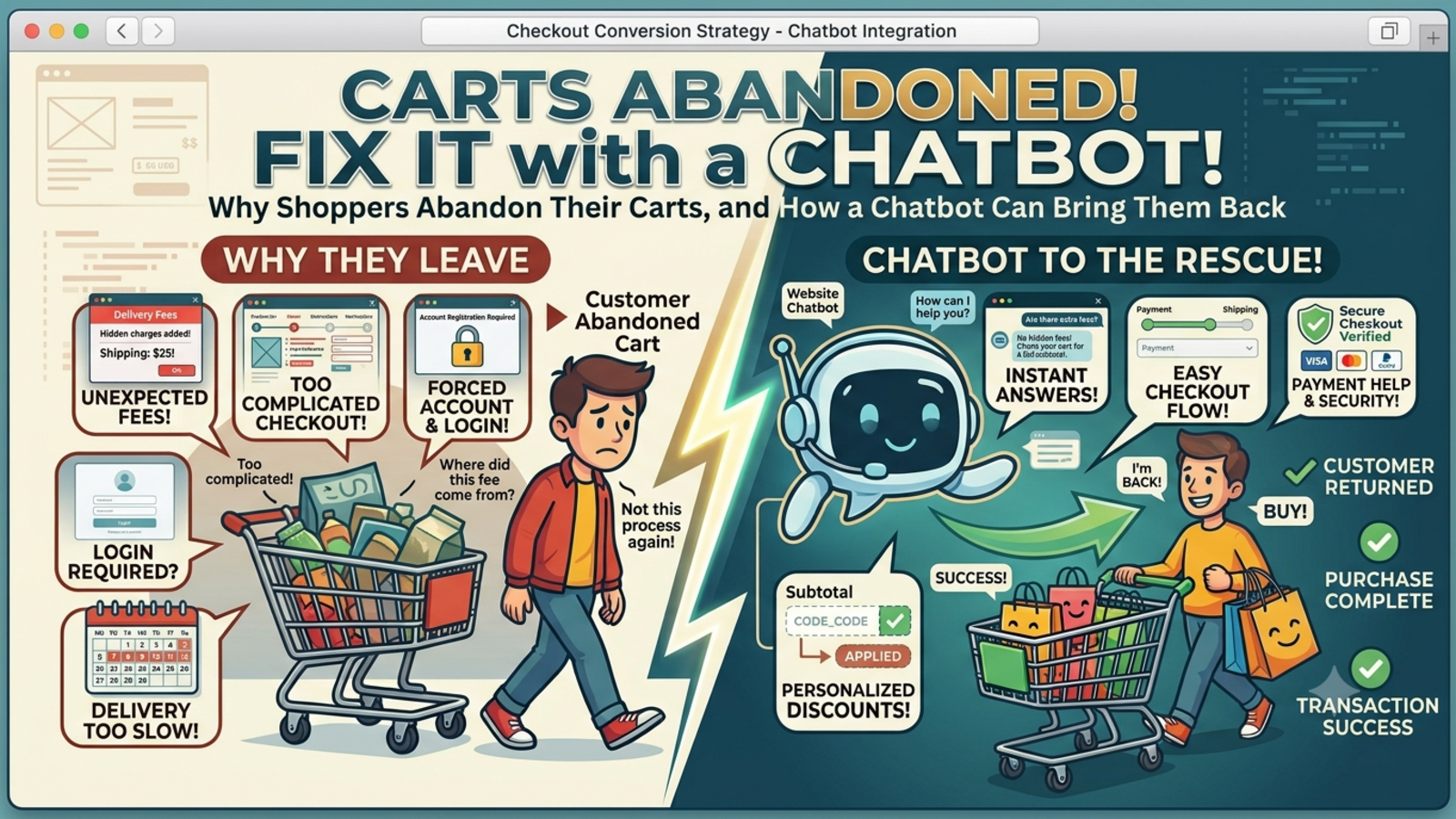
Why Shoppers Abandon Their Carts, and How a Chatbot Can Bring Them Back
About 7 in 10 online shoppers leave without buying. Here's how a well-set-up chatbot can answer the questions that make them hesitate and win back carts you'd otherwise lose.
You've done the hard part. Someone found your store, liked a product, and added it to their cart. Then they left.
It happens constantly. Baymard Institute, which has tracked this for years, puts the average cart abandonment rate at around 70%. Check their site for the latest figure before you quote it, since it shifts a little each year.
Some of those people were never going to buy. They were comparing prices, saving something for later, or killing time on their lunch break. But plenty of them left because of a small doubt that nobody was around to clear up.
That's the gap a chatbot can fill.
Why people really leave
Look at the common reasons shoppers give for abandoning a purchase:
Extra costs showed up late. Shipping, taxes, or fees appeared at the last step.
They were forced to create an account.
Delivery looked too slow.
They didn't trust the site with their card details.
Checkout felt long or confusing.
The return policy wasn't clear, or wasn't good enough.
They had a question and couldn't find the answer.
Look at that list again. Most of these aren't price problems. They're information and confidence problems. The shopper wanted to know something, or wanted reassurance, and nobody was there to give it.
A chatbot works well here because it shows up at exactly the moment of doubt.
1. Answer the "wait, how much will this really cost?" question
Surprise shipping costs are one of the biggest reasons people bail. A chatbot can tell shoppers what shipping will cost before they reach checkout.
Set it up so it can answer things like:
"How much is shipping to my pincode?"
"Is there free delivery?"
"Are there any extra charges at checkout?"
If you offer free shipping over a certain amount, the chatbot can mention it when someone's cart is close: "You're ₹300 away from free delivery." That's helpful, not pushy, and it often nudges the order size up too.
2. Handle the delivery and returns questions that stall decisions
"Will this arrive before the weekend?" and "Can I return it if it doesn't fit?" are the kind of questions people don't want to hunt for. They're usually buried in a policy page nobody reads.
Feed your shipping and returns policies into the chatbot so it can give a short, direct answer in seconds. Keep the answers plain. "Returns are free within 14 days, and refunds take 3 to 5 working days" beats a link to a wall of legal text.
3. Reach out at the right moment, not every moment
Timing matters more than any clever script. A chatbot that pops up the second someone lands on your homepage is just noise.
A better approach is to trigger it by behavior:
The shopper has been sitting on the cart page for a while without moving.
They've gone back and forth between the cart and the product page.
They're about to leave the site (exit intent).
They've viewed the same product several times.
At those moments, a light message works best: "Got a question about this order? I can help." No countdown timers, no fake urgency. Shoppers can tell, and it erodes trust.
4. Help with sizing, fit, and "is this the right one?"
Fashion, furniture, electronics, and beauty stores all share a problem: people aren't sure they're picking the right thing. Uncertainty kills conversions.
A chatbot can ask two or three quick questions and point shoppers to the right option:
"What size do you usually wear in other brands?"
"Is this for a small room or a large one?"
"Do you have sensitive skin?"
It's the online version of a good shop assistant. It also cuts down on returns, which is a nice side effect.
5. Take the friction out of checkout
Sometimes the shopper is ready to buy and the process gets in the way. A chatbot can help with:
"Do I have to create an account?" (If you offer guest checkout, say so.)
"What payment methods do you accept?"
"Is my payment safe?"
"My coupon code isn't working."
That last one is a big deal. A failed discount code is a classic reason for dropping out, and a chatbot that can check the code and explain why it failed can save the sale on the spot.
6. Follow up after they leave
Not everyone will convert in the moment, and that's fine. If you have the shopper's contact details (with their consent), a chatbot can follow up on channels like WhatsApp or email.
Keep it useful instead of nagging:
Remind them what's in their cart.
Answer any question they asked earlier but didn't finish.
Let them know if an item is running low, but only if it's true.
One or two well-timed messages usually do the job. Five is how you get blocked.
7. Hand off to a human when it matters
A chatbot shouldn't try to be everything. For high-value orders, complaints, or anything involving a payment problem, make it easy to reach a real person. A shopper stuck in a loop with a bot that doesn't understand them will leave faster than if there'd been no chatbot at all.
A good rule: if the bot can't answer after two tries, offer a human or a callback.
What to avoid
Fake urgency. "Only 2 left!" when there are 200 will cost you trust.
Popping up too early or too often. Respect the shopper's space.
Vague answers. If the chatbot can't give a clear answer, it should say so and route the question elsewhere.
Outdated information. If your shipping times or prices change, update the chatbot's content right away.
Hiding that it's a bot. People are fine talking to one. They're not fine being tricked.
How to measure whether it's working
Don't judge it by chat volume alone. Watch these numbers:
Cart abandonment rate, before and after, for shoppers who chatted versus those who didn't
Conversion rate among people who engaged with the chatbot
Average order value, especially if you use free-shipping nudges
Most common questions, which show you what your product pages and checkout are failing to explain
Handoff rate, meaning how often the bot had to pass someone to a human
That fourth one is an underrated bonus. If the same question keeps coming up, fix it on the page itself and fewer people will need to ask.
A simple way to start
You don't need to overhaul your store. Begin small:
Collect the 15 to 20 questions your support team hears most often.
Load clear, current answers into the chatbot.
Trigger it only on the cart and checkout pages at first.
Review the conversations weekly and fix gaps.
Expand once you see what's working.
The bottom line
Cart abandonment won't drop to zero, and it shouldn't be your goal. Plenty of people are just browsing. But for the shoppers who were interested and got stuck on a small, fixable doubt, a chatbot can be the difference between a lost sale and a completed order.
The best ones don't feel like marketing tools. They feel like someone saying, "Need a hand with that?" at the right moment.