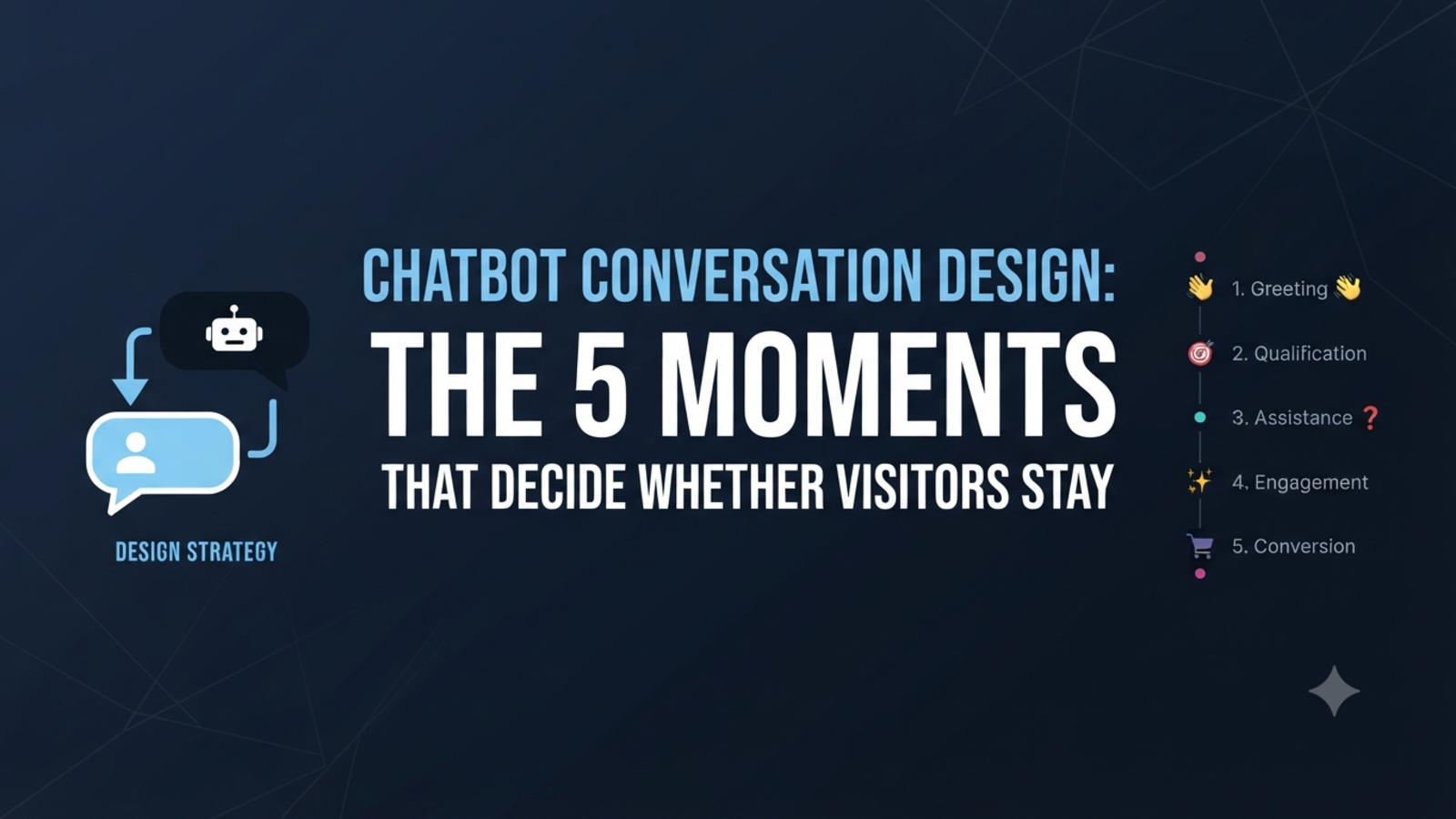
Chatbot Conversation Design: The 5 Moments That Decide Whether Visitors Stay
Learn the 5 important moments in chatbot conversation design that influence whether website visitors stay, engage, and become customers.
Introduction
Imagine a potential customer visiting your website for the first time.
They are interested in your services, have a few questions, and are considering whether your business is the right choice. A chatbot appears in the corner of the screen, offering assistance.
The visitor opens it.
But instead of getting useful help, they receive a generic greeting, are asked to provide their email address immediately, and then have to navigate through several confusing questions just to get a simple answer.
What happens next?
Most likely, they close the chat and continue browsing elsewhere. Some might even leave your website entirely.
Now imagine a different experience.
The chatbot welcomes the visitor naturally, understands what they are looking for, provides a relevant answer, and guides them towards the right next step. The conversation feels simple, helpful, and personal.
The difference between these two experiences is not necessarily the AI model behind the chatbot. It is often the way the conversation has been designed.
This is where chatbot conversation design becomes important.
A chatbot is not just a small window on your website. It is often one of the first interactions a potential customer has with your business. Every message, question, response, and recommendation can influence how that visitor feels about your brand.
In this article, we will explore the five important moments in chatbot conversation design that can determine whether visitors continue interacting with your website or leave without taking action.
What Is Chatbot Conversation Design?
Chatbot conversation design is the process of planning how a chatbot communicates with visitors.
It includes deciding:
How the chatbot welcomes visitors.
What questions it asks.
How it understands customer requests.
How it responds to different situations.
What happens when it does not know an answer.
How it guides visitors towards useful actions.
Think of it as designing a conversation between your business and a potential customer.
Just as a well-designed website makes navigation easier, a well-designed chatbot conversation makes communication easier.
The objective is not to make a chatbot sound overly human or use complicated language. It is to make every interaction useful, clear, and relevant to the visitor.
Let's look at the five moments that matter most.
1. The First Greeting: Making the Right First Impression
The first few seconds of a chatbot interaction can influence whether someone decides to continue the conversation.
When a visitor opens your chatbot, they should immediately understand what it can help them with.
Unfortunately, many businesses use generic greetings such as:
"Hello! How can I help you?"
There is nothing particularly wrong with this message, but it does not tell visitors much about the chatbot or what they can ask.
A more useful greeting provides context.
For example, imagine someone visiting a travel agency website.
Generic greeting:
"Hi! Welcome to our website. How can I help you?"
Better greeting:
"Hi there! Planning your next holiday? I can help you explore destinations, understand our travel packages, and answer questions about bookings. What would you like to know?"
The second greeting immediately tells visitors what kind of assistance is available.
It also gives them ideas about what they can ask.
Why does the first greeting matter?
Visitors arrive at websites with different intentions.
Some want product information. Others need technical support, pricing details, or help with an existing order.
A chatbot greeting should make it easy for them to understand where to begin.
Best practices for designing your chatbot greeting
Keep the welcome message short and friendly.
Explain what the chatbot can help with.
Use language that matches your brand.
Avoid unnecessary promotional messages.
Offer a few relevant conversation starters.
Do not immediately demand personal information.
For example, a software company's chatbot could display quick replies such as:
Explore Features
View Pricing
Technical Support
Talk to Our Team
These options help visitors start a conversation without having to think about what to type.
Remember: A good greeting should invite visitors into a conversation, not make them feel like they are entering a complicated support system.
2. Understanding the Visitor's Question: Listen Before Responding
The second important moment happens when the visitor sends their first message.
This is where many chatbot experiences go wrong.
A visitor might ask a short, incomplete, or slightly confusing question. Instead of understanding the actual intention, the chatbot may provide a generic response that does not solve the problem.
For example:
Customer: "How much?"
Chatbot: "Our products are available at competitive prices."
This response does not help because the chatbot has not understood what the customer is asking about.
A better chatbot would respond:
"Are you asking about our Basic plan, Professional plan, or a particular service?"
This small difference can make the conversation much more useful.
Understand intent, not just individual words
People do not always communicate in complete sentences.
They might type:
"Pricing?"
"Do you deliver here?"
"How to cancel?"
"Need help with booking."
"Can I speak to someone?"
A good chatbot should be designed to understand the purpose behind these messages rather than relying only on exact keywords.
For example, the questions "What does your service cost?" and "Can you tell me your pricing?" have different wording but similar intent.
The chatbot should be able to recognize that both visitors are asking about pricing.
Ask follow-up questions when necessary
Sometimes a visitor's request genuinely needs more information.
In such situations, asking a relevant follow-up question is much better than guessing.
Consider an online store with hundreds of products.
Customer: "Do you have this in blue?"
A useful chatbot might ask:
"Which product are you referring to?"
This makes the next response more accurate.
Best practices for understanding customer questions
Recognize different ways of asking the same question.
Avoid giving unrelated responses.
Ask for clarification when necessary.
Use the business's actual information.
Keep follow-up questions relevant and limited.
The goal is simple: make visitors feel that the chatbot understands what they need.
3. The First Useful Answer: Give Visitors a Reason to Continue
A friendly greeting may encourage someone to open a chatbot, but a useful answer gives them a reason to stay.
This is arguably one of the most important moments in the entire conversation.
Imagine someone visiting a digital marketing agency's website.
They ask:
"Do you help small businesses improve their Google rankings?"
A weak chatbot might respond:
"Yes! We offer excellent digital marketing services to help your business grow."
The answer sounds positive, but it does not provide much useful information.
A better response would be:
"Yes. We offer SEO services for businesses looking to improve their search visibility. Our services can include keyword research, on-page SEO, technical SEO, and content optimization. Would you like to explore our SEO services?"
The second response provides more context and gives the visitor a clear next step.
Accuracy matters more than impressive language
One of the biggest mistakes businesses make is trying to make their chatbot sound impressive instead of making it genuinely helpful.
A chatbot should not invent prices, services, guarantees, or business policies just to keep a conversation going.
For example, if your business does not offer weekend support, the chatbot should not claim that support is available seven days a week.
Similarly, if your pricing information is unavailable, it should not make up a number.
A transparent response is better:
"I don't have the latest pricing information available. I can help connect you with our team for the correct details."
Provide answers that move the conversation forward
A useful response should ideally do at least one of these things:
Answer the visitor's question.
Explain a product or service.
Recommend relevant information.
Help the visitor complete an action.
Identify what information is still needed.
Avoid long responses when a short one will solve the problem.
Visitors generally want answers, not an entire company brochure inside a chat window.
The takeaway: A chatbot should focus on solving the visitor's problem rather than simply producing more messages.
4. The Next Step: Turn a Conversation Into Meaningful Action
Getting a visitor to start a conversation is only part of the process.
The next challenge is helping them understand what to do after receiving an answer.
Imagine a potential customer asking about the price of a website development service.
The chatbot explains the available packages, but then the conversation ends.
The visitor has received information, but there is no clear direction.
A better experience would guide them towards a relevant action.
For example:
"Would you like to discuss your project with our team? I can help you submit an enquiry."
This provides a natural path from information to action.
What should your chatbot encourage visitors to do?
The right next step depends on your business.
For an online store, it might be viewing a product or checking delivery information.
For a travel agency, it could be exploring holiday packages or submitting a booking enquiry.
For a software company, it could involve requesting a demo or viewing subscription plans.
For a service-based business, it might mean scheduling a consultation or requesting a quotation.
Make lead capture feel natural
Lead generation is one of the most useful applications of website chatbots.
However, asking for personal information too early can make visitors uncomfortable.
Compare these two approaches.
Poor experience:
"Please provide your name, email address, and phone number before I can answer your question."
Better experience:
"I'd be happy to help you explore the available packages. If you'd like a personalized quotation, I can also collect your contact details so our team can follow up."
The second approach gives visitors a reason to share their details.
Use clear and relevant calls to action
Your chatbot should offer next steps that match the conversation.
Examples include:
View Pricing
Explore Services
Request a Quote
Book a Consultation
Contact Support
Speak to Our Team
Avoid displaying too many options at once.
A visitor who receives one relevant recommendation is more likely to understand what to do next than someone presented with ten unrelated buttons.
The goal is not to force a conversion. It is to make the next step convenient.
5. The Recovery Moment: What Happens When the Chatbot Cannot Help?
Even a well-configured AI chatbot will sometimes encounter questions it cannot answer correctly.
A visitor may ask about an unusual situation, a specific billing issue, or a company policy that is not available in the chatbot's knowledge base.
This is where conversation design becomes especially important.
A poor chatbot experience looks like this:
Customer: "Can I get a refund for an order that was already delivered?"
Chatbot: "Yes, we offer refunds."
Customer: "Even after delivery?"
Chatbot: "Yes, absolutely!"
If this information is incorrect, the chatbot could create a serious customer service problem.
A better chatbot should recognize when it does not have sufficient information.
For example:
"I don't have enough information to confirm your refund eligibility. Let me help you contact our support team so they can review your order."
This response is more transparent and gives the customer a way forward.
Why human handoff matters
Some conversations require human understanding and judgment.
Examples include:
Billing disputes.
Complicated refund requests.
Complaints about previous interactions.
Special service requests.
Questions involving exceptions to company policies.
Situations where the chatbot cannot find a reliable answer.
In these cases, transferring the conversation to a human representative can provide a better customer experience.
Design a useful fallback response
Every business chatbot should have a plan for situations where it cannot answer.
A good fallback message should:
Clearly explain that the chatbot cannot confirm the answer.
Avoid inventing information.
Suggest a practical next step.
Offer human support when appropriate.
Your chatbot should never make a visitor feel trapped in an endless conversation.
A reliable chatbot is not one that answers everything. It is one that knows when to answer, when to ask, and when to involve a human.
How Glanceia Helps Businesses Create Better Chatbot Experiences
Designing a useful chatbot conversation does not have to involve building an AI system from scratch.
Businesses need a platform that allows them to provide their own information, customize the chatbot experience, understand customer interactions, and offer human assistance when necessary.
This is where Glanceia can help.
Glanceia is an AI-powered website chatbot that helps businesses automate customer support, answer common questions, and capture potential leads.
Rather than relying entirely on generic AI knowledge, you can train your chatbot using your own business information.
Here are some ways Glanceia supports a better chatbot experience.
1. Business-Specific Knowledge
Your chatbot should understand your business before answering customer questions.
With Glanceia, you can provide knowledge from your website, FAQs, documents, and PDFs.
This helps the chatbot respond to questions using information relevant to your products and services.
2. Customize Your Chatbot's Appearance
First impressions matter.
Glanceia allows you to customize the chatbot's appearance, including its title, subtitle, position, and other visual settings.
You can make the widget fit your website's design instead of making it feel like an unrelated third-party element.
3. Lead Capture During Conversations
A visitor asking questions about your services could become your next customer.
Glanceia supports lead capture, allowing businesses to collect details such as names, email addresses, and phone numbers during conversations.
This makes it easier to follow up with visitors who are genuinely interested.
4. Review Conversations and Understand Visitors
Your chatbot conversations can reveal what visitors are looking for.
With Glanceia's analytics and conversation management features, you can review customer interactions, understand common questions, and identify areas where your chatbot may need better information.
These insights can help you improve your chatbot conversations over time.
5. Human Support When AI Is Not Enough
Not every customer question should be handled automatically.
Glanceia supports an AI and human support workflow, allowing businesses to switch to human assistance when a conversation requires personal attention.
This helps combine automated support with direct communication.
6. Simple Website Integration
You do not need to build a chatbot from scratch or create a complicated integration.
Glanceia provides a simple embed script that you can add to your website.
Once installed and configured, your chatbot can start assisting visitors with questions about your business.
Want to create a more helpful experience for your website visitors?
Explore Glanceia and start building your AI-powered website chatbot for free.
7. Five Questions to Ask Before Launching Your Website Chatbot
Before making your chatbot available to every website visitor, take a moment to evaluate its conversation experience.
Here is a simple checklist:
Does the opening message clearly explain what the chatbot can help with?
Can it understand common customer questions in different wording?
Does it provide accurate answers based on your business information?
Does it guide visitors towards relevant next steps without being pushy?
Can visitors reach a human when the chatbot cannot help?
Try these questions yourself by acting like a first-time website visitor.
Ask about pricing, services, policies, availability, and other common topics.
Test unclear questions too.
If the chatbot repeatedly misunderstands the same request, improve its knowledge or instructions before launch.
A little testing can help prevent frustrating experiences later.
Frequently Asked Questions (FAQs)
1. What is chatbot conversation design?
Chatbot conversation design is the process of planning how a chatbot interacts with users. It includes welcome messages, questions, responses, conversation flows, lead capture, and human handoff. The goal is to create a clear and helpful experience for website visitors.
2. Why is conversation design important for AI chatbots?
Conversation design helps make chatbot interactions more natural, relevant, and useful. Without proper planning, a chatbot may provide generic answers, misunderstand customer questions, or make it difficult for visitors to find the information they need.
3. What should a good chatbot welcome message include?
A good welcome message should be friendly, short, and relevant to your business. It should explain what the chatbot can help with and, where useful, provide a few suggested questions or quick replies to help visitors get started.
4. How can I make my website chatbot more engaging?
Provide accurate business information, write natural welcome messages, understand customer intent, avoid unnecessary questions, and offer relevant next steps. Review actual conversations regularly to identify where visitors get confused or stop interacting.
5. Should chatbots ask for email addresses immediately?
Usually, it is better to provide some value before asking for contact information. Visitors are more likely to understand why they should share their details when the request is connected to something useful, such as receiving a quotation, booking a consultation, or getting personalized assistance.
6. What should a chatbot do when it does not know an answer?
It should avoid guessing, clearly communicate that it cannot confirm the information, and offer a practical alternative. Depending on the situation, this could involve asking a follow-up question, directing the visitor to a relevant page, or transferring the conversation to human support.
7. Can a chatbot help businesses generate leads?
Yes. A website chatbot can answer questions, explain services, identify visitor interests, and collect contact details from potential customers. The results depend on the quality of the conversation and how naturally lead capture is included in the interaction.
8. How can Glanceia help improve chatbot conversations?
Glanceia allows businesses to train a chatbot using their website content and business documents, customize its appearance, capture visitor leads, review conversations, and combine AI assistance with human support. These features help businesses create a more useful website chat experience.
Final Thoughts
A chatbot conversation is made up of small moments, but each one can influence how visitors experience your business.
The welcome message encourages them to start. Understanding their question makes them feel heard. A useful answer builds confidence. A relevant next step helps them move forward. And a thoughtful human handoff ensures they are not left without help when AI reaches its limits.
You do not need a chatbot that sends dozens of messages or tries to sound like a human in every situation.
You need one that understands what visitors are looking for and makes it easier for them to get there.
That is the real purpose of good chatbot conversation design.
Ready to create a chatbot that does more than greet your website visitors? Try Glanceia for free and give your customers a better way to interact with your business.