Facebook Messenger Chatbot App — Complete Guide for Easy AI Integration (2026)
Everything about Facebook Messenger chatbot apps in 2026 — what they are, key benefits, real stats, best apps ranked, setup guide, and expert do's and don'ts. Free to start.
With over 1.3 billion monthly active users, Facebook Messenger is one of the most direct lines a business can have to its customers. People are already there — messaging friends, asking questions, and making purchase decisions in real time. When they message your business page, they expect a fast reply.
The problem is obvious: unless you have a support team online around the clock, those messages sit unanswered for hours. Leads go cold. Sales slip away to whoever responded first.
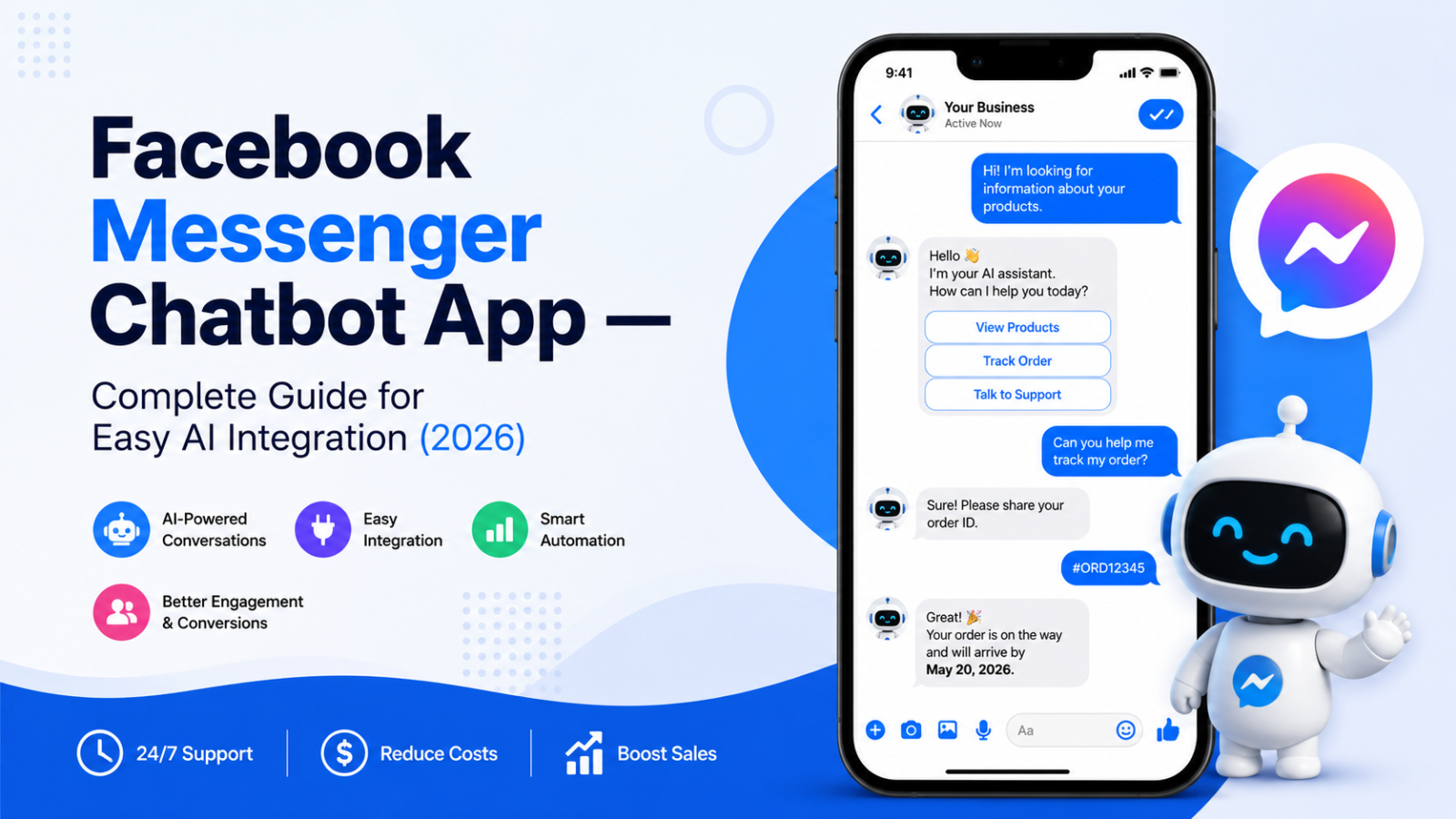
A Facebook Messenger chatbot app fixes this. It connects to your Facebook Business Page and automatically handles conversations through Messenger — answering questions, qualifying leads, and capturing customer details — 24 hours a day, 7 days a week, without a human agent needing to be present.
79 percent of chatbot engagements occur on Facebook Messenger compared to other messenger platforms. 63 percent of consumers believe businesses should be on Messenger.
This guide covers everything you need to know about Facebook Messenger chatbot apps in 2026 — what they are, why they matter, which app to use, how to set one up, and expert best practices for getting real business results from your Messenger chatbot.
What Is a Facebook Messenger Chatbot?
A Facebook Messenger chatbot is an automated, AI-powered program that interacts with users through your Facebook Business Page's Messenger inbox. It can answer questions, provide product or service information, qualify leads, handle support requests, and guide customers through decisions — all through natural conversation, without a human agent involved.
A Facebook chatbot is an automated third-party assistant that responds to messages sent to your business via Messenger. Businesses use it to handle common inquiries, collect lead information, qualify intent, route conversations, and pass chats to human agents when needed — all within Messenger. Instead of relying on manual replies, chatbots let businesses deliver fast, consistent responses at scale, even during peak traffic or outside business hours.
In 2026, Facebook chatbots have evolved far beyond simple button-menu bots. Advanced AI agents now understand free-text Messenger messages, detect intent, and respond contextually. They can qualify leads, answer FAQs, collect customer details, escalate to humans when needed, and take actions like assigning conversations or updating contact fields — turning Messenger into a real sales and support channel.
Facebook Messenger Chatbot Statistics — Why This Matters in 2026
The numbers behind Facebook Messenger chatbots paint a clear picture of why businesses across every industry are implementing them:
Facebook Messenger has 1.3 billion active users.
79 percent of chatbot engagements occur on Facebook Messenger compared to other messenger platforms.
Using chatbots for customer service can increase customer satisfaction by up to 24 percent. Businesses can reduce their response time from hours to just a few seconds by using chatbots to handle routine inquiries.
Messenger AI agents achieve 70 to 80 percent open rates compared to roughly 20 percent for email — when you reach customers on Messenger, they actually see and respond.
E-commerce brands using Messenger AI agents see an average 20 percent uplift in conversion rates by engaging shoppers at the moment of intent. Businesses report a 28 percent increase in lead capture rates with Messenger AI agents.
E-commerce stores that used Facebook Messenger and an abandoned cart chatbot saw a revenue boost of 7 to 25 percent, with a 30 percent increase in order tracking.
80 percent of companies use or plan to use AI-powered chatbots for customer service in 2026. By 2027, 25 percent of organizations will use chatbots as their primary customer service channel.
The message is unambiguous: Messenger chatbots are not a trend. They are established business infrastructure.
Benefits of a Facebook Messenger Chatbot for Business
1. Instant Response at Any Hour
62 percent of consumers would use a customer service bot rather than wait for human agents to respond to their requests. A Messenger chatbot gives every person who messages your page an instant reply — whether it is 2 AM or 2 PM, weekday or weekend.
2. Scalable Customer Service Without Added Headcount
Always-on availability is one of the strongest advantages. Customers increasingly expect quick replies, regardless of time or channel. Businesses using Messenger chatbots have seen measurable improvements in service performance.
A single chatbot handles hundreds of simultaneous Messenger conversations. Your human team handles only what genuinely needs judgment — complaints, complex enquiries, high-value relationship conversations.
3. Higher Lead Capture and Conversion
Businesses report a 28 percent increase in lead capture rates with Messenger AI agents. Conversational lead qualification feels natural and has higher completion rates than static forms.
Typing answers to a chatbot in Messenger feels far more natural than filling out a web form — which is exactly why conversion rates from chatbot conversations are consistently higher than from traditional contact forms.
4. Omnichannel Customer Experience
A Facebook Messenger chatbot connects your social media presence with your broader customer service operation. Platforms like Facebook, Instagram, and WhatsApp have transitioned from simple messaging apps into full-scale commerce hubs, and chatbots are the engine making that scale possible.
A customer who discovers your business through a Facebook ad, messages your page with a question, gets an instant intelligent response, and is then directed to your website where another chatbot continues the conversation — that is an omnichannel experience that builds trust at every step.
5. Marketing and Sales Amplification
41 percent of all business chatbots are used for sales purposes. 35 percent of business leaders declare that AI agents made it easier to close sales deals.
Facebook Messenger chatbots can be triggered by Click-to-Messenger ads — Facebook ads where the call-to-action opens a Messenger conversation directly instead of sending users to a landing page. This eliminates the traditional landing-page-to-form friction and captures leads in a format that feels natural.
6. Rich Customer Insights
Every Messenger interaction becomes structured data that teams can analyse to understand recurring issues, content gaps, and friction points. Over time, this insight helps teams refine support processes and product communication rather than reacting to issues one conversation at a time.
Two Types of Facebook Messenger Chatbots
Understanding the difference between these two types helps you choose the right app and set the right expectations.
Rule-Based (Scripted) Messenger Chatbots
Traditional Facebook chatbots use fixed logic such as buttons, menus, keywords, or simple yes/no paths. They handle predictable, high-volume tasks like FAQs, opening hours, pricing, delivery info, or basic lead capture. They offer controlled responses, making them easy to manage and low risk. They perform best in structured scenarios where user inputs do not vary much.
Best for: Simple, predictable use cases — a restaurant posting menu and reservation information, or a retailer answering basic order and delivery questions.
Limitation: The moment a customer asks something outside the scripted flow, the bot hits a dead end. This frustrates users and erodes trust.
AI-Powered (Conversational) Messenger Chatbots
Advanced AI agents understand free-text Messenger messages, detect intent, and respond contextually. They can qualify leads, answer FAQs, collect customer details, escalate to humans when needed, and take actions like assigning conversations or updating contact fields.
Best for: Businesses wanting genuine conversation capability — travel agencies, real estate agents, SaaS companies, service businesses, hospitality — where customers ask varied, specific questions that a button menu cannot handle.
Advantage: Trained on your specific business content, AI chatbots give accurate, specific answers that build trust rather than frustrating customers with scripted loops.
Key Features to Look For in a Facebook Messenger Chatbot App
AI trained on your own content: The best Facebook chatbot platforms let you train AI on your company's documents, FAQs, websites, and internal knowledge. This ensures Messenger responses are accurate, consistent, and on-brand, even when handling complex questions or high conversation volumes.
No-code setup: You should not need a developer to build or manage your Messenger chatbot. The best apps give you a visual interface or a content upload system that lets you go from signup to live bot without writing code.
Seamless human handoff: When a conversation exceeds what the chatbot can handle — a complaint, a complex order issue, a sensitive situation — it should escalate to a human agent immediately and share the full conversation history so the customer does not have to repeat themselves.
Omnichannel capability: The ideal chatbot app connects Messenger with your website, WhatsApp, and Instagram from a single platform — giving you one dashboard for all customer conversations across every channel.
Lead capture and CRM integration: Every Messenger conversation should capture customer name, email, and relevant details — feeding your CRM or marketing automation platform automatically rather than requiring manual data entry.
Analytics and conversation insights: Track which questions come up most, what issues lead to human escalation, and where conversations drop off. This data is essential for continuously improving both your chatbot and your broader customer communication.
Best Facebook Messenger Chatbot Apps in 2026
#1 — Glanceia
Best for: Small and medium businesses wanting a powerful AI chatbot across their website AND Messenger from a single platform
Starting price: Free / $9/month
AI included: ✅ Yes — in all plans including free
No-code setup: ✅ Yes
Omnichannel: ✅ Yes — website, Messenger, and more from one dashboard
Free plan: ✅ Fully functional, no time limit
Glanceia earns the top spot as the best chatbot app for businesses in 2026 because it solves a problem most Messenger-only chatbot tools ignore: the vast majority of customer conversations do not start on Facebook Messenger — they start on your website.
A customer who finds you through a Google search lands on your website, not your Facebook page. A traveler browsing tour packages at 11 PM opens your website, not Messenger. A potential client considering your services reads your pricing page before reaching out. These are the conversations that most directly impact your revenue — and they happen on your website, not on Facebook.
Glanceia powers AI conversations on your website as the primary channel, with the ability to connect Messenger for a consistent omnichannel experience. This means your AI chatbot trained on your specific business content — your packages, your pricing, your FAQs, your policies — is available to every visitor regardless of whether they find you through Google, Facebook, Instagram, or a direct link.
What makes Glanceia the right choice:
It trains on your actual business content. Upload your FAQ documents, pricing sheets, service descriptions, and policies — the AI learns from all of it and answers questions specifically and accurately, whether the conversation happens on your website or through Messenger.
The setup takes under 30 minutes with no developer required. Upload content, customise the widget, embed on your website, connect to Messenger — live across every channel from a single dashboard.
Lead capture is built into every plan at no extra cost. Every conversation — website or Messenger — automatically captures name, email, and qualifying information for your team to follow up on.
Pricing is flat and honest. Free plan with no credit card required and no time limit. Paid plans from $9/month with AI fully included — no separate AI add-on fees, no per-conversation charges.
Try Glanceia free — no credit card needed →
#2 — ManyChat
Best for: Businesses running Instagram and Facebook marketing campaigns wanting social-first automation
Starting price: Free (1,000 contacts) / Pro $15/month
AI included: ⚠️ GPT features require paid add-on
No-code setup: ✅ Yes
Best channel: Facebook Messenger, Instagram DMs, WhatsApp
36 percent of businesses incorporate chatbots into their lead-generation strategies, with many incorporating chatbots across multiple channels simultaneously. ManyChat is one of the most popular tools for social media-first lead generation, with strong Facebook Messenger and Instagram DM automation capabilities.
Its free plan covers 1,000 contacts on Messenger and Instagram — genuinely useful for small businesses testing social media automation. The Pro plan at $15/month is one of the most affordable paid entry points in the market.
The main limitation: ManyChat is built for social channels first. Its website chatbot capability is secondary. For businesses that primarily need a website chatbot alongside Messenger, ManyChat alone does not cover both effectively. AI features also require a GPT add-on on top of the Pro plan.
#3 — Chatfuel
Best for: E-commerce businesses wanting Facebook and Instagram chatbot automation with built-in templates
Starting price: 7-day free trial / Entrepreneur from $14.99/month
AI included: ✅ Yes — on paid plans
No-code setup: ✅ Yes
Best channel: Facebook Messenger, Instagram
Chatfuel is one of the most established dedicated Facebook Messenger chatbot platforms — it has been focused on Meta integrations since before most other tools entered the market. Its template library for common e-commerce use cases (abandoned cart recovery, order status, product recommendations) saves significant setup time.
The platform offers good analytics dashboards for tracking Messenger conversation performance and is widely used by e-commerce brands selling through Facebook Shops and Instagram Shopping.
#4 — Respond.io
Best for: Mid-sized and growing businesses managing high Messenger conversation volume across multiple team members
Starting price: From $79/month
AI included: ✅ Yes
No-code setup: ✅ Yes
Best channel: Omnichannel — Messenger, WhatsApp, Instagram, email, web
Respond.io is the most scalable and stable option for growing and enterprise businesses selling via instant messaging. It brings Facebook Messenger, WhatsApp, Instagram, email, and web chat into a single team inbox — making it the strongest option for businesses managing high conversation volume across multiple agents and channels.
The team inbox feature — where multiple agents can see and respond to conversations, with assignment, notes, and escalation built in — makes Respond.io particularly suited to businesses with dedicated customer service teams rather than solo operators or small businesses with a single point of contact.
#5 — Chatbase
Best for: Technical teams wanting an AI agent trained on their own data deployed on Messenger and their website
Starting price: Free (limited) / Hobby $32/month
AI included: ✅ Yes — credit-based
No-code setup: ✅ Partial
Best channel: Website + Messenger
Chatbase lets you train an AI on your own data — documents, URLs, FAQs — and deploy it on your website and Facebook Messenger. For technical teams comfortable with API setup and credit-based pricing, it is a flexible option with strong AI quality.
The limitations: the free plan deletes chatbots after 14 days of inactivity, making it a trial rather than a production-ready free tier. Credit-based pricing makes monthly costs harder to predict as conversation volume grows.
How to Set Up a Facebook Messenger Chatbot in 5 Steps
Step 1: Choose Your Chatbot App
Based on your primary channel and business needs:
Website + Messenger together → Glanceia
Social media marketing focus → ManyChat
E-commerce on Facebook/Instagram → Chatfuel
Team inbox at scale → Respond.io
Step 2: Connect Your Facebook Business Page
Inside your chosen platform, go to the integrations or channels section and connect your Facebook Business Page. You will need to log in to Facebook, select your business page, and grant the required Messenger permissions.
Requirements before connecting:
A Facebook Business Page (not a personal profile — Messenger automation only works with business pages)
Admin access to the business page
The business page must have Messenger enabled
Step 3: Build Your AI Knowledge Base
Upload your business content so the chatbot can answer questions accurately:
Your full FAQ document with specific, detailed answers
Your service or product descriptions
Pricing information
Policies — returns, cancellations, shipping, booking terms
Contact details and business hours
The more specific and complete your uploaded content, the more accurately the chatbot handles real Messenger conversations. Vague content produces vague responses that frustrate customers. Specific content produces specific answers that build trust.
Step 4: Design Your Welcome Message and Conversation Flow
Write a Messenger-specific welcome message that feels natural for the channel:
"Hi! Thanks for messaging [Business Name]. What can I help you with today — product info, support, or something else?"
"Hey! You've reached [Business Name] on Messenger. Ask me anything about our services, pricing, or how to get started."
"Hello! I'm here to help. What brings you to [Business Name] today?"
Set up the most common conversation scenarios: FAQ answering, lead qualification, support escalation, and the human handoff trigger for queries the bot cannot handle.
Step 5: Test and Go Live
Send test messages to your Facebook Business Page from a personal Facebook account. Check that:
Common questions get accurate, specific answers
The tone matches your brand voice
Lead capture collects the right information
Escalation to human works correctly
The conversation flows naturally without awkward dead ends
Once satisfied, activate the chatbot and monitor the first week of live conversations closely.
Real-World Facebook Messenger Chatbot Examples
Domino's — Dom the Ordering Bot
Domino's chatbot, Dom, allows customers to place or reorder their favourite pizzas through Facebook Messenger or voice assistants like Alexa. It remembers past orders and provides real-time order tracking. By simplifying the ordering process, Domino's significantly reduced response time and improved overall customer satisfaction.
LEGO — Ralph the Gift Advisor
LEGO's Ralph chatbot on Messenger helped customers find the perfect gift by asking a series of targeted questions about age, interests, and budget. Launched before Christmas and deployed across the UK, US, Canada, France, Germany, and Poland, the campaign was one of the earliest high-profile demonstrations of Messenger chatbots driving direct purchase decisions.
H&M — Personalised Style Assistant
H&M deployed a Messenger chatbot that acts as a personal style advisor — asking customers about their preferences and suggesting outfits from the current collection. By making product discovery conversational rather than browse-based, the brand increased time on conversation and drove direct purchase intent from Messenger.
McDonald's — McBot Interactive Campaign
McDonald's created a Messenger chatbot that combined a digital board game with discount codes and prizes. Over 175,000 people participated in the first week — demonstrating how a well-designed Messenger chatbot can turn a marketing campaign into a mass engagement event.
Do's and Don'ts for Messenger Chatbot Success
✅ Do: Train on Specific Business Content Generic answers are the fastest path to a frustrated customer. Train your chatbot on your actual FAQs, policies, and product details so every answer is specific and useful.
❌ Don't: Make It Too Salesy Too Fast Build trust and rapport first. Answer the customer's question before pivoting to a sales suggestion. A chatbot that pushes a product before understanding what the customer needs feels pushy and damages the relationship.
✅ Do: Provide Clear Human Escalation There are times when users require support from a real person. When human agents are needed, the Messenger bot should use keywords from the customer's messages to route them to the appropriate department. Never leave a customer in a chatbot dead end.
❌ Don't: Overwhelm With Too Many Options Keep conversation flows simple and decision points clean. A menu with 8 buttons overwhelms users and reduces engagement. Limit initial options to the 3 to 4 most common customer needs.
✅ Do: Keep the Tone Conversational Messenger is a messaging app — customers expect it to feel like a conversation, not a corporate FAQ page. Write chatbot responses the way a knowledgeable, friendly team member would talk, not the way a policy document reads.
❌ Don't: Spam Users With Follow-Up Messages If you want customers to communicate with you, do not be pushy and do not spam them with messages. A simple "Hello, how can I help you?" is enough to engage visitors. If they want to chat with you, they will.
✅ Do: Continuously Monitor and Improve Deploying a chatbot is not a one-time task. Analyse user feedback, track metrics, and regularly update your chatbot's responses and functionalities to meet evolving customer expectations.
❌ Don't: Launch and Abandon A chatbot that was accurate when launched becomes outdated as your business evolves. Update your content whenever pricing, products, policies, or processes change.
FAQ — Facebook Messenger Chatbot App
What is a Facebook Messenger chatbot app?
A Facebook Messenger chatbot app is a third-party software platform that lets you build and deploy an AI chatbot on your Facebook Business Page's Messenger inbox — automatically handling customer conversations, answering questions, and capturing leads without manual human involvement.
Do I need to know how to code to set up a Facebook Messenger chatbot?
No. The best Messenger chatbot apps — including Glanceia, ManyChat, and Chatfuel — are fully no-code platforms where you build and train the chatbot through a visual interface, with no programming knowledge required.
Does Facebook have a built-in chatbot builder?
Facebook does not offer a native chatbot builder for general business use. You need a third-party chatbot app to build and deploy a Messenger bot on your business page.
What is the best free Facebook Messenger chatbot app?
For small businesses wanting AI capability across both their website and Messenger, Glanceia offers the best free plan — fully functional, no time limit, no credit card required, with AI trained on your content included. For social media-first businesses, ManyChat's free plan covers 1,000 contacts on Messenger and Instagram.
Can a Facebook Messenger chatbot capture leads?
Yes — and it does so more effectively than most web forms. Businesses report a 28 percent increase in lead capture rates with Messenger AI agents because conversational lead qualification feels natural and has higher completion rates than static forms.
How do I measure if my Facebook Messenger chatbot is working?
Track response rate (percentage of Messenger conversations the chatbot handles without human escalation), lead capture rate (percentage of conversations that collect contact details), customer satisfaction (thumbs up/down or post-conversation survey), and conversion rate (conversations that result in a sale or booking).
Can I use the same chatbot for my website and Facebook Messenger?
Yes — platforms like Glanceia let you train one AI on your business content and deploy it across your website and Messenger from a single dashboard, giving customers a consistent experience regardless of which channel they reach you through.
Final Thoughts
Whether it is qualifying a lead through an Instagram DM or providing personalised product recommendations in Facebook Messenger, chatbots allow you to be present for your audience 24/7. By integrating these bots into your social strategy, you are not just saving time — you are feeding your lead generation funnel with highly qualified prospects.
A Facebook Messenger chatbot app is no longer a feature for large enterprises with development teams. In 2026, the best platforms let any small business go from zero to live Messenger bot in under an hour — with AI trained on their specific business content, lead capture built in, and a human handoff for anything the bot cannot handle.
The businesses that implement this now get the early-mover advantage of faster response times, more captured leads, and better customer experiences than competitors still relying on manual Messenger replies.
Ready to start? The most powerful AI chatbot platform for small businesses — covering both your website and Messenger — is free to try today.
Try Glanceia free — no credit card needed →
Published by Laxman - Team Glanceia