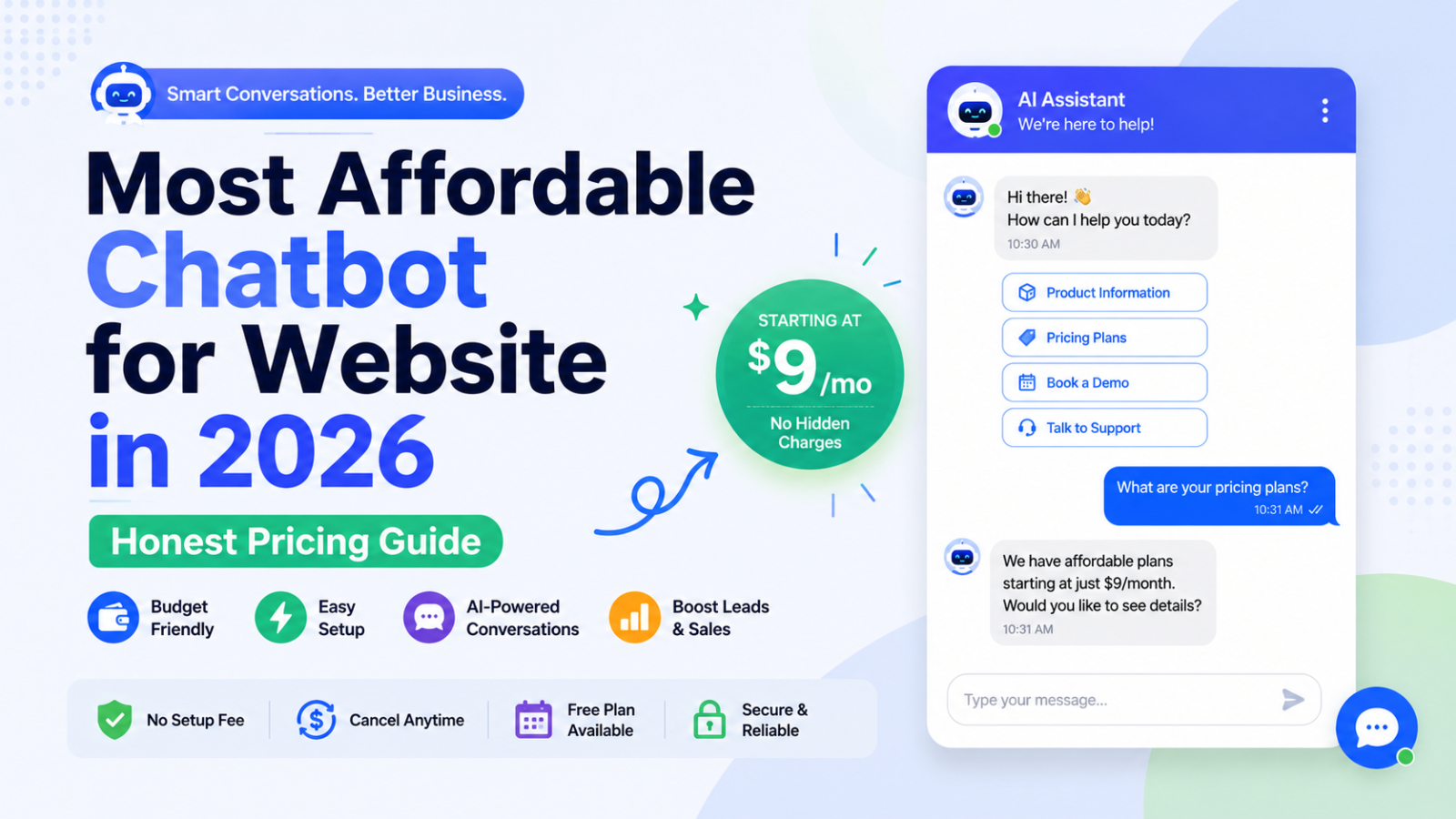
Most Affordable Chatbot for Website in 2026 — Honest Pricing Guide
Find the most affordable chatbot for your website in 2026 — real pricing, hidden costs exposed, and the best value options ranked. Free to start with Glanceia from $9/month.
Most businesses searching for an affordable chatbot for their website hit the same wall: the advertised price looks reasonable, they sign up, and two months later the invoice is three times higher than expected.
For most small businesses, an affordable chatbot means an entry plan between roughly $14 and $39 a month billed annually — not a custom enterprise quote and not a bare $0 plan you will outgrow in a week.
The challenge is that most chatbot platforms are not transparent about what that entry price actually includes. AI is often billed separately. Per-seat charges multiply with your team. Credit systems make monthly costs unpredictable. Branding removal costs extra. What looks like a $15 product becomes a $60 product once you actually use it.
This guide cuts through that noise. We looked at every major chatbot platform in 2026 specifically through the lens of affordability for website use — the real total cost including AI, the hidden fees to watch for, and the tools that genuinely deliver value without billing surprises.
What "Affordable" Actually Means for a Website Chatbot
Affordable is not the same as cheap. A $5 chatbot that requires developer setup, lacks AI capability, and hits volume limits after the first week is not affordable — it is a time sink that delivers no value. An $9 chatbot that trains on your business content, captures leads automatically, and goes live in 30 minutes is one of the most affordable tools your business can deploy.
A $20 per month tool that requires developer setup costs more than a $30 solution you can launch in an afternoon. Price alone does not tell the whole story.
The real measure of affordability for a website chatbot is total cost of ownership across three dimensions:
The actual monthly bill with all features you need: Not the entry plan price, but what you pay once you add the AI layer, enough conversation volume for your traffic, and any features required for a production deployment.
The time cost of setup and maintenance: A platform requiring 20 hours of setup time and ongoing developer involvement is not affordable for a small business team, regardless of its subscription price.
The return it generates: A business receiving 1,000 support requests per week that automates 80 percent at a manual cost of $3 per interaction saves approximately $2,400 per week, or $124,000 annually — easily justifying even premium chatbot subscriptions. An affordable chatbot is one whose cost is dwarfed by the revenue it helps generate and the support hours it saves.
With that framework clear, here is what genuinely drives chatbot costs up — and what to avoid.
5 Hidden Cost Traps That Make "Affordable" Chatbots Expensive
Trap 1: AI Billed Separately From the Base Plan
This is the single most common pricing trap in the chatbot market. Platforms advertise a low base plan and then charge separately for the AI engine that makes the chatbot actually useful.
Tidio's free plan gives you 50 live chat conversations per month and basic chatbot flows. But once you want AI responses, you need the Lyro add-on starting at €29 per month for 50 AI conversations. If your chatbot handles 200 AI conversations per month, you are looking at higher tiers.
This means Tidio's advertised free plan is not an AI chatbot at all — it is a basic scripted chat tool. The actual AI chatbot starts at $29+ per month on top of the base plan.
How to avoid it: Choose a platform where AI is included at the base price. Glanceia includes AI in every plan including the free tier — no separate AI add-on required.
Trap 2: Per-Seat Pricing That Multiplies With Your Team
A $19 per user plan is cheap for one person and triples the moment three people need inbox access. Count who genuinely needs a seat before comparing per-user tools against flat-price tools.
Tools like Zoho SalesIQ, Freshchat, and LiveChat charge per operator or agent. One person managing your chatbot might cost $9 to $19 per month — but a small team of four instantly makes that $36 to $76 per month before any AI features are included.
How to avoid it: Look for flat pricing that does not multiply with team size. Glanceia's flat monthly rate covers your chatbot regardless of how many team members access the dashboard.
Trap 3: Credit Systems That Make Costs Unpredictable
Credit-based pricing sounds flexible but creates budget unpredictability. You buy a bundle of credits per month and each AI response consumes credits — but using premium AI models consumes significantly more credits per response than using basic ones.
The trap is choosing a plan that meters the wrong unit, then paying more in overages than the next plan up would have cost.
On Chatbase, for example, using Claude or GPT-4 burns 3 to 5 credits per response instead of 1 — meaning a 500-credit monthly plan can shrink to 100 to 160 effective responses when using premium models. The plan that looked affordable on signup becomes expensive in practice.
How to avoid it: Choose flat monthly pricing over credit systems if predictability matters to your business. Know exactly what you will pay every month regardless of how many conversations the chatbot handles.
Trap 4: Annual Billing Disguised as Monthly Pricing
Most advertised entry prices assume annual billing. Monthly billing typically runs meaningfully higher. Compare the billing period you would really choose and recheck the vendor's pricing page before paying.
A $9 per month price listed prominently often requires a 12-month upfront commitment. The actual monthly flexibility price may be $15 to $25 per month. Always check whether the listed price requires annual billing before factoring it into your budget.
How to avoid it: Look for the monthly price, not just the annual price. If you are not ready to commit for a year, make sure the monthly option fits your budget.
Trap 5: Branding Removal Fees
Many chatbot platforms display their own logo on your website's chat widget by default on free and entry-level plans. Removing it — so the widget looks professionally branded — often requires upgrading to a higher plan or paying a specific add-on fee.
Branding removal is one of the most common hidden upgrade triggers in chatbot pricing. For a business that cares about professional brand presentation, this can push the real cost significantly above the base plan price.
How to avoid it: Check whether the plan you are evaluating allows white-label or custom branding before signing up.
The Most Affordable Chatbots for Websites in 2026
#1 — Glanceia: Most Affordable All-In AI Chatbot for Websites
Monthly cost (real, with AI): Free / $9/month flat
AI included at base price: ✅ Yes
Setup time: Under 30 minutes
No-code: ✅ Yes
Lead capture included: ✅ Yes
Hidden costs: None
Glanceia is the most affordable chatbot for websites in 2026 by the measure that actually matters: the price you see is the price you pay, with AI fully included.
There is no Lyro-style add-on billed on top. There is no credit system that makes monthly costs unpredictable. There is no per-seat charge that multiplies when your team grows. You pay one flat monthly price and get a fully functional AI chatbot trained on your specific business content — your FAQ documents, pricing pages, service descriptions, and policies.
What makes Glanceia genuinely affordable:
The free plan is a real, production-ready product — not a 14-day trial and not a 50-message monthly limit that runs out after two days of normal traffic. You can upload your business content, customise the widget, embed on your website, and go live without entering a credit card.
The paid plan starts at $9 per month — the lowest flat-rate entry price for a genuine AI chatbot builder that trains on your content in the market. No add-ons required, no credit system, no branding surprise.
Lead capture is included at every level. Every visitor conversation automatically collects name, email, and qualifying information — turning anonymous website traffic into warm leads without any extra cost.
Setup takes under 30 minutes for a non-technical business owner. Upload content, customise the widget, paste one embed script into your website footer — live on every page instantly. Works on WordPress, Wix, Webflow, Shopify, Squarespace, or any custom site.
The affordability bottom line: $0 to start with full AI capability. $9 per month when you need more. No other platform on this list matches that combination of capability and price.
Try Glanceia free — no credit card needed →
#2 — ManyChat: Most Affordable for Social Media-First Businesses
Monthly cost (real, with AI): Free (1,000 contacts) / $15/month Pro / $44+/month with GPT add-on
AI included at base price: ❌ Requires paid add-on
Setup time: 30-45 minutes
No-code: ✅ Yes
Best for: Instagram, Facebook Messenger, WhatsApp automation
ManyChat offers a free plan with basic automation for 1,000 contacts, with their Pro plan at $15 per month — though GPT-powered features require a $29 per month add-on.
ManyChat's free plan is genuinely one of the most useful in the market — for businesses whose primary customer channel is Instagram DMs, Facebook Messenger, or WhatsApp. Up to 1,000 contacts at zero cost, with functional automation flows, makes it an excellent starting point for social media-first businesses.
The important limitation: ManyChat is built for social channels, not website chatbots. If your goal is a chatbot that lives on your website answering visitor questions and capturing leads from web traffic, ManyChat is not the right primary tool — it does not function as a website chatbot widget in the same way website-first tools do.
#3 — Chatbase: Most Affordable Developer-Friendly Option
Monthly cost (real, with AI): Free (demo-grade, 14-day inactivity limit) / $32/month Hobby
AI included at base price: ✅ Yes — credit-based
Setup time: 30-60 minutes (some technical comfort needed)
No-code: ✅ Partial
Best for: Technical teams, SaaS companies, developers
Chatbase is a platform for building AI-powered chatbots trained on your business data and content. You do not need to code and website integration is straightforward.
Chatbase's Hobby plan at $32 per month includes genuine AI trained on your uploaded content — a strong capability at a reasonable price for technical users comfortable with the platform's credit-based system.
The limitations that affect its affordability ranking: the free plan deletes chatbots after 14 days of inactivity (making it a trial, not a permanent free option), and the credit-based pricing system makes monthly costs harder to predict as conversation volume grows or as you use premium AI models.
#4 — Freshchat: Most Affordable for Teams With Multiple Agents
Monthly cost (real, with AI): Free (10 agents, 500 Freddy AI sessions) / $19/agent/month Growth
AI included at base price: ✅ Free plan includes Freddy AI sessions
Setup time: 45-60 minutes
No-code: ✅ Yes
Best for: Small teams needing multi-agent live chat with basic AI
Freshchat offers the strongest entry point with a genuinely free plan supporting 10 agents plus 500 free Freddy AI sessions.
Freshchat's free plan is one of the more generous in the market — 10 agents and 500 AI sessions per month at zero cost is genuinely useful for a small team. For businesses with 2 to 5 support agents who want everyone in a shared inbox, Freshchat's free plan covers the basics.
The key limitation: per-agent billing on paid plans means costs scale directly with team size. A 5-person team on the Growth plan ($19 per agent per month) costs $95 per month — significantly more than Glanceia's flat $9 per month for the same underlying AI capability.
#5 — Tidio: Most Affordable for Ecommerce Live Chat (Without AI)
Monthly cost (real, with AI): $29/month base + $39/month Lyro = $68+/month with AI
AI included at base price: ❌ Lyro AI is a separate add-on
Setup time: 30-45 minutes
No-code: ✅ Yes
Best for: Small ecommerce stores wanting live chat with basic automation
Tidio is one of the most popular chatbot tools for small ecommerce businesses, with strong Shopify and WooCommerce integrations and an intuitive interface. For businesses wanting a human-staffed live chat platform with light automation, Tidio's Starter plan at $29 per month is reasonable.
The affordability concern is specific to AI: if you want the chatbot to answer questions automatically without a human present, the Lyro AI add-on is required on top of the base plan — pushing the real monthly cost to $68 or above. If your chatbot handles 200 AI conversations per month, you are looking at higher tiers still.
Is an Affordable Chatbot Actually Worth It? The ROI Calculation
The affordability question only makes full sense in the context of what a chatbot returns.
Scenario — Small Service Business:
150 website visitors per month
Current inquiry rate via contact form: 6% = 9 inquiries per month
With chatbot capturing after-hours visitors: 12% inquiry rate = 18 inquiries
Additional 9 inquiries at 25% conversion = 2 to 3 additional clients per month
Average client value: ₹15,000
Additional monthly revenue: ₹30,000 to ₹45,000
Chatbot cost: $9 per month (approximately ₹750)
The chatbot generates 40 to 60 times its monthly cost in additional revenue — in month one.
Scenario — Ecommerce Store:
Businesses that automate 80 percent of 1,000 weekly support requests at a manual cost of $3 per interaction save approximately $2,400 per week — the chatbot cost becomes negligible against the savings.
On these numbers, the right question is not whether you can afford an AI chatbot for your website. It is what it is costing you not to have one.
How to Set Up the Most Affordable Chatbot for Your Website
Getting Glanceia's free AI chatbot live on your website takes under 30 minutes:
Step 1: Sign up free
Go to Glanceia and create a free account. No credit card required.
Step 2: Upload your business content
Upload your FAQ document, pricing information, service descriptions, and policies. The AI trains on everything you provide and uses it to answer visitor questions specifically and accurately. The more detailed your content, the better the chatbot performs.
Step 3: Customise the widget
Match the widget color to your brand, write a welcome message specific to your business, and name the chatbot.
Step 4: Set up lead capture
Configure the chatbot to collect visitor name and email in every conversation — turning anonymous browsers into named leads your team can follow up with.
Step 5: Embed on your website
Copy the Glanceia embed script and paste it into your website footer. Works on:
WordPress → WPCode plugin footer scripts
Wix → Settings → Custom Code → Body end
Webflow → Project Settings → Custom Code → Footer
Shopify → theme.liquid before
</body>Any HTML site → before
</body>tag
Step 6: Test and go live
Open your site in an incognito window, test with real visitor questions, refine any answers that need work, and publish.
How to Keep Your Website Chatbot Affordable Long-Term
Choose flat pricing over usage-based pricing
The most predictable way to keep chatbot costs affordable is a flat monthly fee. Per-conversation, per-resolution, or credit-based pricing all introduce unpredictability — a busy month or a viral social media post can produce a bill significantly higher than usual.
Start free and upgrade only when you need to
Free tiers work for validating demand before committing a budget. Once you are processing 20 or more meaningful conversations weekly, paid plans quickly justify themselves through time saved. Start on Glanceia's free plan, prove the value with real traffic, then upgrade when the volume justifies it.
Keep your knowledge base updated — it reduces escalations
A chatbot that handles 70 to 80 percent of inquiries without human escalation is affordable. One that constantly escalates to your team because its training content is outdated adds hidden labour costs. Update the chatbot's knowledge base whenever your business changes.
Track ROI, not just cost
The best affordable platforms scale with you. They do not force plan upgrades just because you got 10 more website visitors this month. Measure leads captured, support hours saved, and conversion rate improvement — not just the monthly subscription cost.
FAQ — Affordable Chatbot for Website
What is the most affordable AI chatbot for a website?
Glanceia is the most affordable AI chatbot for websites in 2026 — free plan with AI included, no time limit, no credit card required. Paid plans from $9 per month with AI fully included, no add-ons, no hidden costs.
Can I get a free chatbot for my website that actually works?
Yes — Glanceia's free plan is a genuine, production-ready AI chatbot, not a demo. It includes AI trained on your content, lead capture, and a widget that works on any website platform. Other tools like ManyChat offer free plans but without AI on the free tier, or like Chatbase delete your chatbot after 14 days of inactivity.
What is the difference between a cheap chatbot and an affordable chatbot?
A cheap chatbot has a low sticker price but often lacks AI, hits tight volume limits, or requires expensive add-ons to be useful. An affordable chatbot has a reasonable total cost — including AI and lead capture — that is justified by the value it delivers. Glanceia at $9 per month with AI included is affordable. A platform with a $15 base plan that charges $29 extra for AI is not.
Why do some chatbots cost more than their advertised price?
Most advertised entry prices assume annual billing and exclude add-ons like AI engines, branding removal, and per-seat charges. The advertised price is the base plan alone — what you actually pay for a production-ready deployment is often 2 to 3 times higher.
How much should a small business pay for a website chatbot?
For most small businesses, an affordable chatbot means an entry plan between roughly $14 and $39 a month billed annually. With Glanceia, small businesses can get a fully functional AI chatbot for $9 per month — below even this already-affordable range — with no hidden costs at that price.
Does an affordable chatbot slow down my website?
No — Glanceia's widget loads asynchronously, meaning it does not block your website's content from loading and will not affect your Core Web Vitals or page speed scores.
Can I switch to a cheaper chatbot later if I find a better option?
Yes — switching involves re-uploading your content and replacing the embed script on your website. The process takes about an hour. That said, Glanceia is designed to grow with your business — the free plan, $9/month paid plan, and scalable tiers mean most small businesses never need to switch.
Final Thoughts
In 2026, you do not need an enterprise budget or an engineering team to deploy a chatbot that drives real results. The chatbot market has matured to the point where small business owners can deploy genuinely intelligent AI chatbots in hours — not weeks — without writing a single line of code.
The key to finding a genuinely affordable chatbot for your website is looking past the advertised entry price and asking what you actually pay once AI, lead capture, and production-ready features are factored in.
On that honest measure, Glanceia is the most affordable AI chatbot for websites in 2026 — starting free with no time limit, upgrading for $9 per month when you need more, and delivering genuine AI capability trained on your specific business content throughout.
The ROI starts showing from the first week. The cost is the lowest in the market.
Ready to add an affordable AI chatbot to your website for free? Try Glanceia →
Published by Laxman- Team Glanceia