How to Train a Chatbot on Your Own Data (PDFs, FAQs, Docs) — 2026 Guide
Generic chatbots give generic answers — and that kills trust. In this guide we show you exactly how to train an AI chatbot on your own PDFs, FAQs, and documents so every answer is accurate, on-brand, and specific to your business.
How to Train a Chatbot on Your Own Data (PDFs, FAQs, Docs) — 2026 Guide
Introduction
Most AI chatbots have a serious problem: they give generic answers.
Ask a standard chatbot "What's included in your Bali tour package?" and it'll give you a vague response about Bali tourism pulled from the internet. That's useless. Worse — it damages trust with your customer.
What you actually want is a chatbot that knows your business. One that answers from your exact pricing sheet, your specific FAQs, your real service descriptions. A chatbot that sounds like it works for you — because it's been trained on your data.
In 2026, this is completely possible without writing a single line of code. Tools like Glanceia let you upload your business documents and turn them into an intelligent AI assistant in minutes.
In this guide, we'll walk you through exactly how to train a chatbot on your own data — what file types work, how the training process works, and how to get the best results.
Why Generic AI Chatbots Don't Work for Business
Before we get into the how, it's worth understanding the why.
Generic AI chatbots (think basic GPT wrappers or rule-based bots) have two major problems for businesses:
Problem 1: They make things up. Without grounding in your actual data, AI models will hallucinate answers — confidently stating wrong prices, incorrect policies, or services you don't offer. One wrong answer can cost you a customer and damage your reputation.
Problem 2: They sound generic. A chatbot that gives textbook answers about your industry isn't helpful. Customers are asking about your products, your prices, your process. Generic answers send them straight to your competitor.
The solution is training your chatbot on your own proprietary data — your documents, your FAQs, your knowledge base. When you do this, every answer the chatbot gives is grounded in what you've actually told it. No hallucinations, no generic fluff.
What Does "Training a Chatbot on Your Own Data" Actually Mean?
When people say "train a chatbot on your data," they don't mean you're building a machine learning model from scratch. That would take months and hundreds of thousands of dollars.
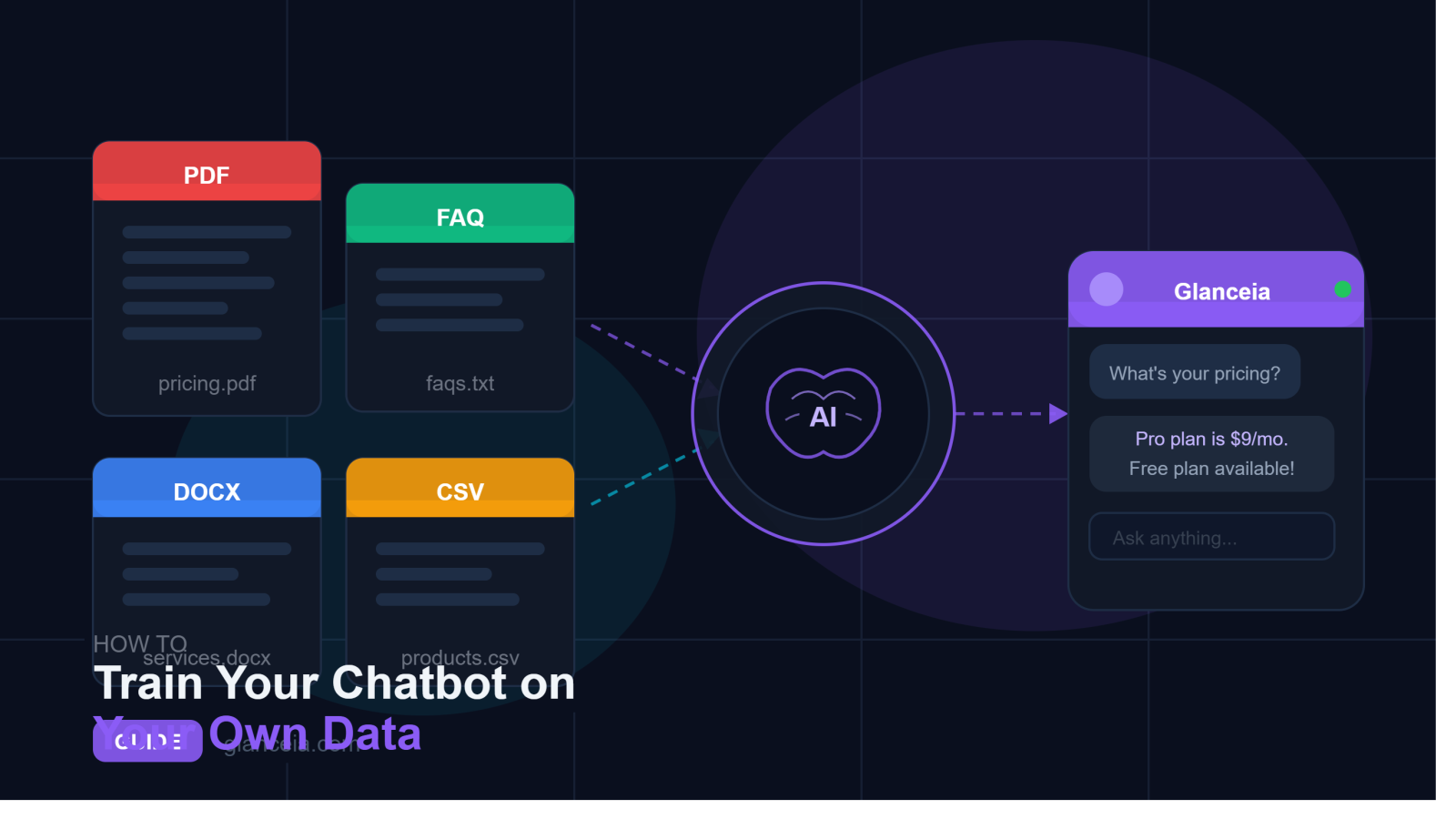
What it actually means in 2026 is much simpler: you upload your documents to a chatbot platform, and that platform uses them as the chatbot's knowledge base. When a visitor asks a question, the AI searches through your uploaded content, finds the relevant information, and generates a response based on it.
Think of it like giving a new employee all your company documentation and telling them: "Only answer questions based on what's in these files." Except the AI reads and processes everything instantly — and never forgets any of it.
What Types of Data Can You Train a Chatbot On?
Different chatbot platforms support different file types. Here's what works with most modern tools, including Glanceia:
PDF Files
The most common format for business documents. Great for:
Product or service catalogs
Pricing sheets
Company brochures
Legal documents and policies
Training manuals
Tour or travel packages
Word Documents (.docx)
Perfect for:
Internal SOPs (Standard Operating Procedures)
Detailed service descriptions
Employee handbooks
Proposal templates
Plain Text Files (.txt)
Simple and lightweight. Useful for:
Raw FAQ lists
Simple knowledge base articles
Product descriptions exported from a CMS
CSV / Excel Files
Good for:
Product inventory with prices
Package comparison tables
Location or service area data
FAQ Documents
One of the most powerful training sources. A well-structured FAQ document — with clear questions and detailed answers — trains the chatbot to give precise, helpful responses to your most common queries.
Website Content (URL scraping)
Some platforms also let you point the chatbot at your website URL and it will automatically read and learn from your existing web pages.
Pro tip: The more structured and detailed your documents are, the better the chatbot performs. Vague or poorly written source material produces vague chatbot answers.
Step-by-Step: How to Train a Chatbot on Your Own Data Using Glanceia
Let's walk through the full process using Glanceia as an example.
Step 1: Sign Up and Create Your Chatbot
Go to glanceia.com and create a free account. Once inside the dashboard, click to create a new chatbot. Give it a name that reflects your business or use case.
Step 2: Prepare Your Documents
Before uploading, take 10 minutes to prepare your files for best results:
Do this:
Use clear headings and subheadings in your documents
Write in complete sentences with full context (don't assume the reader knows your business)
Include specific details: prices, locations, dates, conditions
Create a dedicated FAQ document if you don't already have one
Avoid this:
Scanned image PDFs where the text isn't selectable (the AI can't read images of text)
Documents with tables that are images rather than actual table data
Very old or outdated files — the chatbot will give outdated answers
Step 3: Upload Your Files to Glanceia
Inside your Glanceia dashboard, navigate to the Knowledge Base section. You'll see options to upload files directly.
Click upload and select your PDFs, Word docs, or text files. Glanceia processes them automatically — extracting the text, understanding the structure, and indexing the content so the AI can search it when answering questions.
For most documents, processing takes under a minute. Large files (100+ pages) may take a few minutes.
You can upload multiple files — in fact, the more relevant content you provide, the better your chatbot will perform. A chatbot trained on 10 documents will always outperform one trained on 2.
Step 4: Add a FAQ Document (Highly Recommended)
Even if you've uploaded product and service documents, we strongly recommend also creating a dedicated FAQ document. Here's why:
Your customers are going to ask questions in different ways. "What does the Bali package cost?" and "How much is Bali?" are the same question phrased differently. A good FAQ document that covers your most common questions — written the way customers actually ask them — helps the chatbot match intent more accurately.
Structure your FAQ like this:
Q: How much does [your service] cost?
A: Our [service] is priced at [X]. This includes [specific details]. For custom quotes, contact us at [email].
Q: How long does setup take?
A: Most customers are up and running within [timeframe]. Our team is available to help at every step.
The more specific and complete your FAQ answers, the more precise your chatbot's responses will be.
Step 5: Test Your Chatbot
Before publishing, test the chatbot by asking it questions a real customer would ask. In Glanceia, you can preview the chatbot directly from your dashboard.
Try questions like:
What are your prices?
What's included in [service/package]?
How long does it take?
Do you offer [specific service]?
How do I get started?
If an answer is wrong or missing, go back and update your source documents with better information. The chatbot is only as good as what you've given it to learn from.
Step 6: Customize and Embed
Once you're happy with how the chatbot is performing, customize its appearance (brand colors, avatar, welcome message) and grab your embed code. Paste it into your website and you're live.
From this point on, the chatbot handles questions automatically — 24/7, in 95+ languages, without any ongoing effort on your part.
Tips to Get the Best Results from Your Training Data
Keep Your Documents Updated
Your chatbot answers based on the content you've uploaded. If your pricing changes, update the PDF and re-upload it. If you launch a new service, add a document about it. Treat your knowledge base like a living resource — review it every quarter at minimum.
Use Multiple Short Documents vs. One Giant File
Instead of one massive 200-page document, break your content into focused files by topic: one for pricing, one for services, one for FAQs, one for policies. This helps the AI retrieve the right information more accurately.
Write for Your Customers, Not Your Team
Internal documents are often written assuming the reader knows your business. Your chatbot will be talking to people who know nothing about you. Rewrite your training documents from the customer's perspective — include context, explain terms, and avoid internal jargon.
Include Real Questions in Your FAQ
The single biggest improvement you can make to chatbot accuracy is adding a comprehensive FAQ written exactly the way your customers ask questions. Go through your customer support emails and WhatsApp messages, pull out the most common questions, and answer each one in full.
Test With Unexpected Questions
Real customers will ask things you haven't anticipated. During testing, try unusual phrasings, edge cases, and questions that aren't directly covered in your documents. If the chatbot struggles, add more content that addresses those gaps.
Real-World Examples: How Different Businesses Train Their Chatbot
Travel Agency: Uploads tour package PDFs, a visa requirements guide, a pricing sheet, and a FAQ document covering common questions about destinations, inclusions, and booking process. The chatbot can now answer detailed questions about any package — 24/7.
E-commerce Store: Uploads product catalog, shipping policy, return policy, and sizing guide. Customers get instant, accurate answers to "do you ship internationally?" or "what's your return window?" without waiting for a human response.
SaaS Company: Uploads product documentation, feature descriptions, and a FAQ. New users get onboarded faster because the chatbot can answer "how do I set up X?" or "what does Y feature do?" instantly.
Real Estate Agency: Uploads property listings, neighborhood guides, and a FAQ about the buying process. Prospective buyers can ask about specific properties and get detailed answers even at midnight.
Healthcare Clinic: Uploads a services list, insurance information, and appointment process FAQ. Patients get answers to common administrative questions without tying up reception staff.
Common Mistakes to Avoid When Training Your Chatbot
Uploading scanned image PDFs — If your PDF is a scan of a physical document (like a photographed brochure), the text isn't readable by the AI. Always use text-based PDFs where you can select and copy the text.
Uploading outdated documents — Old pricing, discontinued services, or expired promotions will make your chatbot give wrong answers. Audit your documents before uploading.
Not testing thoroughly — Many businesses upload documents and go live without testing. Then customers get wrong answers and trust is damaged. Always test with 20+ real customer questions before publishing.
Relying on one document — A single FAQ document isn't enough. Give your chatbot rich, multi-document training data for the best performance.
Forgetting to update — Your chatbot is a living tool. Every time your business changes, your training data should too.
Frequently Asked Questions
Do I need technical skills to train a chatbot on my own data?
No. With tools like Glanceia, the entire process is point-and-click. You upload files, the platform does the rest. No coding, no API configurations, no machine learning knowledge required.
How many documents can I upload?
This depends on your plan. Glanceia's free plan supports a limited context window, while the Pro plan ($9/month) gives you an extended context window supporting significantly more content.
What if my documents are confidential?
Glanceia operates with full data isolation — your uploaded documents are only ever used to train your chatbot. They are never shared with other companies or used to train shared AI models.
Can I update the training data after the chatbot is live?
Yes. You can add, update, or remove documents from your knowledge base at any time. Changes take effect immediately after processing.
What language should my documents be in?
You can upload documents in any language. Glanceia supports 95+ languages, so visitors can ask questions in their language and the chatbot will respond accordingly — even if your source documents are in a different language.
How accurate will the chatbot be?
Accuracy is directly tied to the quality of your training data. Well-structured, detailed, up-to-date documents produce highly accurate responses. Vague or incomplete documents produce vague answers.
Conclusion
Training a chatbot on your own data is the difference between a generic bot that frustrates customers and a smart AI assistant that genuinely helps them — and converts them.
The process is simpler than most people expect. Prepare your documents, upload them to a platform like Glanceia, test thoroughly, and go live. The whole thing takes an afternoon at most.
Once it's running, your website is answering customer questions accurately, 24 hours a day, in any language — all from the exact information you've given it.
That's not just convenience. That's a competitive advantage.
Start training your chatbot for free on Glanceia →
Published by the Glanceia Team | glanceia.com