How to Use a Chatbot to Onboard New Customers
Learn how to use a chatbot to onboard new customers automatically — welcome sequences, guided setup, FAQ answering, and reducing churn from day one. Free to start with Glanceia
Introduction
The first 30 days after a customer buys from you are the most important 30 days of the entire customer relationship.
During this window, new customers form their lasting impression of your business. They decide whether they made the right choice. They encounter their first frustrations, ask their first questions, and make the initial decisions that determine whether they become long-term clients or early churners.
Most businesses handle this critical period poorly — not because they do not care, but because onboarding at scale is genuinely hard. A new customer buys, receives a generic welcome email, and is then left to figure things out on their own. Questions go unanswered for hours. Simple setup steps become confusing without guidance. The gap between excitement at purchase and confidence in the product is wider than it should be.
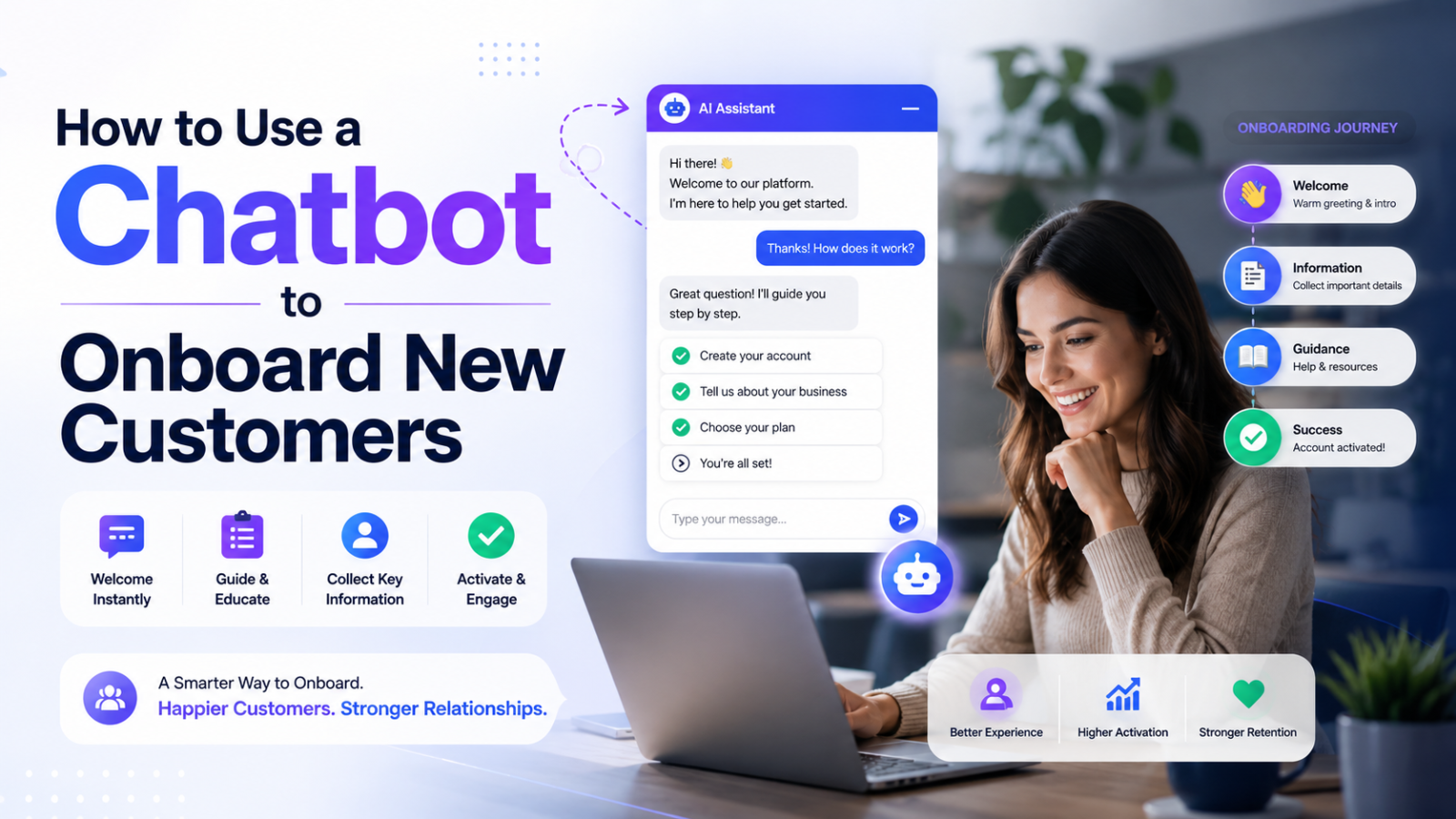
A chatbot closes this gap. It greets every new customer personally, answers their setup questions instantly, guides them through your product or service step by step, and identifies potential churn signals before they become cancellations — automatically, at any hour, for every customer simultaneously.
This guide covers exactly how to build a customer onboarding chatbot that reduces churn, increases satisfaction, and saves your team the repetitive manual work of walking the same customers through the same steps, day after day.
Why Onboarding Is Where Most Businesses Lose Customers
Customer churn has a predictable pattern in most businesses: the highest concentration of cancellations, refunds, and disengagement happens within the first 30 to 90 days after purchase.
The reason is almost always the same — not product quality, not pricing, but the experience of getting started. New customers who experience friction during onboarding lose confidence quickly. Questions that go unanswered create doubt. Steps that are unclear create frustration. Without someone or something guiding them through those early moments, customers make assumptions, hit roadblocks, and give up before they ever experience the core value of what they purchased.
A chatbot reduces this dropout rate by being present exactly when and where new customers need help — at the moment they hit a wall, at the moment they have a question, at the moment they are about to abandon the process.
What a Customer Onboarding Chatbot Can Do
A well-configured onboarding chatbot covers multiple stages of the new customer journey simultaneously:
Welcome and orientation Greet new customers by name, confirm what they have purchased, and give them a clear picture of what to expect in the coming days — all automatically the moment their purchase is confirmed.
Guided setup assistance Walk customers through setup steps one at a time — asking whether they have completed each step before moving to the next, providing troubleshooting help when they get stuck, and ensuring nobody falls behind because they did not understand an instruction.
FAQ answering on demand Every new customer has questions. Where do I find X? How do I do Y? What happens when Z? A chatbot trained on your onboarding documentation answers all of these instantly, eliminating the need for customers to search through a knowledge base or wait for a support reply.
Progress tracking and nudges For subscription products, software tools, or multi-step service deliveries, a chatbot can check in proactively — asking whether a customer has completed key milestones, nudging those who have not, and escalating to a human when someone appears to be genuinely stuck.
Cross-selling and upselling in context Once a customer has completed basic onboarding, the chatbot can introduce complementary products, features, or service upgrades in a natural, helpful way — not as a sales pitch, but as a "now that you have done X, here is what most customers find valuable next."
Capturing early feedback A chatbot can ask new customers about their experience during onboarding — what was confusing, what was helpful, what they wish they had known sooner. This feedback is invaluable for improving the onboarding process itself and for identifying customers who might be at risk of churning before they actually cancel.
The Onboarding Chatbot Sequence: How to Structure It
An effective customer onboarding chatbot follows a sequence that mirrors the stages of a new customer's experience. Here is how to structure that sequence for maximum impact.
Stage 1: The Welcome Interaction (Day 0 — Immediately After Purchase)
The first interaction sets the tone for everything that follows. Do not waste it on a generic "thank you for your purchase" message that could have come from any business.
A strong onboarding welcome from a chatbot does three things:
1. Acknowledges the specific purchase "Hi [Name]! Welcome to [Business Name]. I can see you've just signed up for our [specific plan or product] — great choice."
2. Sets clear expectations for what happens next "Here's what to expect: over the next few days I'll walk you through getting everything set up. It usually takes about 15 minutes total and most customers start seeing results within the first week."
3. Gives the customer an immediate, easy first action "To get started, the first thing to do is [specific first step]. Have you had a chance to do that yet?"
The specificity is what makes this feel like a genuine welcome rather than an automated sequence. A customer who receives a message that references what they specifically bought, tells them exactly what to expect, and asks about a concrete first step feels guided — not processed.
Stage 2: Guided Setup (Days 1 to 5)
The guided setup stage is where most onboarding chatbots deliver the clearest value. New customers need help completing the steps that activate the core value of what they purchased — and they need that help available immediately when they sit down to do it, not 24 hours after they sent a support email.
Structure your guided setup as a progressive series of check-ins:
Check-in 1 (Day 1): "Have you completed [Step 1]? I can walk you through it if you haven't."
Check-in 2 (Day 2): "Great! Now the next step is [Step 2]. Here's how to do it..."
Check-in 3 (Day 3): "You're almost set up. The last step is [Step 3]. This one is quick."
Between check-ins, the chatbot should be available for any questions that come up — answering from your onboarding documentation instantly rather than letting confusion build until the next scheduled check-in.
Stage 3: First Value Confirmation (Day 5 to 7)
By day five to seven, most customers who are going to complete onboarding have done so. This is the moment to confirm that the customer has experienced the core value of what they purchased — and to catch those who have not.
A simple check-in question goes a long way: "How's everything going so far? Have you been able to [key outcome the customer purchased for]?"
Customers who answer positively are candidates for a referral prompt or an upsell conversation. Customers who answer with uncertainty or frustration are candidates for immediate human escalation — catching a potential churner before they decide to cancel.
Stage 4: 30-Day Check-In (Day 28 to 30)
The 30-day mark is when customers evaluate whether they got what they paid for. A proactive chatbot check-in at this stage — asking how things are going, whether they have any questions, and what they have found most useful — makes customers feel valued and gives you a final opportunity to intervene if there are problems.
It is also the natural moment to introduce complementary services or upgrades — a customer who has successfully onboarded and experienced value is far more receptive to an upsell than a customer who is still figuring out the basics.
How to Build Your Customer Onboarding Chatbot With Glanceia
Glanceia is the fastest way to deploy a customer onboarding chatbot for small and medium businesses in 2026. Here is how to set it up specifically for onboarding.
Step 1: Create Your Onboarding Knowledge Base
The foundation of your onboarding chatbot is the content it uses to answer questions. For onboarding specifically, compile:
Your Complete Onboarding Guide Write out every step a new customer needs to complete, in order, with specific instructions for each one. Assume the customer has no prior knowledge of your product or service. Every step that requires a decision should explain the options clearly. Every step that is technically involved should include exactly what to click, enter, or do.
Your Top 20 Onboarding Questions Ask your support team: what are the questions new customers ask most in the first 30 days? What gets asked in every onboarding call? What do customers email about in the first week? Write specific, complete answers to every one of these questions.
Your Troubleshooting Guide For the most common problems new customers encounter during setup — account access issues, technical errors, configuration confusion — write step-by-step troubleshooting instructions. A customer who hits a wall during onboarding and gets an instant troubleshooting guide from the chatbot is far more likely to push through than one who submits a support ticket and waits.
Your Quick Start Summary A concise, one-page overview of the three to five most important things a new customer needs to know and do in the first 24 hours. This is the content you want the chatbot to lead with for customers who ask "where do I start?"
Upload all of this to your Glanceia dashboard as PDFs or pasted text. The chatbot reads everything and uses it to answer onboarding questions accurately.
Step 2: Write Your Onboarding Welcome Message
Your chatbot's welcome message for onboarding should be warm, specific, and action-oriented. It should feel like a message from a knowledgeable colleague who is there to help, not a generic system notification.
Strong onboarding welcome message examples:
For a SaaS product: "Hi! Welcome to [Product Name]. I'm here to help you get set up and make the most of your account. Most users are up and running within 15 minutes — want me to walk you through the first steps?"
For a coaching or consulting service: "Welcome! I'm so glad you're here. I'll be guiding you through your first steps with us. To get started, I'd love to know — have you had a chance to review the welcome materials we sent over?"
For an ecommerce subscription: "Hi [Name], welcome to the [Brand Name] family! Your first order is on its way. In the meantime, I can answer any questions you have about your subscription, how it works, or what to expect."
For a professional service: "Welcome aboard! I'm here to help you through your onboarding with us. We'll start with a few quick steps to get everything in place. What would be most helpful to go through first?"
Step 3: Configure Escalation Triggers for At-Risk Customers
The most valuable configuration in an onboarding chatbot is the escalation trigger — the moment where the chatbot hands off to a human because a customer shows signs of struggling.
Configure escalation to trigger when:
A customer has not completed a key setup step within a set timeframe
A customer reports a problem the chatbot's troubleshooting guide does not resolve
A customer expresses frustration in the conversation
A customer asks to speak to a human
A customer asks about cancellation or refund options
When escalation triggers, the chatbot should immediately provide the customer with a direct, easy-to-use route to a human — your support email, a link to book a call, or your WhatsApp number — and notify your team so they can follow up proactively.
Step 4: Embed the Chatbot in Your Onboarding Flow
The onboarding chatbot works best when it is embedded directly in the environment where onboarding happens. Depending on your business, that might be:
Your website or client portal Add the Glanceia embed script to the pages new customers use during onboarding. Use Glanceia's platform-specific guides for WordPress, Wix, Webflow, Shopify, or Squarespace to embed in under five minutes.
Your onboarding email sequence Reference the chatbot in your onboarding emails. "Have a question at any point? Our chatbot on [website URL] can answer instantly — even at midnight." This directs customers to the chatbot at the exact moments they are thinking about their onboarding.
Your welcome documentation Include the chatbot link in your welcome PDF, your client handbook, or your getting started guide. Customers who encounter a question while reading documentation should know exactly where to get an instant answer.
Real Examples of Onboarding Chatbots by Business Type
SaaS and Software Companies
A SaaS company's onboarding chatbot covers account setup, feature navigation, integration configuration, and common error resolution. For technical products with multiple configuration steps, a chatbot that walks users through each step interactively is significantly more effective than a static documentation page.
The chatbot also catches users who sign up but do not activate — the most common churn pattern in SaaS. A proactive check-in on day two or three ("Have you had a chance to log in and set up your account? I can walk you through it") converts passive signups into active users.
Professional Services and Agencies
An agency or consulting firm's onboarding chatbot covers the client journey from contract signing to project kick-off. It answers questions about the process, explains what information is needed from the client, outlines timelines and deliverables, and handles administrative questions about invoicing, communication preferences, and project management tools.
This type of chatbot significantly reduces the back-and-forth emails between account managers and new clients in the first week — freeing the team for the actual client work.
Health, Wellness, and Fitness Businesses
A fitness studio or wellness practitioner's onboarding chatbot guides new clients through their first booking, explains what to bring or expect, answers preparation questions, and follows up after the first session to ask how it went.
For businesses where the first experience is make-or-break for retention, a chatbot that guides clients through exactly what to expect and follows up proactively after their first session meaningfully improves retention rates.
Ecommerce Subscription Businesses
An ecommerce subscription brand's onboarding chatbot covers delivery timelines, product usage instructions, customisation options, and how to manage or pause the subscription. For consumable products where the customer needs to see results before they cancel, a chatbot that provides usage guidance and checks in on results helps customers stay subscribed long enough to experience the value.
Measuring Your Onboarding Chatbot's Performance
These are the metrics that tell you whether your onboarding chatbot is working:
30-Day Retention Rate Compare the 30-day retention rate of customers who engaged with the onboarding chatbot versus those who did not. If the chatbot is working, chatbot-engaged customers should retain at a meaningfully higher rate.
Time to First Value How long does it take new customers to complete the setup steps and experience the core value of your product or service? A successful onboarding chatbot reduces this time — customers who get instant answers to setup questions complete onboarding faster.
Support Ticket Volume in First 30 Days Track the volume of support tickets, calls, and emails from customers in their first 30 days. A successful onboarding chatbot reduces this volume as common questions get answered by the chatbot instead of reaching your team.
Onboarding Completion Rate What percentage of new customers complete all required onboarding steps? If this rate increases after deploying the chatbot, the chatbot is successfully guiding customers through the process rather than leaving them to figure it out alone.
Escalation Rate and Reason Track what percentage of onboarding chatbot conversations escalate to a human and why. High escalation rates for a specific step or question reveal an onboarding process problem — something that is genuinely confusing or technically broken that the chatbot cannot resolve alone.
Common Onboarding Chatbot Mistakes to Avoid
Starting with a generic welcome instead of a specific one A welcome message that could apply to any business from any customer is a missed opportunity. Personalise the welcome to reference the specific product purchased, the specific next step, and the specific outcome the customer is working toward.
Only being reactive rather than proactive An onboarding chatbot that only answers questions when asked is half a tool. The most impactful onboarding chatbots proactively check in at key milestones — day two, day five, day thirty — rather than waiting for customers to come to them with problems.
Not escalating to a human fast enough An onboarding chatbot that tries to handle everything, including frustrated customers who clearly need a human, makes the problem worse. Configure escalation to trigger early for any sign of genuine frustration or a problem the chatbot cannot resolve.
Treating onboarding as a one-time event Onboarding is not a one-day process — it is a 30 to 90 day journey. Structure the chatbot to be present throughout that entire journey with appropriate check-ins, not just in the first 24 hours after purchase.
Not gathering feedback during the process The chatbot interacts with every new customer during their most formative experience with your business. Ask for feedback at appropriate moments — after setup completion, after the first value experience, at the 30-day mark. This data is invaluable and the chatbot is uniquely positioned to collect it at scale.
FAQ — Chatbot Customer Onboarding
What is a customer onboarding chatbot? A customer onboarding chatbot is an AI-powered assistant that guides new customers through the process of getting started with a product or service — answering setup questions, walking through steps, nudging customers who fall behind, and escalating to a human when someone is genuinely struggling.
How is a chatbot better than a welcome email sequence for onboarding? A welcome email sequence delivers information on a schedule. A chatbot delivers information on demand — when the customer is actively trying to do something and hits a question. The customer does not need to find the right email and search for the answer; they ask the chatbot directly and get an instant response. Both work best together rather than either replacing the other.
Can a chatbot reduce customer churn during onboarding? Yes. The majority of early churn is caused by customers who encountered friction during onboarding that went unresolved. A chatbot reduces this friction by answering questions instantly, guiding customers through setup steps, and identifying at-risk customers early enough for human intervention.
Do I need to set up a separate chatbot for onboarding? Not necessarily. With Glanceia, you can train one chatbot on both your onboarding content and your general FAQ content — the same chatbot handles pre-purchase questions on your website and post-purchase onboarding in your client portal. You can also create a separate dedicated onboarding chatbot if you want a more specialised experience.
How long should the onboarding chatbot sequence run? This depends on your product or service complexity. Simple ecommerce subscriptions might need a 7-day sequence. Software products with multiple features might need 30 to 60 days. Professional services with multi-phase delivery might need 90 days. Match the sequence length to the natural timeline of your onboarding process.
What is the most important thing to get right when building an onboarding chatbot? The quality of the knowledge base content. An onboarding chatbot is only as good as the documentation it was trained on. Write your onboarding guide and FAQ thoroughly, with specific step-by-step instructions and complete answers to every common question. Invest the most time here — everything else in the setup is straightforward.
Final Thoughts
The gap between purchase and confident, successful use of your product or service is the most dangerous period in the customer relationship. It is where expectations are formed, where first impressions are set, and where the majority of churn decisions are made.
A customer onboarding chatbot fills this gap with instant, always-available guidance — answering every question at the moment it arises, walking every customer through every step at their own pace, and flagging the ones who need human help before they get frustrated enough to cancel.
The result is higher retention, lower support costs, faster time to value, and customers who feel genuinely guided rather than abandoned after their purchase.
Set it up with Glanceia in under 30 minutes. Start with your core onboarding guide and your top 20 new customer questions. Go live. Improve from the conversation data you collect in the first week.
The customers you retain in the first 30 days are the customers who refer you to others, who buy again, and who write the reviews that bring in the next wave. An onboarding chatbot is one of the most direct investments you can make in the long-term value of every customer you acquire.
Ready to build your customer onboarding chatbot for free? Try Glanceia — no credit card needed →
Published by Laxman- Team Glanceia