Top 5 Chatbot Use Cases for Small Business in 2026
Discover the top 5 chatbot use cases for small business in 2026 — from lead capture to customer support. Real examples, setup tips, and how to get started free with Glanceia.
Introduction
Small businesses operate under a fundamental constraint that large companies do not: limited time, limited staff, and limited budget — with the same expectation from customers to be available, responsive, and helpful around the clock.
A customer expects an instant answer at 10 PM on a Sunday. Your team is offline. A potential client wants to know your pricing before booking a call. Nobody is there to tell them. A website visitor is interested but has one unanswered question standing between browsing and buying. That question goes unanswered. They leave.
This is the gap that an AI chatbot closes for small businesses. Not by replacing your team — but by being present when they cannot be, handling the interactions that do not require a human, and freeing your people to focus on the work that genuinely needs them.
In 2026, chatbot adoption among small businesses has accelerated dramatically. The technology is more accessible, more affordable, and more capable than it has ever been. But the businesses getting the most value from chatbots are not simply adding them to their websites and hoping for results — they are deploying them against specific, high-impact use cases.
This guide covers the five use cases where small businesses are seeing the clearest, most measurable results from AI chatbots in 2026 — with real examples, practical setup guidance, and the metrics that tell you whether each use case is working.
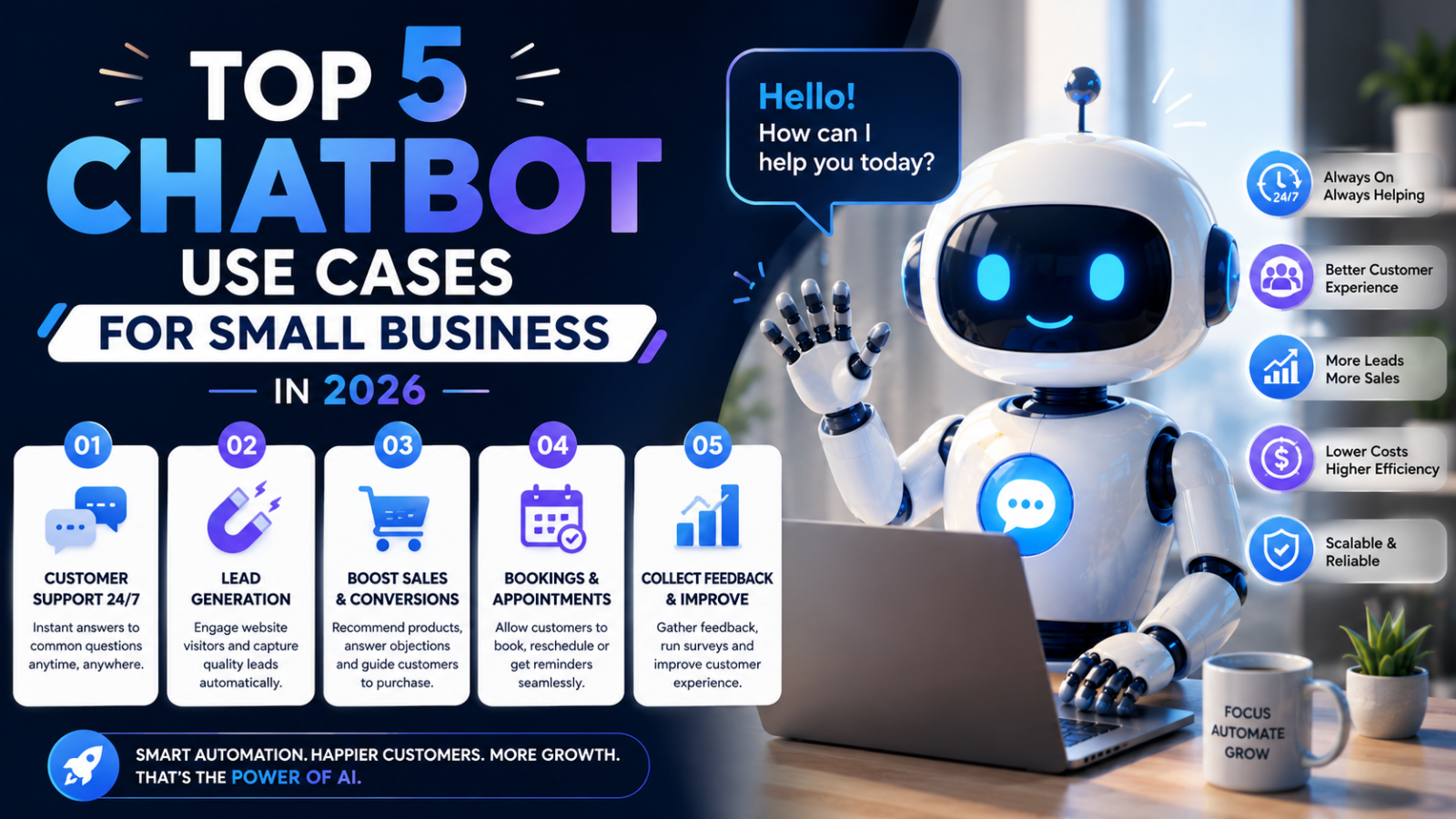
Use Case 1: 24/7 Lead Capture and Qualification
The Problem
Most small business websites generate more traffic than they convert. Visitors arrive — from Google, from social media, from referrals — browse for a few minutes, and leave without making contact. The reason is almost always the same: they had a question they could not immediately answer, or they were not ready to fill in a contact form, or they arrived outside business hours and found nobody available.
The result is a steady, invisible leak of potential leads. You cannot see the visitors who left. You cannot measure what they would have been worth. But the leak is real and it compounds over time.
How a Chatbot Fixes It
An AI chatbot engages visitors in real time — the moment they land on your website, regardless of what hour it is. It answers their initial question, earns a small amount of trust, and then collects their contact details as a natural next step in the conversation rather than a barrier to cross.
Critically, a well-configured lead generation chatbot also qualifies visitors before capturing their details. Instead of just collecting an email address, it collects name, email, and the specific information your sales team needs to have a meaningful first conversation — budget range, service interest, project timeline, number of employees, travel dates. Your team wakes up to pre-qualified leads with context, rather than cold names in an inbox.
Real Example
A travel agency running a standard contact form was converting 6 percent of website visitors into inquiries. After deploying a chatbot trained on their package brochures and visa information, the same website converted 14 percent of visitors into leads — with each lead including destination preference, travel dates, group size, and budget captured automatically. The sales team's first conversation with each lead started informed rather than starting from scratch.
How to Set This Up With Glanceia
Upload your FAQ, service descriptions, and pricing to Glanceia so the chatbot can answer visitor questions accurately
Configure lead capture fields: name, email, and two to three qualifying questions specific to your business
Write a proactive welcome message that invites visitors to ask questions rather than waiting for them to click the widget
Enable the proactive trigger so the chatbot opens after 15 to 30 seconds on high-intent pages like pricing and services
Connect to your CRM or Mailchimp via Zapier so every captured lead flows automatically into your marketing stack
The Metrics That Tell You It Is Working
Lead capture rate: percentage of chatbot conversations that result in an email collected — aim for 15 to 25 percent
After-hours lead proportion: what percentage of total leads arrive outside business hours — if this number is growing, the chatbot is doing its job
Lead quality score: track whether chatbot-sourced leads convert to customers at a similar rate to form-sourced leads — in most cases, they convert better
Use Case 2: Automated Customer Support and FAQ Answering
The Problem
For most small businesses, the majority of customer support interactions involve the same 10 to 20 questions repeated hundreds of times a month. What are your opening hours? What is your returns policy? How long does delivery take? Can I change my appointment? What is included in the package?
Every one of these questions is being answered by a human who could be doing something more valuable. Every one of these answers exists somewhere — in your FAQ, in your policy document, in your staff's heads — but is not accessible to customers instantly and automatically.
The cost of this inefficiency is twofold. First, the direct cost in staff time. Second, the indirect cost of customers who did not get an answer fast enough and went elsewhere.
How a Chatbot Fixes It
An AI chatbot trained on your business content — your FAQ document, your policy pages, your service descriptions — answers every repetitive question instantly and accurately, 24 hours a day. Your team stops fielding the same questions repeatedly and starts spending their time on the interactions that genuinely need human judgment.
The best customer support chatbots also handle the escalation gracefully. When a question goes beyond what the chatbot can handle, it acknowledges the limit and provides a clear next step — your support email, WhatsApp number, or a link to book a call — rather than leaving the customer in a dead end.
Real Example
A software company was receiving around 300 support emails per month. After auditing the inbox, they found that 220 of those emails were asking one of 15 questions about their pricing, onboarding process, and integration options. They uploaded their documentation to a chatbot trained on those 15 questions and deployed it on their website and in their help centre. Within 30 days, email support volume dropped by 60 percent and the support team focused entirely on the complex technical issues that actually required their expertise.
How to Set This Up With Glanceia
Audit your support inbox and identify the 15 to 30 most common questions your team answers repeatedly
Write specific, complete answers to each one — not vague deflections, but the actual answer a customer needs
Compile these into a comprehensive FAQ document and upload it to Glanceia along with your policy pages, product descriptions, and any other relevant documentation
Configure the human handoff: set the chatbot to provide your support email or phone number when a query falls outside its capability
Review the chatbot's unanswered questions weekly and add new content to address the gaps
The Metrics That Tell You It Is Working
Support deflection rate: what percentage of common questions are resolved by the chatbot without reaching a human — aim for 60 to 80 percent of routine queries
First response time: the time between a visitor asking a question and receiving an answer — should be near-instant for all chatbot-handled queries
Team time saved: track hours per week your team previously spent on repetitive support, and verify the reduction after chatbot deployment
Use Case 3: After-Hours Business Coverage
The Problem
Small businesses are not open 24 hours a day. Most operate 8 to 10 hours a day, five or six days a week. But customer interest does not follow those hours. Research happens in the evenings, on weekends, and during public holidays. Urgent questions arise at midnight. Impulse inquiries happen at 7 AM before your team arrives.
Every hour your business is effectively offline — with no one able to respond — is an hour when potential customers can reach your competitor instead. And in most industries, the business that responds first wins the relationship.
How a Chatbot Fixes It
An AI chatbot gives your business a professional, responsive presence at every hour without staffing costs. A visitor arriving at 11 PM on a Friday gets the same quality of response as a visitor arriving at 11 AM on a Tuesday. Questions get answered. Leads get captured. Appointments get logged. All automatically, all without your team being present.
For businesses in industries where the buying decision is often made outside business hours — travel, real estate, professional services, healthcare — after-hours coverage is not a nice-to-have. It is the difference between capturing a customer and losing them to a competitor who had their chatbot running.
Real Example
A boutique hotel running a website without a chatbot received the majority of its booking inquiries through an email contact form. Analysis of their inbox showed that 40 percent of all inquiries arrived between 8 PM and midnight — the window when their reservations team was completely offline. Reply times averaged 14 hours for these inquiries. After deploying a chatbot trained on their room descriptions, pricing, and availability FAQs, after-hours inquiries now receive instant responses and lead capture. The hotel attributed a 22 percent increase in direct bookings to after-hours engagement within the first 90 days.
How to Set This Up With Glanceia
Identify your peak after-hours traffic windows — use Google Analytics to see when visitors arrive on your site
Ensure your chatbot's knowledge base covers the questions most commonly asked during those hours — typically pricing, availability, and process questions
Configure a specific after-hours greeting that sets expectations: "Hi! Our team is offline right now but I can answer your questions and make sure the right person follows up with you first thing tomorrow."
Set up lead capture to collect visitor details so your team has a complete record of who enquired and what they needed when they return to the office
Enable email or SMS notifications for new leads captured overnight so your team can follow up at the earliest opportunity
The Metrics That Tell You It Is Working
After-hours lead volume: track month-on-month growth in leads captured between your offline hours
After-hours conversion rate: do after-hours leads convert to customers at a similar rate to business-hours leads — if yes, the chatbot is maintaining quality engagement outside your team's availability
First-morning follow-up speed: are your team members following up with overnight leads within the first two hours of opening? The chatbot captures the lead but fast human follow-up closes the sale
Use Case 4: Appointment and Booking Management
The Problem
For service businesses — clinics, salons, consultancies, law firms, personal trainers, travel agencies — the booking process is a significant operational burden. Answering availability questions, confirming appointments, sending reminders, handling rescheduling requests, and managing cancellations consumes substantial staff time every day.
Every phone call spent confirming an appointment is a phone call that cannot be used for a client consultation. Every email thread about availability is a thread that adds nothing of value to the service being delivered.
How a Chatbot Fixes It
A chatbot trained on your booking process and availability information handles the front-end of appointment management automatically. It answers availability questions, explains the booking process, collects the information needed to confirm a booking, and sends the enquiry to your team with all details captured.
For businesses using booking software like Calendly or Acuity Scheduling, the chatbot can direct visitors to self-serve booking with a link — making the entire process seamless without any staff involvement for straightforward appointments.
The chatbot also handles the repetitive administrative messaging that surrounds appointments — answering questions about what to bring, how to prepare, where to park, and what happens if a visitor needs to cancel — without a human needing to respond to each message individually.
Real Example
A physiotherapy clinic was spending approximately two hours every day answering phone calls and messages about appointment availability, session duration, and what to bring to a first appointment. They deployed a chatbot trained on their services, pricing, availability windows, and pre-appointment preparation guide. Within two weeks, inbound calls decreased by 55 percent. The front desk team redirected that time to patient intake and follow-up care — work that directly impacted patient satisfaction and retention.
How to Set This Up With Glanceia
Create a comprehensive appointment FAQ document — common questions about availability, session types, pricing, preparation, what to bring, cancellation policy
Upload this document to Glanceia along with a clear description of your booking process step by step
If you use a booking platform, include the direct booking link in the chatbot's responses and configure the chatbot to direct visitors there for self-serve scheduling
Configure lead capture to collect name, phone number, preferred appointment type, and preferred date range — so your team has everything they need to confirm the booking without a follow-up call for basic information
Set up a notification so your team is alerted immediately when a booking enquiry comes through the chatbot
The Metrics That Tell You It Is Working
Phone and email volume for routine booking enquiries: measure the reduction in inbound contacts for questions the chatbot now handles
Booking conversion rate from chatbot conversations: what percentage of chatbot conversations about appointments result in a confirmed booking
Staff hours saved: track time your team previously spent on administrative booking communication
Use Case 5: Product and Service Recommendation
The Problem
Many small businesses offer multiple products, services, or packages — and visitors frequently arrive not knowing which one is right for them. A visitor on a software company's pricing page does not know whether to choose the Starter plan or the Professional plan. A traveler on an agency's website does not know whether to book the budget package or the premium one. A customer on a beauty salon's website does not know which treatment addresses their specific concern.
When visitors cannot quickly determine which option is right for them, they either contact the business for help — adding to the team's workload — or they leave and research elsewhere, often finding a competitor in the process.
How a Chatbot Fixes It
An AI chatbot trained on your product and service details can guide visitors through a simple, conversational recommendation process — asking a few targeted questions about their needs, goals, or situation, and recommending the most appropriate option based on their answers.
This recommendation process does two things simultaneously: it gives the visitor the guidance they need to make a confident choice, and it qualifies their interest so that when they do convert, they convert into the right product for their situation — which leads to better customer satisfaction and lower refund and churn rates.
Real Example
A SaaS company offering three pricing tiers — Starter, Growth, and Enterprise — was receiving high traffic on their pricing page but low conversion. A chatbot deployed on the pricing page asked visitors three questions: their team size, their primary use case, and whether they needed CRM integration. Based on the answers, the chatbot recommended the appropriate tier and explained specifically why it was the right fit. The pricing page conversion rate increased by 31 percent within the first 60 days of deployment. More significantly, the proportion of customers who upgraded within the first 90 days decreased — because the chatbot was matching customers to the right tier from the start rather than underselling them onto a plan they would outgrow.
How to Set This Up With Glanceia
Map your products or services and the customer profiles that are the best fit for each one — what differentiates your Starter customer from your Professional customer, your budget traveler from your premium traveler, your basic treatment seeker from your specialist treatment seeker
Write this mapping into your knowledge base document so the chatbot understands which option to recommend in which scenario
Configure the chatbot to ask two to three qualifying questions before making a recommendation — keep the questions focused on the visitor's situation, not just their budget
Train the chatbot to explain the recommendation specifically — not just naming the product but explaining why it fits the visitor's specific answers
Include a clear next step in every recommendation — a link to buy, a link to book a call, or a link to learn more
The Metrics That Tell You It Is Working
Conversion rate on pages where the recommendation chatbot is deployed — measure before and after deployment
Average deal value or plan tier of chatbot-assisted conversions — are visitors converting into the right product rather than the default cheapest option?
Churn rate or return rate — businesses that see lower early churn after deploying recommendation chatbots are evidence that better product matching is occurring
How to Prioritise Which Use Case to Start With
You do not need to deploy all five use cases at once. Start with the one that addresses your most pressing business problem and delivers the fastest measurable return.
Start with lead capture if: Your biggest challenge is converting existing website traffic into enquiries. You have visitors arriving but too few are making contact. This is the most common small business problem and the use case with the clearest, fastest ROI.
Start with customer support automation if: Your team is spending significant time on repetitive enquiries and you want to free them for higher-value work. Calculate how many staff hours per week are spent on questions that a chatbot could answer — the cost savings are usually immediate.
Start with after-hours coverage if: You are in an industry where buying decisions are made outside business hours — travel, hospitality, real estate, healthcare — and you suspect you are losing leads to competitors who respond faster.
Start with appointment management if: You are a service business where booking friction is costing you clients and your team is spending too much time on administrative communication around appointments.
Start with product recommendation if: You have multiple options and conversion rate on your pricing or services page is lower than it should be.
Getting Started: Setting Up Your First Small Business Chatbot
Regardless of which use case you start with, the setup process with Glanceia is the same — and takes under 30 minutes.
Step 1: Create a free account Go to glanceia.com and sign up with no credit card required. The free plan is fully functional — AI included, lead capture included, no time limit.
Step 2: Build your knowledge base Upload the content relevant to your chosen use case:
For lead capture: your services and pricing overview
For customer support: your FAQ document and key policies
For after-hours coverage: your services, pricing, and contact information
For appointment management: your booking process and appointment FAQ
For product recommendation: your product descriptions and ideal customer profiles for each
Step 3: Configure for your use case Set up lead capture fields, write a welcome message relevant to your goal, and enable proactive triggers on the pages most relevant to your use case.
Step 4: Embed on your website One script, paste into your website footer. Works on WordPress, Wix, Webflow, Shopify, Squarespace, and any custom site. The chatbot goes live on every page immediately.
Step 5: Measure and improve Review conversation logs weekly. Fill gaps in the knowledge base. Track the metrics specific to your use case. Refine and expand over time.
FAQ — Chatbot Use Cases for Small Business
Which chatbot use case delivers the fastest ROI for small businesses? Lead capture typically delivers the fastest measurable ROI because the impact is directly visible — more leads captured from the same traffic, with each lead representing a potential sale. Most small businesses see measurable lead volume increases within the first two to four weeks of deployment.
Do I need a different chatbot for each use case? No. A well-configured AI chatbot like Glanceia can handle multiple use cases simultaneously — capturing leads, answering FAQs, managing appointment enquiries, and recommending products within the same conversation. Start with one primary use case and add capability over time as you refine the knowledge base.
How do I know if a chatbot is right for my specific small business? If your business has a website that receives traffic, customers who ask repetitive questions, or any period during the day or week when no one is available to respond to enquiries — a chatbot will deliver value. The five use cases in this guide cover the vast majority of small business scenarios.
Can a chatbot handle multiple languages for my small business? Yes — modern AI chatbots including Glanceia support multilingual conversations. If your business serves customers in multiple languages, configure the chatbot with content in those languages and it will respond accordingly.
What content do I need before setting up a chatbot? Start with whatever you have — even a basic FAQ document with your 10 most common customer questions answered specifically is enough to go live and start seeing results. You add more content over time based on what visitors are actually asking.
How long before I see results from my small business chatbot? Most small businesses see first results — leads captured, support queries handled, after-hours enquiries responded to — within the first 24 to 48 hours of going live. Measurable improvement in lead volume and support efficiency typically shows within the first 30 days.
Final Thoughts
The small businesses getting the most value from AI chatbots in 2026 are not the ones with the most sophisticated technical setup. They are the ones that identified a specific, high-impact problem — too many website visitors leaving without making contact, too much staff time spent on repetitive questions, too many leads going cold overnight — and deployed a chatbot precisely against that problem.
Start with one use case. Set it up properly. Measure the results. Then expand.
The technology is affordable — free to start with Glanceia, $9 per month when you scale. The setup is fast — under 30 minutes for any of the five use cases above. The results are measurable — leads captured, support hours saved, conversion rates improved.
The only thing standing between where your small business is now and the benefits in this guide is the decision to start.
Try Glanceia free — no credit card needed →
Published by Laxman - Team Glanceia